> ## Documentation Index
> Fetch the complete documentation index at: https://aegean.ai/llms.txt
> Use this file to discover all available pages before exploring further.
# Image-to-Video Semantic Retrieval via Object Detection
> Build scalable image-to-video semantic retrieval using object detection and structured indexing.
### Overview and learning objectives
In this assignment, you will build a visual retrieval system that answers the following query:
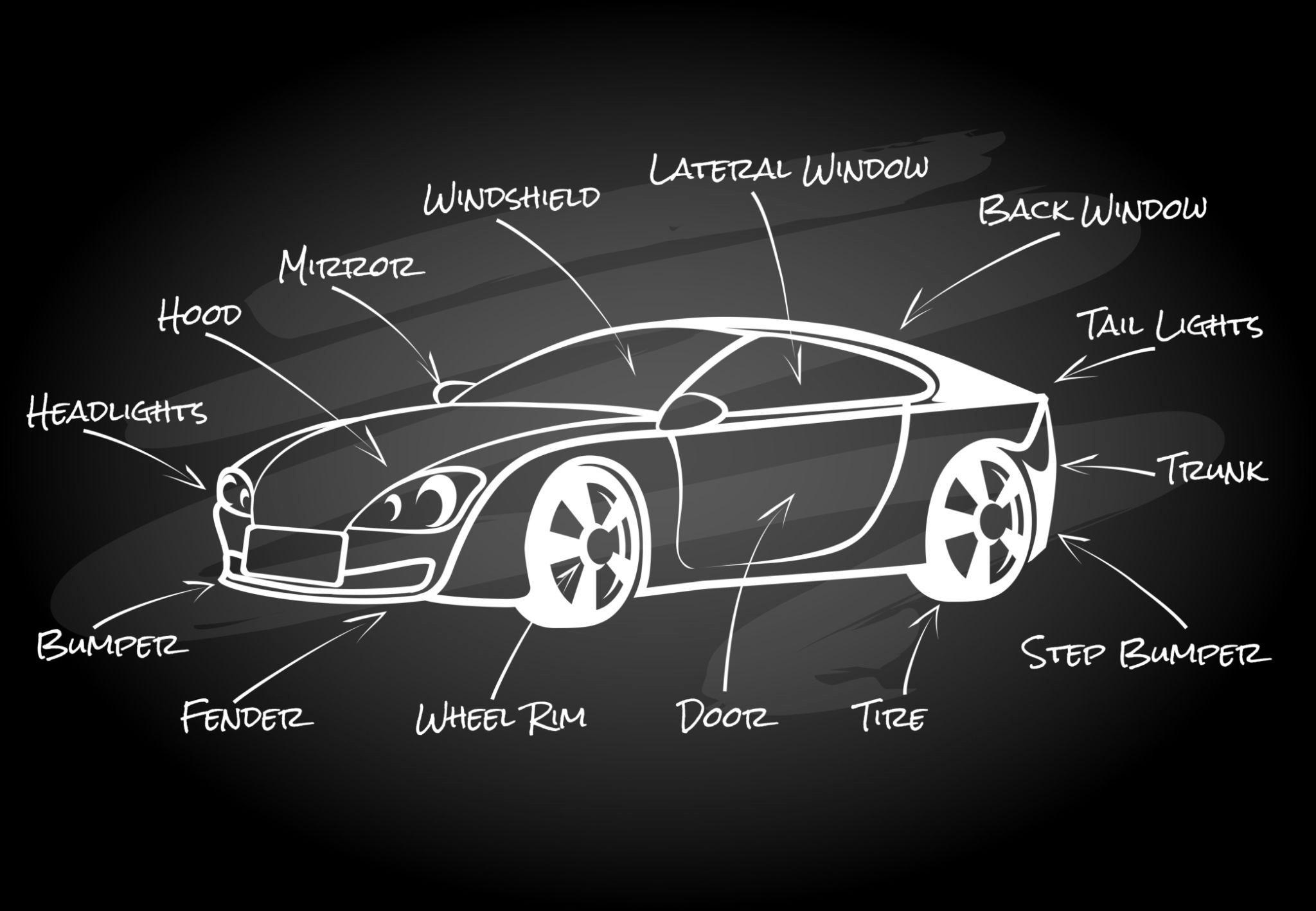
Given a single image of a car exterior component, retrieve the video clip(s) in which that component appears.
The system must operate by detecting semantic content in a video stream and matching it against image-based queries. The emphasis is on representation, indexing, and retrieval, not end-to-end supervised training.
By completing this assignment, you will learn to:
* Use an object detector to extract semantic structure from video.
* Index detections in a form suitable for retrieval.
* Perform image-to-video semantic search using shared representations.
* Produce machine-readable outputs for downstream evaluation.
***
## Provided data
### 1. Training dataset (for detector selection only)
Students may use the following dataset to select and configure an object detector:
* Ultralytics Car Parts Segmentation Dataset
[https://docs.ultralytics.com/datasets/segment/carparts-seg/](https://docs.ultralytics.com/datasets/segment/carparts-seg/)
You may use any object detector (YOLO, Faster R-CNN, DETR, etc.), pretrained or fine-tuned, as long as it operates at the object part level. You are not graded on training performance.
***
### 2. Input video (retrieval corpus)
* A single car exterior video will be provided:
This video serves as the searchable corpus. You must process the video offline and build an index of detected semantic content.
#### Downloading and segmenting the video with ffmpeg
You need a local copy of the input video to sample frames. Use [yt-dlp](https://github.com/yt-dlp/yt-dlp) to download it and [ffmpeg](https://ffmpeg.org/) to create clips.
```bash macOS theme={null}
brew install ffmpeg yt-dlp
```
```bash Ubuntu / WSL theme={null}
sudo apt update && sudo apt install -y ffmpeg
pip install yt-dlp
```
```bash pip (any platform) theme={null}
pip install yt-dlp
```
Verify the installation:
```bash theme={null}
ffmpeg -version
yt-dlp --version
```
```bash theme={null}
yt-dlp -f "bestvideo[ext=mp4]+bestaudio[ext=m4a]/best[ext=mp4]" \
-o "input_video.mp4" \
"https://www.youtube.com/watch?v=YcvECxtXoxQ"
```
Use `-ss` for the start time and `-t` for the duration. This extracts a 45-second clip starting at 2:00:
```bash theme={null}
ffmpeg -ss 00:02:00 -i input_video.mp4 -t 45 -c copy clip_120_165.mp4
```
The `-c copy` flag avoids re-encoding, making the operation nearly instant.
Sample one frame per second from a clip:
```bash theme={null}
ffmpeg -i clip_120_165.mp4 -vf "fps=1" frames/frame_%04d.jpg
```
Or sample every 5 seconds from the full video:
```bash theme={null}
mkdir -p frames
ffmpeg -i input_video.mp4 -vf "fps=1/5" frames/frame_%04d.jpg
```
***
### 3. Query images (semantic search)
Query images will be drawn from a slightly different distribution than the video frames. These query images are available as a public Hugging Face dataset:
* **Dataset:** [aegean-ai/rav4-exterior-images](https://huggingface.co/datasets/aegean-ai/rav4-exterior-images/viewer)
The dataset is stored in Parquet format and contains the following columns:
| Column | Type | Description |
| ---------------- | ------ | ---------------------------------------------------------------------------- |
| `image` | Image | The extracted frame (JPEG) |
| `timestamp` | string | Time position in the source video (MM:SS) |
| `timestamp_sec` | int | Time position in seconds |
| `exterior_score` | float | CLIP zero-shot classification confidence that the frame shows a car exterior |
| `width` | int | Frame width in pixels |
| `height` | int | Frame height in pixels |
| `video_title` | string | Title of the source YouTube video |
The images were extracted from a Toyota RAV4 2026 review video at 5-second intervals and filtered using a CLIP model (`openai/clip-vit-base-patch32`) with an exterior confidence threshold of 0.90. Only frames classified as exterior views with high confidence are included.
You can load the dataset in Python with:
```python theme={null}
from datasets import load_dataset
ds = load_dataset("aegean-ai/rav4-exterior-images", split="train")
```
***
## Task definition
You will build a system that performs image-based semantic search over a video.
Given:
* a query image of a car exterior component,
your system must:
1. Identify which semantic component(s) appear in the query image.
2. Retrieve the corresponding video clip(s) in which that component is visible.
3. Return the matching clip and its temporal extent , that is, the start and end timestamps (in seconds) of every contiguous segment where the queried component is detected. You can verify your results visually using the YouTube embed URL with `start` and `end` parameters. For example, to check a clip from 2:00 to 2:45, open:
```
https://www.youtube.com/embed/YcvECxtXoxQ?start=120&end=165
```
This plays only the specified interval, letting you prove that the returned segment actually contains the queried component.
***
## System requirements
### 1. Video processing and detection
You must:
* Sample frames from the input video.
* Run an object detector on each frame.
* Produce bounding boxes and class labels for detected exterior components.
Detections should be temporally indexed by frame number or timestamp.
***
### 2. Image semantic search
For each query image:
* Run the same detector (or a compatible image encoder).
* Identify the detected component class(es).
* Match these against detected components in the video index.
* Retrieve contiguous time intervals where the component is present.
Simple matching (e.g., class label overlap) is sufficient, but you may incorporate confidence thresholds or similarity scores.
***
### 3. Output format (required)
All detection results must be uploaded to Hugging Face as a Parquet file.
Each row in the Parquet file must correspond to a single detection in the video and contain at least the following fields:
* video\_id
* frame\_index or timestamp
* class\_label
* bounding\_box (x\_min, y\_min, x\_max, y\_max)
* confidence\_score
You may add additional fields (e.g., detector\_name, embedding\_id), but these are optional.
The Parquet file serves as the sole interface between detection and retrieval.
***
## Retrieval output
For each query image, your system must return:
* start\_timestamp
* end\_timestamp
* class\_label used for retrieval
* number\_of\_supporting\_detections
The retrieval logic itself does not need to be uploaded, but your detection outputs must be sufficient to reproduce the result.
***
## Evaluation criteria
You will be graded on:
1. Correctness
Do the retrieved clips actually contain the queried component?
2. Temporal coherence
Are clips reasonably contiguous, or overly fragmented?
3. Detection quality
Are detections consistent and semantically meaningful?
4. Data engineering quality
Is the Parquet schema clean, well-documented, and reproducible?
5. Report clarity
Can you clearly explain how image queries are matched to video content?
***
## Restrictions
* You may not manually label frames from the video.
* You may not hard-code timestamps for specific components.
* You may not use query-specific heuristics.
All retrieval must operate through detected semantic structure.
***
## Deliverables
1. A Hugging Face repository containing:
* The Parquet file with video detections.
* A short README describing the schema.
2. A short report (3–4 pages) explaining:
* Detector choice and configuration.
* Video sampling strategy.
* Image-to-video matching logic.
* Failure cases and limitations.
***
***
[Edit this page on GitHub](https://github.com/aegean-ai/eaia/edit/main/src/aiml-common/assignments/main/ai-spring-2026/assignment-2.mdx) or [file an issue](https://github.com/aegean-ai/eaia/issues/new/choose).
 ### Overview and learning objectives
In this assignment, you will build a visual retrieval system that answers the following query:
Given a single image of a car exterior component, retrieve the video clip(s) in which that component appears.
The system must operate by detecting semantic content in a video stream and matching it against image-based queries. The emphasis is on representation, indexing, and retrieval, not end-to-end supervised training.
By completing this assignment, you will learn to:
* Use an object detector to extract semantic structure from video.
* Index detections in a form suitable for retrieval.
* Perform image-to-video semantic search using shared representations.
* Produce machine-readable outputs for downstream evaluation.
***
## Provided data
### 1. Training dataset (for detector selection only)
Students may use the following dataset to select and configure an object detector:
* Ultralytics Car Parts Segmentation Dataset
[https://docs.ultralytics.com/datasets/segment/carparts-seg/](https://docs.ultralytics.com/datasets/segment/carparts-seg/)
You may use any object detector (YOLO, Faster R-CNN, DETR, etc.), pretrained or fine-tuned, as long as it operates at the object part level. You are not graded on training performance.
***
### 2. Input video (retrieval corpus)
* A single car exterior video will be provided:
This video serves as the searchable corpus. You must process the video offline and build an index of detected semantic content.
#### Downloading and segmenting the video with ffmpeg
You need a local copy of the input video to sample frames. Use [yt-dlp](https://github.com/yt-dlp/yt-dlp) to download it and [ffmpeg](https://ffmpeg.org/) to create clips.
### Overview and learning objectives
In this assignment, you will build a visual retrieval system that answers the following query:
Given a single image of a car exterior component, retrieve the video clip(s) in which that component appears.
The system must operate by detecting semantic content in a video stream and matching it against image-based queries. The emphasis is on representation, indexing, and retrieval, not end-to-end supervised training.
By completing this assignment, you will learn to:
* Use an object detector to extract semantic structure from video.
* Index detections in a form suitable for retrieval.
* Perform image-to-video semantic search using shared representations.
* Produce machine-readable outputs for downstream evaluation.
***
## Provided data
### 1. Training dataset (for detector selection only)
Students may use the following dataset to select and configure an object detector:
* Ultralytics Car Parts Segmentation Dataset
[https://docs.ultralytics.com/datasets/segment/carparts-seg/](https://docs.ultralytics.com/datasets/segment/carparts-seg/)
You may use any object detector (YOLO, Faster R-CNN, DETR, etc.), pretrained or fine-tuned, as long as it operates at the object part level. You are not graded on training performance.
***
### 2. Input video (retrieval corpus)
* A single car exterior video will be provided:
This video serves as the searchable corpus. You must process the video offline and build an index of detected semantic content.
#### Downloading and segmenting the video with ffmpeg
You need a local copy of the input video to sample frames. Use [yt-dlp](https://github.com/yt-dlp/yt-dlp) to download it and [ffmpeg](https://ffmpeg.org/) to create clips.