> ## Documentation Index
> Fetch the complete documentation index at: https://aegean.ai/llms.txt
> Use this file to discover all available pages before exploring further.
# Estimating Motion by Patch Matching
> Recovering image motion with local patch matching on synthetic frames, with endpoint error metrics and failure cases.
 *This section was written by [Ruimeng Yang](https://github.com/ruimengyang1) ([pull request #48](https://github.com/pantelis/eng-ai-agents/pull/48)), with help from an AI coding agent on the code. It reproduces the ideas of Chapter 46 of [*Foundations of Computer Vision*](https://visionbook.mit.edu/motion_estimation_intro.html) by Antonio Torralba, Phillip Isola, and William T. Freeman. The book's own figures are not reproduced here, because the book's license covers only the work in full; links point to them instead.*
Motion estimation asks a simple question: if something moves between two frames, can you recover **where it went**?
In this section you:
* build intuition for motion in image coordinates,
* recover motion with a readable patch-matching baseline,
* estimate a sparse motion field on synthetic data with known ground truth,
* measure accuracy with endpoint error and match ratios,
* study how patch size, search radius, and noise change the results,
* and inspect failure modes such as repetitive texture and motion that is too large.
## The book's figures
The book introduces the task with two frames of a street in Palma ([Figure 46.3](https://visionbook.mit.edu/motion_estimation_intro.html#fig-two_frames_from_palma_street)): each region of the first frame has to be assigned a displacement into the second. The code in this section solves the same task on synthetic frames with known ground truth. Related figures in the book:
* the [matching-cost map](https://visionbook.mit.edu/motion_estimation_intro.html#fig-matching_cost_figure), whose minimum SSD location becomes the estimated displacement, the counterpart of the patch-matching diagnostic below;
* the [patch-size comparison](https://visionbook.mit.edu/motion_estimation_intro.html#fig-matching_optical_flow_patch_size_effect): small patches are noisy, large patches blur motion boundaries, the same tradeoff the parameter sweep measures;
* the perception demonstrations: a [still photograph that implies motion](https://visionbook.mit.edu/motion_estimation_intro.html#fig-050822_172806__MG_5366), a [static pattern that looks like it moves](https://visionbook.mit.edu/motion_estimation_intro.html#fig-motion_illusion), and two space-time illusions ([first](https://visionbook.mit.edu/motion_estimation_intro.html#fig-motionIllusion1), [second](https://visionbook.mit.edu/motion_estimation_intro.html#fig-motionIllusion2));
* the learned alternatives in [chapter 49 of the book](https://visionbook.mit.edu/motion_estimation.html): a network that maps two frames [directly to optical flow](https://visionbook.mit.edu/motion_estimation.html#fig-supervised_estimation), and one that keeps [features, a cost volume, and cost aggregation](https://visionbook.mit.edu/motion_estimation.html#fig-supervised_estimation_modular). The endpoint error that this section reports is defined there as well.
## Intuition
Between two video frames, a moving object often keeps a similar local appearance. So a small patch around a point in Frame 1 may reappear a few pixels away in Frame 2.
This section uses the image-coordinate convention common in vision:
* $x$ increases to the **right**,
* $y$ increases **downward**,
* a motion vector is written as $(dx, dy)$.
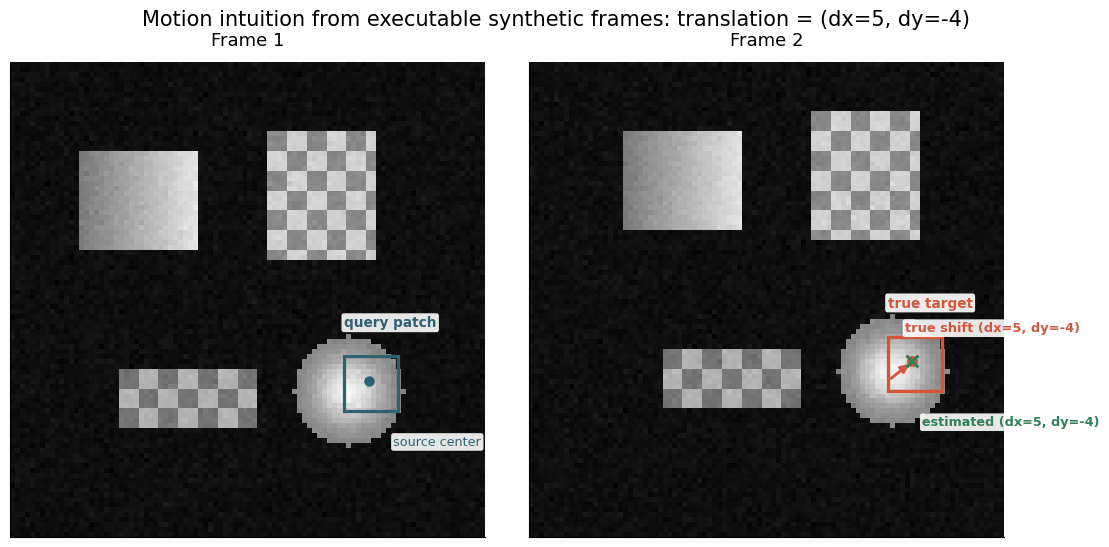
So $(dx=5, dy=-4)$ means "move 5 pixels right and 4 pixels up."
The first figure below is generated from the synthetic frames used throughout the section. It marks three landmarks: the source patch in Frame 1, the true target in Frame 2, and the estimated target recovered by local patch matching. Because the example uses a known translation, you can check that the visual displacement and the recovered motion agree exactly.
```python theme={null}
import time
from pathlib import Path
import numpy as np
import matplotlib.pyplot as plt
from matplotlib.patches import FancyArrowPatch, Rectangle
```
```python theme={null}
rng = np.random.default_rng(7)
```
## Synthetic example setup
Start with clean synthetic frames, because the true motion is known exactly. That lets you debug the estimator before dealing with real video. The scene uses a few textured geometric shapes so patch matching has enough visual structure to lock onto.
The helper below builds a frame pair with a known integer translation. The motion-intuition figure comes later, once the patch matcher has also produced the estimated target.
```python theme={null}
def normalize_image(img):
return np.clip(img, 0.0, 1.0)
def add_rectangle(img, x0, y0, w, h, base=0.75, texture="flat"):
yy, xx = np.mgrid[y0 : y0 + h, x0 : x0 + w]
patch = np.full((h, w), base, dtype=float)
if texture == "gradient":
patch *= 0.55 + 0.45 * (xx - x0) / max(w - 1, 1)
elif texture == "checker":
patch *= 0.65 + 0.35 * (((xx - x0) // 4 + (yy - y0) // 4) % 2)
img[y0 : y0 + h, x0 : x0 + w] = np.maximum(img[y0 : y0 + h, x0 : x0 + w], patch)
def add_disk(img, cx, cy, radius, base=0.82):
yy, xx = np.mgrid[: img.shape[0], : img.shape[1]]
dist = np.sqrt((xx - cx) ** 2 + (yy - cy) ** 2)
mask = dist <= radius
ripple = 0.78 + 0.22 * np.cos(dist[mask] / max(radius, 1) * np.pi)
img[mask] = np.maximum(img[mask], base * ripple)
def shift_image_integer(img, dx, dy, fill_value=0.06):
shifted = np.full_like(img, fill_value)
h, w = img.shape
src_x0 = max(0, -dx)
src_x1 = min(w, w - dx)
src_y0 = max(0, -dy)
src_y1 = min(h, h - dy)
dst_x0 = max(0, dx)
dst_x1 = dst_x0 + (src_x1 - src_x0)
dst_y0 = max(0, dy)
dst_y1 = dst_y0 + (src_y1 - src_y0)
if src_x1 > src_x0 and src_y1 > src_y0:
shifted[dst_y0:dst_y1, dst_x0:dst_x1] = img[src_y0:src_y1, src_x0:src_x1]
return shifted
def make_synthetic_pair(dx=5, dy=-4, noise_std=0.0, size=96, seed=None):
frame1 = np.full((size, size), 0.06, dtype=float)
add_rectangle(frame1, 14, 18, 24, 20, base=0.88, texture="gradient")
add_rectangle(frame1, 52, 14, 22, 26, base=0.82, texture="checker")
add_rectangle(frame1, 22, 62, 28, 12, base=0.70, texture="checker")
add_disk(frame1, 68, 66, 11, base=0.95)
frame2 = shift_image_integer(frame1, dx=dx, dy=dy, fill_value=0.06)
local_rng = np.random.default_rng(seed) if seed is not None else rng
if noise_std > 0:
frame1 = normalize_image(frame1 + local_rng.normal(0.0, noise_std, frame1.shape))
frame2 = normalize_image(frame2 + local_rng.normal(0.0, noise_std, frame2.shape))
return frame1, frame2, np.array([dx, dy], dtype=int)
def motion_to_index(dx, dy, search_radius):
return dx + search_radius, dy + search_radius
```
```python theme={null}
demo_point_xy = (72, 64)
demo_patch_size = 11
frame1, frame2, gt_motion = make_synthetic_pair(dx=5, dy=-4, noise_std=0.015, seed=7)
demo_match = None
```
## Patch matching by local search
The baseline method is deliberately simple:
1. extract an odd-sized patch around a point in Frame 1,
2. search a square window around the same location in Frame 2,
3. score each candidate with SSD (sum of squared differences),
4. keep the displacement with the lowest score.
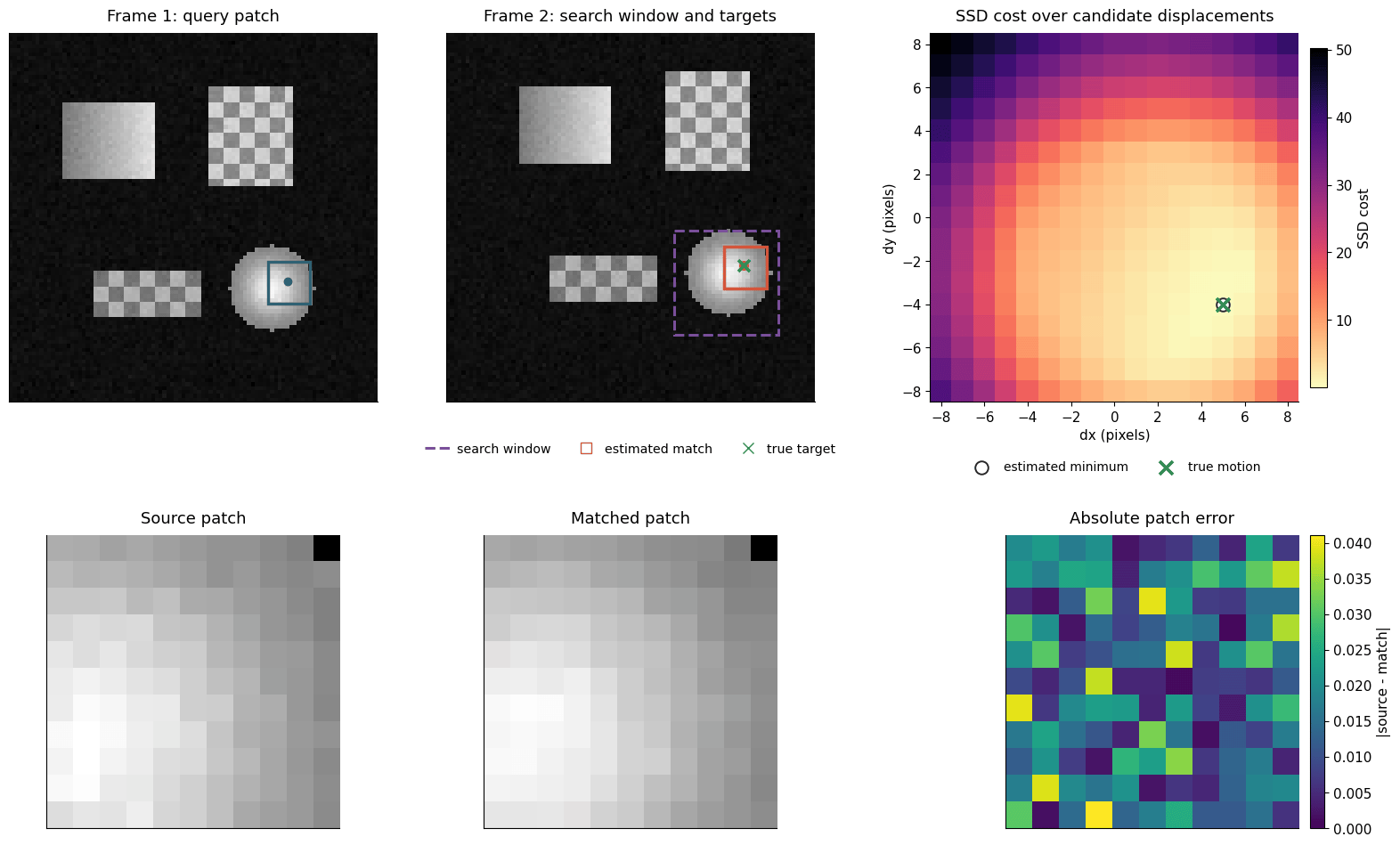
It is easy to read and easy to reason about, which makes it a good baseline. The diagnostic figure below shows the whole loop in one place: source patch, searched region, SSD surface, matched patch, and patch error.
The next cell defines helpers for patch extraction, SSD scoring, and exhaustive local search.
```python theme={null}
def extract_patch(image, center_xy, patch_size):
radius = patch_size // 2
x, y = map(int, center_xy)
if x - radius < 0 or y - radius < 0:
return None
if x + radius >= image.shape[1] or y + radius >= image.shape[0]:
return None
return image[y - radius : y + radius + 1, x - radius : x + radius + 1]
def ssd_cost(template, candidate):
diff = template - candidate
return float(np.sum(diff * diff))
def filter_trackable_points(points, image_shape, patch_size, search_radius):
radius = patch_size // 2 + search_radius
height, width = image_shape
valid_points = []
for x, y in points:
if radius <= x < width - radius and radius <= y < height - radius:
valid_points.append((x, y))
return valid_points
def estimate_patch_motion(frame1, frame2, point_xy, patch_size=11, search_radius=8):
template = extract_patch(frame1, point_xy, patch_size)
if template is None:
raise ValueError("Source patch falls outside the image.")
costs = np.full((2 * search_radius + 1, 2 * search_radius + 1), np.inf)
best = {"cost": np.inf, "dx": 0, "dy": 0, "match_patch": None, "best_point": point_xy}
for row, dy in enumerate(range(-search_radius, search_radius + 1)):
for col, dx in enumerate(range(-search_radius, search_radius + 1)):
candidate_point = (point_xy[0] + dx, point_xy[1] + dy)
candidate = extract_patch(frame2, candidate_point, patch_size)
if candidate is None:
continue
cost = ssd_cost(template, candidate)
costs[row, col] = cost
if cost < best["cost"]:
best = {
"cost": cost,
"dx": dx,
"dy": dy,
"match_patch": candidate,
"best_point": candidate_point,
}
best["template_patch"] = template
best["cost_map"] = costs
return best
```
## Single-point motion estimation
First, track one carefully chosen point so every part of the process is visible. Read the top row from left to right: the source patch in Frame 1, the searched region in Frame 2, and the SSD surface over candidate $(dx, dy)$ displacements. Then compare the bottom-row patches: a low-error match means the winning displacement is also visually plausible.
```python theme={null}
point_xy = demo_point_xy
patch_size = demo_patch_size
search_radius = 8
match_result = estimate_patch_motion(frame1, frame2, point_xy, patch_size=patch_size, search_radius=search_radius)
print(f"Estimated motion at {point_xy}: (dx={match_result['dx']}, dy={match_result['dy']})")
print(f"Ground truth motion: {tuple(map(int, gt_motion))}")
print(f"Best SSD cost: {match_result['cost']:.4f}")
```
```output theme={null}
Estimated motion at (72, 64): (dx=5, dy=-4)
Ground truth motion: (5, -4)
Best SSD cost: 0.0436
```
*This section was written by [Ruimeng Yang](https://github.com/ruimengyang1) ([pull request #48](https://github.com/pantelis/eng-ai-agents/pull/48)), with help from an AI coding agent on the code. It reproduces the ideas of Chapter 46 of [*Foundations of Computer Vision*](https://visionbook.mit.edu/motion_estimation_intro.html) by Antonio Torralba, Phillip Isola, and William T. Freeman. The book's own figures are not reproduced here, because the book's license covers only the work in full; links point to them instead.*
Motion estimation asks a simple question: if something moves between two frames, can you recover **where it went**?
In this section you:
* build intuition for motion in image coordinates,
* recover motion with a readable patch-matching baseline,
* estimate a sparse motion field on synthetic data with known ground truth,
* measure accuracy with endpoint error and match ratios,
* study how patch size, search radius, and noise change the results,
* and inspect failure modes such as repetitive texture and motion that is too large.
## The book's figures
The book introduces the task with two frames of a street in Palma ([Figure 46.3](https://visionbook.mit.edu/motion_estimation_intro.html#fig-two_frames_from_palma_street)): each region of the first frame has to be assigned a displacement into the second. The code in this section solves the same task on synthetic frames with known ground truth. Related figures in the book:
* the [matching-cost map](https://visionbook.mit.edu/motion_estimation_intro.html#fig-matching_cost_figure), whose minimum SSD location becomes the estimated displacement, the counterpart of the patch-matching diagnostic below;
* the [patch-size comparison](https://visionbook.mit.edu/motion_estimation_intro.html#fig-matching_optical_flow_patch_size_effect): small patches are noisy, large patches blur motion boundaries, the same tradeoff the parameter sweep measures;
* the perception demonstrations: a [still photograph that implies motion](https://visionbook.mit.edu/motion_estimation_intro.html#fig-050822_172806__MG_5366), a [static pattern that looks like it moves](https://visionbook.mit.edu/motion_estimation_intro.html#fig-motion_illusion), and two space-time illusions ([first](https://visionbook.mit.edu/motion_estimation_intro.html#fig-motionIllusion1), [second](https://visionbook.mit.edu/motion_estimation_intro.html#fig-motionIllusion2));
* the learned alternatives in [chapter 49 of the book](https://visionbook.mit.edu/motion_estimation.html): a network that maps two frames [directly to optical flow](https://visionbook.mit.edu/motion_estimation.html#fig-supervised_estimation), and one that keeps [features, a cost volume, and cost aggregation](https://visionbook.mit.edu/motion_estimation.html#fig-supervised_estimation_modular). The endpoint error that this section reports is defined there as well.
## Intuition
Between two video frames, a moving object often keeps a similar local appearance. So a small patch around a point in Frame 1 may reappear a few pixels away in Frame 2.
This section uses the image-coordinate convention common in vision:
* $x$ increases to the **right**,
* $y$ increases **downward**,
* a motion vector is written as $(dx, dy)$.
So $(dx=5, dy=-4)$ means "move 5 pixels right and 4 pixels up."
The first figure below is generated from the synthetic frames used throughout the section. It marks three landmarks: the source patch in Frame 1, the true target in Frame 2, and the estimated target recovered by local patch matching. Because the example uses a known translation, you can check that the visual displacement and the recovered motion agree exactly.
```python theme={null}
import time
from pathlib import Path
import numpy as np
import matplotlib.pyplot as plt
from matplotlib.patches import FancyArrowPatch, Rectangle
```
```python theme={null}
rng = np.random.default_rng(7)
```
## Synthetic example setup
Start with clean synthetic frames, because the true motion is known exactly. That lets you debug the estimator before dealing with real video. The scene uses a few textured geometric shapes so patch matching has enough visual structure to lock onto.
The helper below builds a frame pair with a known integer translation. The motion-intuition figure comes later, once the patch matcher has also produced the estimated target.
```python theme={null}
def normalize_image(img):
return np.clip(img, 0.0, 1.0)
def add_rectangle(img, x0, y0, w, h, base=0.75, texture="flat"):
yy, xx = np.mgrid[y0 : y0 + h, x0 : x0 + w]
patch = np.full((h, w), base, dtype=float)
if texture == "gradient":
patch *= 0.55 + 0.45 * (xx - x0) / max(w - 1, 1)
elif texture == "checker":
patch *= 0.65 + 0.35 * (((xx - x0) // 4 + (yy - y0) // 4) % 2)
img[y0 : y0 + h, x0 : x0 + w] = np.maximum(img[y0 : y0 + h, x0 : x0 + w], patch)
def add_disk(img, cx, cy, radius, base=0.82):
yy, xx = np.mgrid[: img.shape[0], : img.shape[1]]
dist = np.sqrt((xx - cx) ** 2 + (yy - cy) ** 2)
mask = dist <= radius
ripple = 0.78 + 0.22 * np.cos(dist[mask] / max(radius, 1) * np.pi)
img[mask] = np.maximum(img[mask], base * ripple)
def shift_image_integer(img, dx, dy, fill_value=0.06):
shifted = np.full_like(img, fill_value)
h, w = img.shape
src_x0 = max(0, -dx)
src_x1 = min(w, w - dx)
src_y0 = max(0, -dy)
src_y1 = min(h, h - dy)
dst_x0 = max(0, dx)
dst_x1 = dst_x0 + (src_x1 - src_x0)
dst_y0 = max(0, dy)
dst_y1 = dst_y0 + (src_y1 - src_y0)
if src_x1 > src_x0 and src_y1 > src_y0:
shifted[dst_y0:dst_y1, dst_x0:dst_x1] = img[src_y0:src_y1, src_x0:src_x1]
return shifted
def make_synthetic_pair(dx=5, dy=-4, noise_std=0.0, size=96, seed=None):
frame1 = np.full((size, size), 0.06, dtype=float)
add_rectangle(frame1, 14, 18, 24, 20, base=0.88, texture="gradient")
add_rectangle(frame1, 52, 14, 22, 26, base=0.82, texture="checker")
add_rectangle(frame1, 22, 62, 28, 12, base=0.70, texture="checker")
add_disk(frame1, 68, 66, 11, base=0.95)
frame2 = shift_image_integer(frame1, dx=dx, dy=dy, fill_value=0.06)
local_rng = np.random.default_rng(seed) if seed is not None else rng
if noise_std > 0:
frame1 = normalize_image(frame1 + local_rng.normal(0.0, noise_std, frame1.shape))
frame2 = normalize_image(frame2 + local_rng.normal(0.0, noise_std, frame2.shape))
return frame1, frame2, np.array([dx, dy], dtype=int)
def motion_to_index(dx, dy, search_radius):
return dx + search_radius, dy + search_radius
```
```python theme={null}
demo_point_xy = (72, 64)
demo_patch_size = 11
frame1, frame2, gt_motion = make_synthetic_pair(dx=5, dy=-4, noise_std=0.015, seed=7)
demo_match = None
```
## Patch matching by local search
The baseline method is deliberately simple:
1. extract an odd-sized patch around a point in Frame 1,
2. search a square window around the same location in Frame 2,
3. score each candidate with SSD (sum of squared differences),
4. keep the displacement with the lowest score.
It is easy to read and easy to reason about, which makes it a good baseline. The diagnostic figure below shows the whole loop in one place: source patch, searched region, SSD surface, matched patch, and patch error.
The next cell defines helpers for patch extraction, SSD scoring, and exhaustive local search.
```python theme={null}
def extract_patch(image, center_xy, patch_size):
radius = patch_size // 2
x, y = map(int, center_xy)
if x - radius < 0 or y - radius < 0:
return None
if x + radius >= image.shape[1] or y + radius >= image.shape[0]:
return None
return image[y - radius : y + radius + 1, x - radius : x + radius + 1]
def ssd_cost(template, candidate):
diff = template - candidate
return float(np.sum(diff * diff))
def filter_trackable_points(points, image_shape, patch_size, search_radius):
radius = patch_size // 2 + search_radius
height, width = image_shape
valid_points = []
for x, y in points:
if radius <= x < width - radius and radius <= y < height - radius:
valid_points.append((x, y))
return valid_points
def estimate_patch_motion(frame1, frame2, point_xy, patch_size=11, search_radius=8):
template = extract_patch(frame1, point_xy, patch_size)
if template is None:
raise ValueError("Source patch falls outside the image.")
costs = np.full((2 * search_radius + 1, 2 * search_radius + 1), np.inf)
best = {"cost": np.inf, "dx": 0, "dy": 0, "match_patch": None, "best_point": point_xy}
for row, dy in enumerate(range(-search_radius, search_radius + 1)):
for col, dx in enumerate(range(-search_radius, search_radius + 1)):
candidate_point = (point_xy[0] + dx, point_xy[1] + dy)
candidate = extract_patch(frame2, candidate_point, patch_size)
if candidate is None:
continue
cost = ssd_cost(template, candidate)
costs[row, col] = cost
if cost < best["cost"]:
best = {
"cost": cost,
"dx": dx,
"dy": dy,
"match_patch": candidate,
"best_point": candidate_point,
}
best["template_patch"] = template
best["cost_map"] = costs
return best
```
## Single-point motion estimation
First, track one carefully chosen point so every part of the process is visible. Read the top row from left to right: the source patch in Frame 1, the searched region in Frame 2, and the SSD surface over candidate $(dx, dy)$ displacements. Then compare the bottom-row patches: a low-error match means the winning displacement is also visually plausible.
```python theme={null}
point_xy = demo_point_xy
patch_size = demo_patch_size
search_radius = 8
match_result = estimate_patch_motion(frame1, frame2, point_xy, patch_size=patch_size, search_radius=search_radius)
print(f"Estimated motion at {point_xy}: (dx={match_result['dx']}, dy={match_result['dy']})")
print(f"Ground truth motion: {tuple(map(int, gt_motion))}")
print(f"Best SSD cost: {match_result['cost']:.4f}")
```
```output theme={null}
Estimated motion at (72, 64): (dx=5, dy=-4)
Ground truth motion: (5, -4)
Best SSD cost: 0.0436
```
 ```output theme={null}
Single-point patch matching: estimated = (5, -4), true = (5, -4), best SSD = 0.0436
```
```output theme={null}
Single-point patch matching: estimated = (5, -4), true = (5, -4), best SSD = 0.0436
```
 ## Sparse motion field estimation
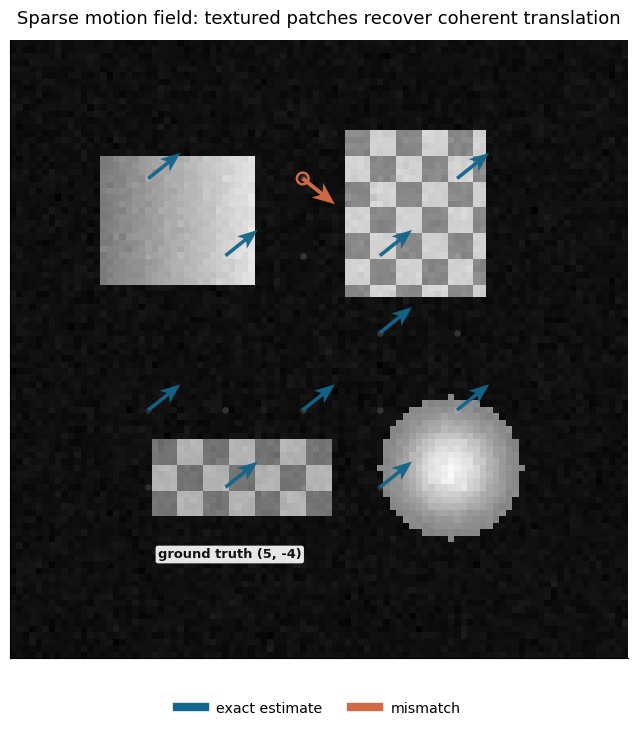
One point builds intuition, but a motion field needs many arrows. You sample textured points on a grid, run the same local matcher at each one, and compute metrics over all valid points. To keep the figure readable, it shows only a subset of arrows, and exact estimates and mismatches are styled differently so the coherent global translation stands out.
```python theme={null}
def sample_textured_points(frame, patch_size, stride=12, threshold=0.18):
radius = patch_size // 2
points = []
for y in range(radius + 2, frame.shape[0] - radius - 2, stride):
for x in range(radius + 2, frame.shape[1] - radius - 2, stride):
patch = extract_patch(frame, (x, y), patch_size)
if patch is None:
continue
if patch.std() > threshold or patch.mean() > 0.35:
points.append((x, y))
return points
def estimate_sparse_motion(frame1, frame2, points, patch_size=11, search_radius=8):
estimates = []
for point in points:
result = estimate_patch_motion(frame1, frame2, point, patch_size=patch_size, search_radius=search_radius)
estimates.append({
"point": point,
"dx": result["dx"],
"dy": result["dy"],
"cost": result["cost"],
})
return estimates
def summarize_motion_metrics(estimates, gt_motion):
vectors = np.array([[item["dx"], item["dy"]] for item in estimates], dtype=float)
gt = np.asarray(gt_motion, dtype=float)
errors = vectors - gt[None, :]
epe = np.sqrt(np.sum(errors ** 2, axis=1))
exact = np.all(vectors == gt[None, :], axis=1)
near = epe <= 1.0
return {
"num_points": len(estimates),
"mean_epe": float(epe.mean()),
"median_epe": float(np.median(epe)),
"max_epe": float(epe.max()),
"exact_match_ratio": float(exact.mean()),
"within_1px_ratio": float(near.mean()),
}
```
```python theme={null}
field_patch_size = 15
field_threshold = 0.08
candidate_points = sample_textured_points(frame1, patch_size=field_patch_size, stride=12, threshold=field_threshold)
points = filter_trackable_points(candidate_points, frame1.shape, patch_size=field_patch_size, search_radius=8)
estimates = estimate_sparse_motion(frame1, frame2, points, patch_size=field_patch_size, search_radius=8)
summary = summarize_motion_metrics(estimates, gt_motion)
print(
f"Sparse field summary: {summary['num_points']} points, exact = {summary['exact_match_ratio']:.2f}, "
f"within 1 px = {summary['within_1px_ratio']:.2f}, mean EPE = {summary['mean_epe']:.2f} px"
)
```
```output theme={null}
Sparse field summary: 22 points, exact = 0.95, within 1 px = 0.95, mean EPE = 0.36 px
```
## Sparse motion field estimation
One point builds intuition, but a motion field needs many arrows. You sample textured points on a grid, run the same local matcher at each one, and compute metrics over all valid points. To keep the figure readable, it shows only a subset of arrows, and exact estimates and mismatches are styled differently so the coherent global translation stands out.
```python theme={null}
def sample_textured_points(frame, patch_size, stride=12, threshold=0.18):
radius = patch_size // 2
points = []
for y in range(radius + 2, frame.shape[0] - radius - 2, stride):
for x in range(radius + 2, frame.shape[1] - radius - 2, stride):
patch = extract_patch(frame, (x, y), patch_size)
if patch is None:
continue
if patch.std() > threshold or patch.mean() > 0.35:
points.append((x, y))
return points
def estimate_sparse_motion(frame1, frame2, points, patch_size=11, search_radius=8):
estimates = []
for point in points:
result = estimate_patch_motion(frame1, frame2, point, patch_size=patch_size, search_radius=search_radius)
estimates.append({
"point": point,
"dx": result["dx"],
"dy": result["dy"],
"cost": result["cost"],
})
return estimates
def summarize_motion_metrics(estimates, gt_motion):
vectors = np.array([[item["dx"], item["dy"]] for item in estimates], dtype=float)
gt = np.asarray(gt_motion, dtype=float)
errors = vectors - gt[None, :]
epe = np.sqrt(np.sum(errors ** 2, axis=1))
exact = np.all(vectors == gt[None, :], axis=1)
near = epe <= 1.0
return {
"num_points": len(estimates),
"mean_epe": float(epe.mean()),
"median_epe": float(np.median(epe)),
"max_epe": float(epe.max()),
"exact_match_ratio": float(exact.mean()),
"within_1px_ratio": float(near.mean()),
}
```
```python theme={null}
field_patch_size = 15
field_threshold = 0.08
candidate_points = sample_textured_points(frame1, patch_size=field_patch_size, stride=12, threshold=field_threshold)
points = filter_trackable_points(candidate_points, frame1.shape, patch_size=field_patch_size, search_radius=8)
estimates = estimate_sparse_motion(frame1, frame2, points, patch_size=field_patch_size, search_radius=8)
summary = summarize_motion_metrics(estimates, gt_motion)
print(
f"Sparse field summary: {summary['num_points']} points, exact = {summary['exact_match_ratio']:.2f}, "
f"within 1 px = {summary['within_1px_ratio']:.2f}, mean EPE = {summary['mean_epe']:.2f} px"
)
```
```output theme={null}
Sparse field summary: 22 points, exact = 0.95, within 1 px = 0.95, mean EPE = 0.36 px
```
 ## Validation metrics
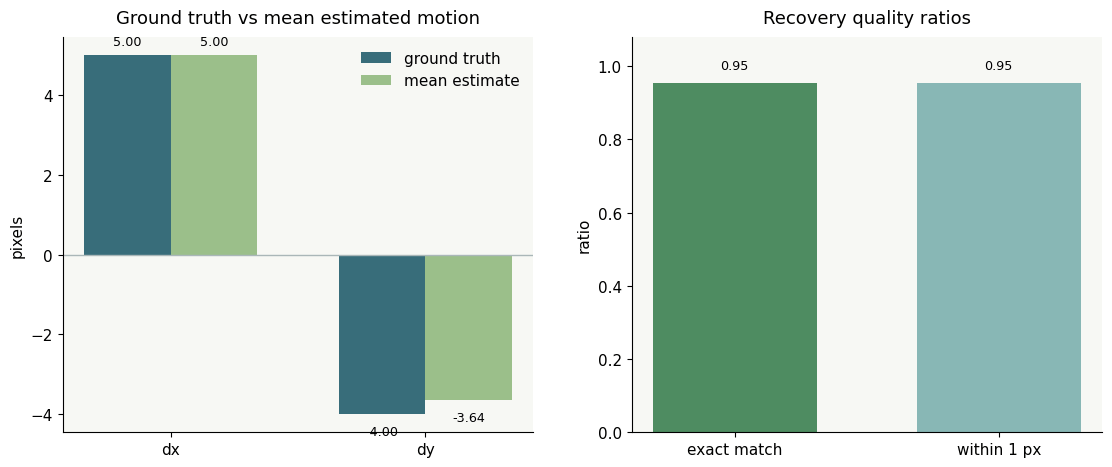
Because the synthetic translation is known, you can score the estimates directly.
* **Endpoint error (EPE)** is the Euclidean distance between the estimated vector and the true vector.
* **Exact match ratio** is the fraction of estimates that recover the exact integer motion.
* **Correct-within-1-pixel ratio** is a softer measure that counts near misses as acceptable.
These metrics answer slightly different questions, so look at all of them. The printed summary reports the mean EPE explicitly.
```python theme={null}
metric_names = ["mean_epe", "median_epe", "max_epe", "exact_match_ratio", "within_1px_ratio"]
for key in metric_names:
print(f"{key:>20}: {summary[key]:.3f}")
```
```output theme={null}
mean_epe: 0.364
median_epe: 0.000
max_epe: 8.000
exact_match_ratio: 0.955
within_1px_ratio: 0.955
```
```output theme={null}
Metrics summary mean EPE: 0.36 px
```
## Validation metrics
Because the synthetic translation is known, you can score the estimates directly.
* **Endpoint error (EPE)** is the Euclidean distance between the estimated vector and the true vector.
* **Exact match ratio** is the fraction of estimates that recover the exact integer motion.
* **Correct-within-1-pixel ratio** is a softer measure that counts near misses as acceptable.
These metrics answer slightly different questions, so look at all of them. The printed summary reports the mean EPE explicitly.
```python theme={null}
metric_names = ["mean_epe", "median_epe", "max_epe", "exact_match_ratio", "within_1px_ratio"]
for key in metric_names:
print(f"{key:>20}: {summary[key]:.3f}")
```
```output theme={null}
mean_epe: 0.364
median_epe: 0.000
max_epe: 8.000
exact_match_ratio: 0.955
within_1px_ratio: 0.955
```
```output theme={null}
Metrics summary mean EPE: 0.36 px
```
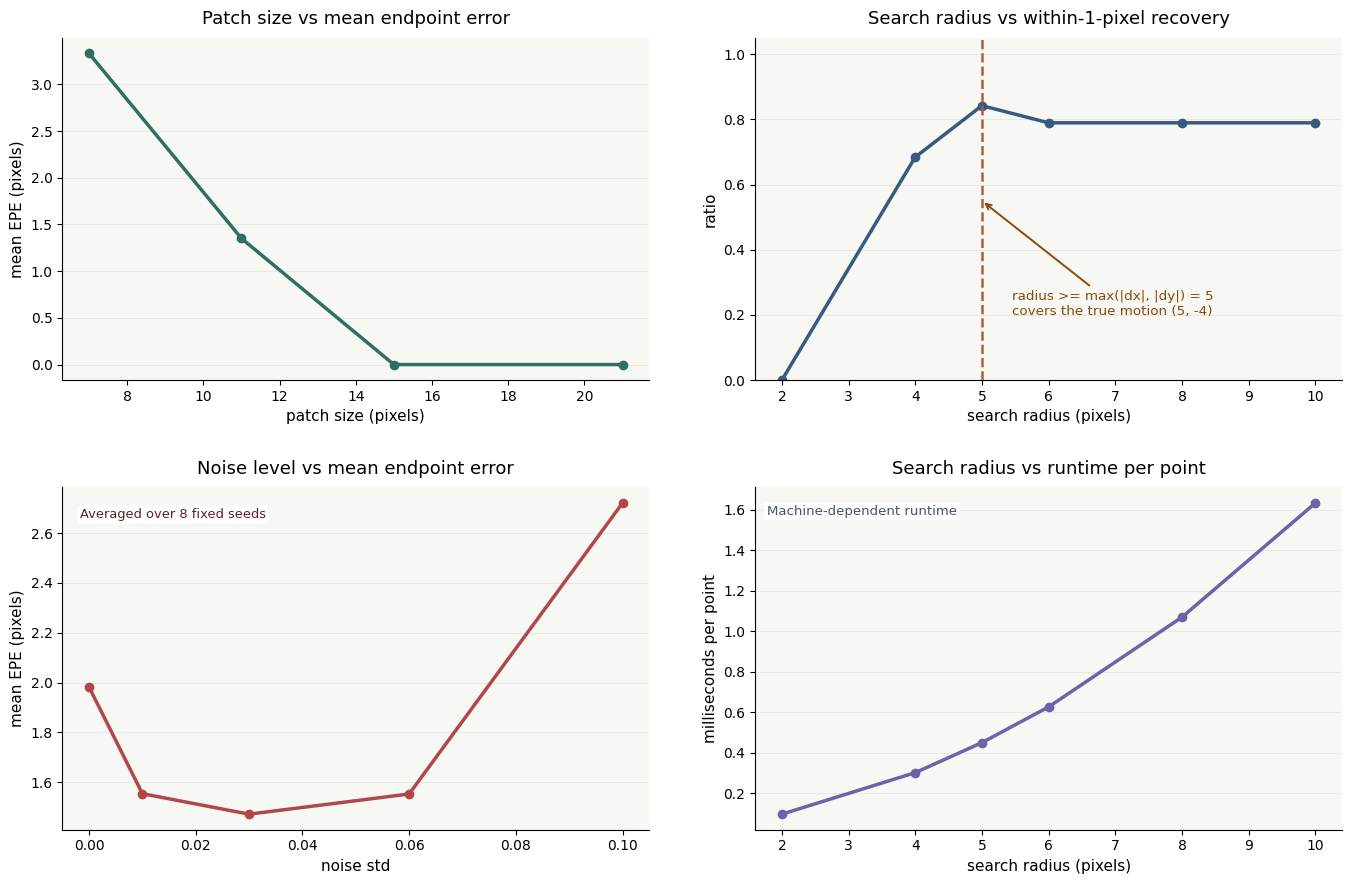
 ## Parameter sweeps
Three knobs matter immediately:
* **Patch size**: larger patches are often more stable, but they blur away local detail.
* **Search radius**: larger windows can recover larger motion, but they cost more and may invite distractors.
* **Noise level**: noisy images reduce the reliability of appearance matching.
The sweeps below come from controlled synthetic experiments. Because the true motion is $(5, -4)$, the search-radius plot also shows when the window first becomes large enough to contain the correct answer. The noise sweep averages over several fixed seeds, so the trend is not an artifact of one noisy draw.
```python theme={null}
def evaluate_setting(dx=5, dy=-4, noise_std=0.015, patch_size=11, search_radius=8, seed=123):
f1, f2, gt = make_synthetic_pair(dx=dx, dy=dy, noise_std=noise_std, seed=seed)
base_points = sample_textured_points(f1, patch_size=11, stride=12, threshold=0.08)
points = filter_trackable_points(base_points, f1.shape, patch_size=patch_size, search_radius=search_radius)
start = time.perf_counter()
est = estimate_sparse_motion(f1, f2, points, patch_size=patch_size, search_radius=search_radius)
elapsed_ms = 1000.0 * (time.perf_counter() - start)
summary = summarize_motion_metrics(est, gt)
summary["ms_per_point"] = elapsed_ms / max(len(points), 1)
summary["num_points"] = len(points)
return summary
patch_sizes = [7, 11, 15, 21]
search_radii = [2, 4, 5, 6, 8, 10]
noise_levels = [0.00, 0.01, 0.03, 0.06, 0.10]
noise_seeds = [101, 202, 303, 404, 505, 606, 707, 808]
required_radius = max(abs(int(gt_motion[0])), abs(int(gt_motion[1])))
patch_results = [evaluate_setting(patch_size=p, search_radius=8, noise_std=0.015, seed=321) for p in patch_sizes]
radius_results = [evaluate_setting(patch_size=11, search_radius=r, noise_std=0.015, seed=321) for r in search_radii]
noise_results = []
for noise_std in noise_levels:
per_seed = [evaluate_setting(patch_size=11, search_radius=8, noise_std=noise_std, seed=seed) for seed in noise_seeds]
noise_results.append(
{
"noise_std": noise_std,
"mean_epe": float(np.mean([item["mean_epe"] for item in per_seed])),
"within_1px_ratio": float(np.mean([item["within_1px_ratio"] for item in per_seed])),
}
)
```
## Parameter sweeps
Three knobs matter immediately:
* **Patch size**: larger patches are often more stable, but they blur away local detail.
* **Search radius**: larger windows can recover larger motion, but they cost more and may invite distractors.
* **Noise level**: noisy images reduce the reliability of appearance matching.
The sweeps below come from controlled synthetic experiments. Because the true motion is $(5, -4)$, the search-radius plot also shows when the window first becomes large enough to contain the correct answer. The noise sweep averages over several fixed seeds, so the trend is not an artifact of one noisy draw.
```python theme={null}
def evaluate_setting(dx=5, dy=-4, noise_std=0.015, patch_size=11, search_radius=8, seed=123):
f1, f2, gt = make_synthetic_pair(dx=dx, dy=dy, noise_std=noise_std, seed=seed)
base_points = sample_textured_points(f1, patch_size=11, stride=12, threshold=0.08)
points = filter_trackable_points(base_points, f1.shape, patch_size=patch_size, search_radius=search_radius)
start = time.perf_counter()
est = estimate_sparse_motion(f1, f2, points, patch_size=patch_size, search_radius=search_radius)
elapsed_ms = 1000.0 * (time.perf_counter() - start)
summary = summarize_motion_metrics(est, gt)
summary["ms_per_point"] = elapsed_ms / max(len(points), 1)
summary["num_points"] = len(points)
return summary
patch_sizes = [7, 11, 15, 21]
search_radii = [2, 4, 5, 6, 8, 10]
noise_levels = [0.00, 0.01, 0.03, 0.06, 0.10]
noise_seeds = [101, 202, 303, 404, 505, 606, 707, 808]
required_radius = max(abs(int(gt_motion[0])), abs(int(gt_motion[1])))
patch_results = [evaluate_setting(patch_size=p, search_radius=8, noise_std=0.015, seed=321) for p in patch_sizes]
radius_results = [evaluate_setting(patch_size=11, search_radius=r, noise_std=0.015, seed=321) for r in search_radii]
noise_results = []
for noise_std in noise_levels:
per_seed = [evaluate_setting(patch_size=11, search_radius=8, noise_std=noise_std, seed=seed) for seed in noise_seeds]
noise_results.append(
{
"noise_std": noise_std,
"mean_epe": float(np.mean([item["mean_epe"] for item in per_seed])),
"within_1px_ratio": float(np.mean([item["within_1px_ratio"] for item in per_seed])),
}
)
```
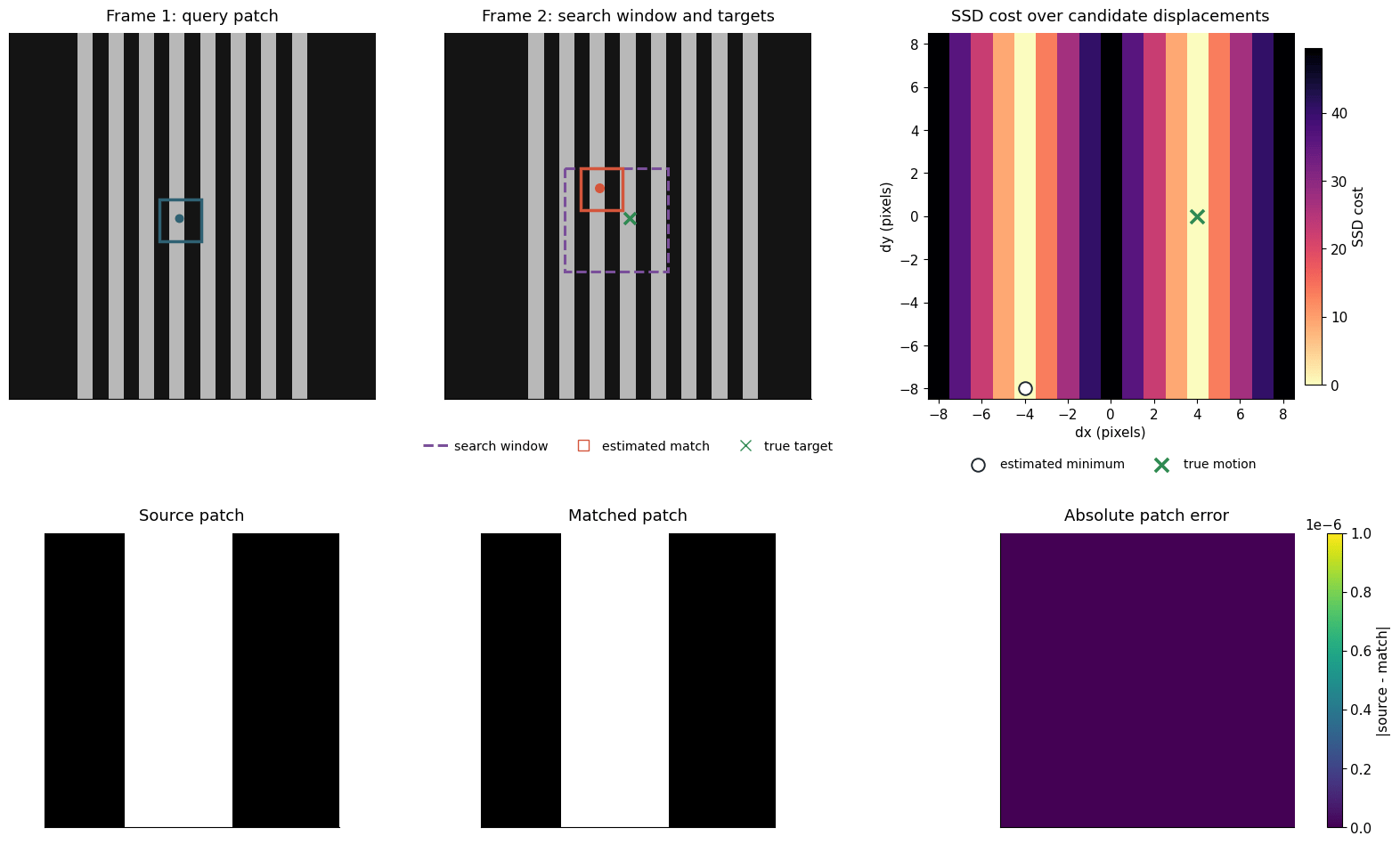
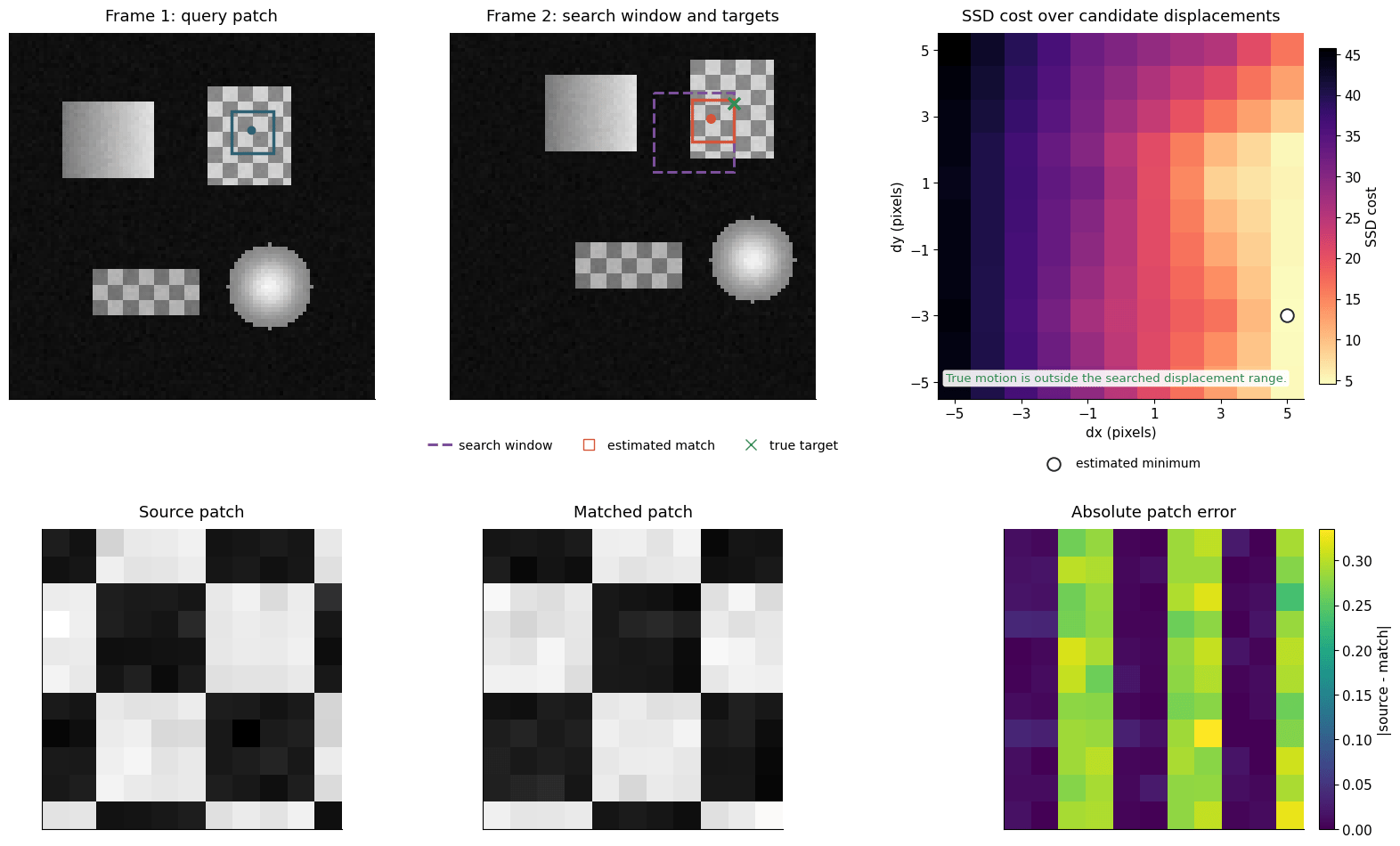
 ## Failure cases
A basic local matcher has clear blind spots. Two of the most important:
1. **Repetitive texture**: many candidate patches look equally good.
2. **Motion outside the search radius**: the correct answer is never even evaluated.
Both panels use the same ingredients as the successful single-point demo. What changes is the geometry of the problem: either the cost surface becomes ambiguous, or the true motion falls outside the searched range. The large-motion panel labels the true target as outside the searched region, so the wrong match is a limit of the search, not a bug in the plot.
```python theme={null}
def make_repetitive_texture_pair(dx=4, dy=0, size=96):
frame1 = np.full((size, size), 0.08, dtype=float)
for x0 in range(18, 78, 8):
frame1[:, x0 : x0 + 4] = 0.72
frame2 = shift_image_integer(frame1, dx=dx, dy=dy, fill_value=0.08)
return frame1, frame2, np.array([dx, dy], dtype=int)
```
```output theme={null}
Failure A: repetitive texture ambiguity: estimated = (-4, -8), true = (4, 0), best SSD = 0.0000
```
## Failure cases
A basic local matcher has clear blind spots. Two of the most important:
1. **Repetitive texture**: many candidate patches look equally good.
2. **Motion outside the search radius**: the correct answer is never even evaluated.
Both panels use the same ingredients as the successful single-point demo. What changes is the geometry of the problem: either the cost surface becomes ambiguous, or the true motion falls outside the searched range. The large-motion panel labels the true target as outside the searched region, so the wrong match is a limit of the search, not a bug in the plot.
```python theme={null}
def make_repetitive_texture_pair(dx=4, dy=0, size=96):
frame1 = np.full((size, size), 0.08, dtype=float)
for x0 in range(18, 78, 8):
frame1[:, x0 : x0 + 4] = 0.72
frame2 = shift_image_integer(frame1, dx=dx, dy=dy, fill_value=0.08)
return frame1, frame2, np.array([dx, dy], dtype=int)
```
```output theme={null}
Failure A: repetitive texture ambiguity: estimated = (-4, -8), true = (4, 0), best SSD = 0.0000
```
 ```output theme={null}
Repeated stripes create nearly identical candidate patches at several displacements, so the SSD minimum is ambiguous even when the true motion lies inside the search window.
Failure B: motion beyond the search radius: estimated = (5, -3), true = (11, -7), best SSD = 4.5418
True target is outside the searched region, so patch matching cannot recover it.
```
```output theme={null}
Repeated stripes create nearly identical candidate patches at several displacements, so the SSD minimum is ambiguous even when the true motion lies inside the search window.
Failure B: motion beyond the search radius: estimated = (5, -3), true = (11, -7), best SSD = 4.5418
True target is outside the searched region, so patch matching cannot recover it.
```
 ```output theme={null}
The true target is outside the searched region, so patch matching cannot recover it and instead returns the best in-range candidate.
```
## Limitations
Patch matching works well when:
* motion is moderate,
* the search window covers the true displacement,
* local texture is distinctive,
* and noise is not too strong.
It struggles when texture is ambiguous, motion is too large, illumination changes, or the motion varies strongly inside one patch. These limitations are why more advanced methods exist: Lucas-Kanade, Horn-Schunck optical flow, pyramidal search, and learned flow estimators.
As an exercise, replace the global translation with a rotation or a locally varying motion and see where the baseline breaks first.
***
[Edit this page on GitHub](https://github.com/aegean-ai/eaia/edit/main/src/aiml-common/lectures/3d-reconstruction/motion-estimation/index.mdx) or [file an issue](https://github.com/aegean-ai/eaia/issues/new/choose).
```output theme={null}
The true target is outside the searched region, so patch matching cannot recover it and instead returns the best in-range candidate.
```
## Limitations
Patch matching works well when:
* motion is moderate,
* the search window covers the true displacement,
* local texture is distinctive,
* and noise is not too strong.
It struggles when texture is ambiguous, motion is too large, illumination changes, or the motion varies strongly inside one patch. These limitations are why more advanced methods exist: Lucas-Kanade, Horn-Schunck optical flow, pyramidal search, and learned flow estimators.
As an exercise, replace the global translation with a rotation or a locally varying motion and see where the baseline breaks first.
***
[Edit this page on GitHub](https://github.com/aegean-ai/eaia/edit/main/src/aiml-common/lectures/3d-reconstruction/motion-estimation/index.mdx) or [file an issue](https://github.com/aegean-ai/eaia/issues/new/choose).