> ## Documentation Index
> Fetch the complete documentation index at: https://aegean.ai/llms.txt
> Use this file to discover all available pages before exploring further.
# Visualizing What ConvNets Learn
> Four techniques for understanding what convolutional neural networks learn, intermediate activations, filter visualization, Grad-CAM, and occlusion sensitivity using PyTorch and ResNet-50.
 Convolutional neural networks are often called "black boxes", but there are principled techniques to inspect what they have learned. This section demonstrates four complementary interpretability methods using a pretrained ResNet-50 on ImageNet.
| Technique | Question answered | Tool |
| ------------------------ | ------------------------------------------- | -------------------------------------- |
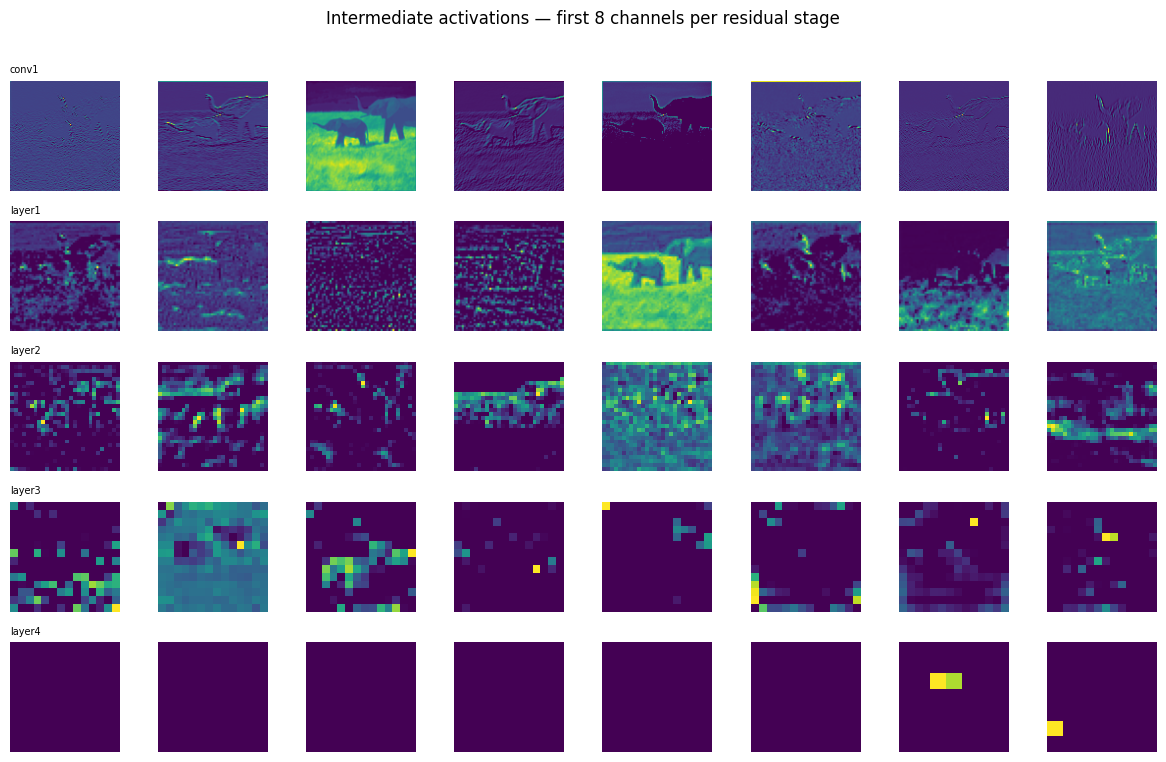
| Intermediate activations | What does each layer "see"? | Forward hooks |
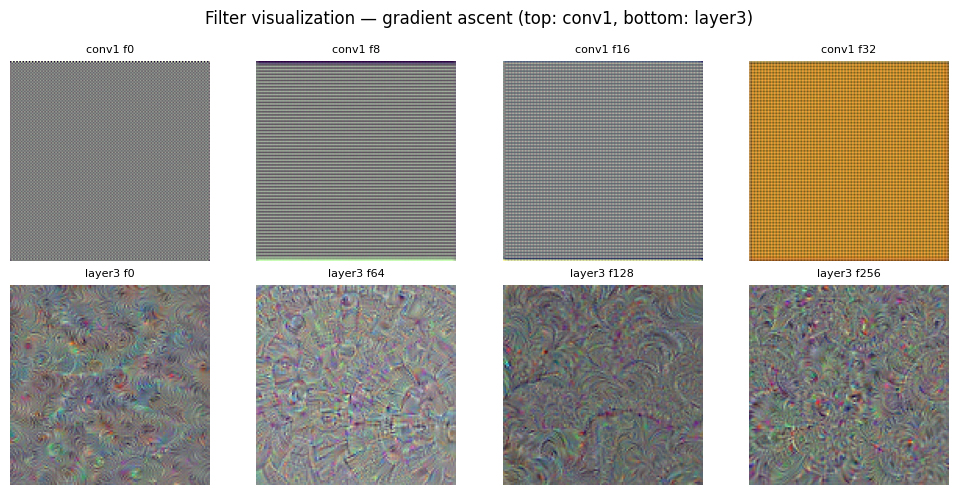
| Filter visualization | What pattern maximally excites each filter? | Gradient ascent |
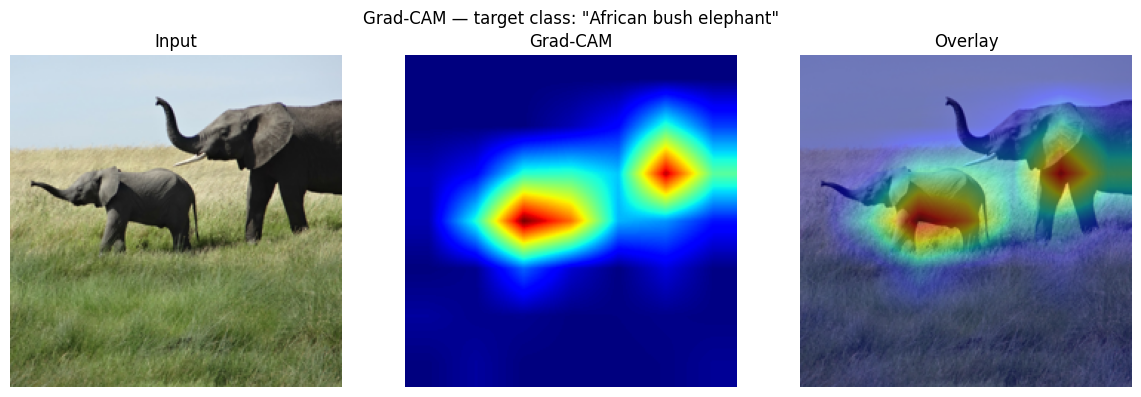
| Grad-CAM | Which image regions drive the prediction? | Gradient-weighted class activation map |
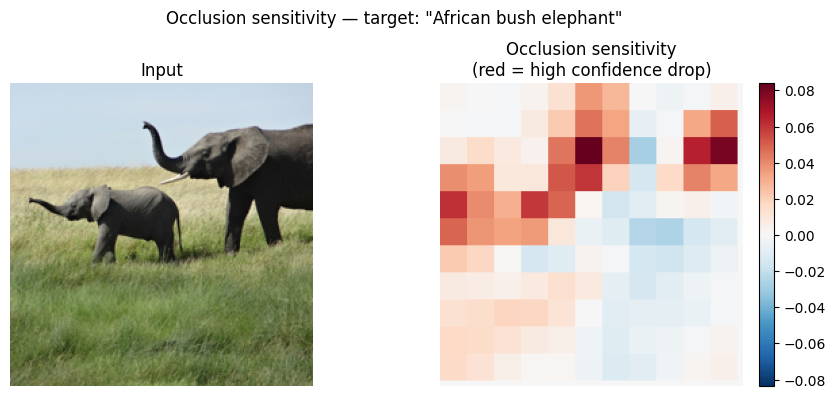
| Occlusion sensitivity | Which pixels matter most? | Systematic patch occlusion |
All four methods use **PyTorch hooks**, no model modification required.
```python theme={null}
import urllib.request
import json
from pathlib import Path
import numpy as np
import matplotlib.pyplot as plt
import matplotlib.cm as cm
from PIL import Image
import torch
import torch.nn.functional as F
import torchvision.models as models
import torchvision.transforms as T
DEVICE = 'cuda' if torch.cuda.is_available() else 'cpu'
print(f'Device: {DEVICE}')
# ImageNet normalisation constants
MEAN = torch.tensor([0.485, 0.456, 0.406], device=DEVICE).view(1, 3, 1, 1)
STD = torch.tensor([0.229, 0.224, 0.225], device=DEVICE).view(1, 3, 1, 1)
def preprocess(img: Image.Image, size=224) -> torch.Tensor:
"""PIL image -> normalised BCHW tensor on DEVICE."""
tf = T.Compose([T.Resize((size, size)), T.ToTensor()])
return (tf(img).unsqueeze(0).to(DEVICE) - MEAN) / STD
def tensor_to_img(t: torch.Tensor) -> np.ndarray:
"""BCHW normalised tensor -> HWC uint8 numpy array."""
t = (t * STD + MEAN).clamp(0, 1)
return (t.squeeze(0).permute(1, 2, 0).cpu().numpy() * 255).astype(np.uint8)
# ResNet-50 pretrained on ImageNet
model = models.resnet50(weights=models.ResNet50_Weights.IMAGENET1K_V2).to(DEVICE)
model.eval()
print('ResNet-50 loaded.')
# ImageNet class labels
labels_url = ('https://raw.githubusercontent.com/anishathalye/imagenet-simple-labels'
'/master/imagenet-simple-labels.json')
with urllib.request.urlopen(labels_url) as r:
LABELS = json.load(r)
print(f'Loaded {len(LABELS)} ImageNet labels.')
```
```output theme={null}
Device: cuda
ResNet-50 loaded.
Loaded 1000 ImageNet labels.
```
```python theme={null}
# Download a CC-licensed elephant image from Wikimedia Commons
IMG_URL = 'https://img-datasets.s3.amazonaws.com/elephant.jpg'
IMG_PATH = Path('elephant.jpg')
if not IMG_PATH.exists():
req = urllib.request.Request(
IMG_URL,
headers={'User-Agent': 'Mozilla/5.0 (X11; Linux x86_64) AppleWebKit/537.36'}
)
with urllib.request.urlopen(req) as response:
IMG_PATH.write_bytes(response.read())
pil_img = Image.open(IMG_PATH).convert('RGB')
img_tensor = preprocess(pil_img) # (1, 3, 224, 224)
# Top-5 predictions
with torch.no_grad():
logits = model(img_tensor)
probs = F.softmax(logits, dim=1)[0]
top5 = probs.topk(5)
print('Top-5 predictions:')
for prob, idx in zip(top5.values, top5.indices):
print(f' {LABELS[idx]:30s} {prob.item()*100:.1f}%')
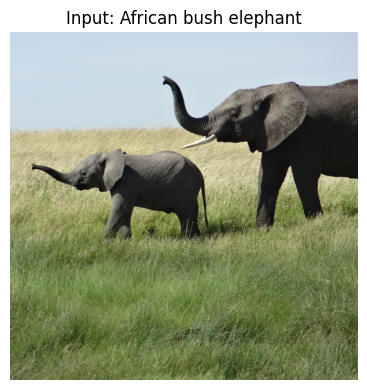
TARGET_CLASS = top5.indices[0].item()
fig, ax = plt.subplots(figsize=(4, 4))
ax.imshow(pil_img)
ax.set_title(f'Input: {LABELS[TARGET_CLASS]}')
ax.axis('off')
plt.tight_layout()
plt.savefig('input_image.png', dpi=120, bbox_inches='tight')
plt.show()
```
```output theme={null}
Top-5 predictions:
African bush elephant 49.5%
tusker 7.2%
Asian elephant 2.2%
water buffalo 0.4%
triceratops 0.2%
```
Convolutional neural networks are often called "black boxes", but there are principled techniques to inspect what they have learned. This section demonstrates four complementary interpretability methods using a pretrained ResNet-50 on ImageNet.
| Technique | Question answered | Tool |
| ------------------------ | ------------------------------------------- | -------------------------------------- |
| Intermediate activations | What does each layer "see"? | Forward hooks |
| Filter visualization | What pattern maximally excites each filter? | Gradient ascent |
| Grad-CAM | Which image regions drive the prediction? | Gradient-weighted class activation map |
| Occlusion sensitivity | Which pixels matter most? | Systematic patch occlusion |
All four methods use **PyTorch hooks**, no model modification required.
```python theme={null}
import urllib.request
import json
from pathlib import Path
import numpy as np
import matplotlib.pyplot as plt
import matplotlib.cm as cm
from PIL import Image
import torch
import torch.nn.functional as F
import torchvision.models as models
import torchvision.transforms as T
DEVICE = 'cuda' if torch.cuda.is_available() else 'cpu'
print(f'Device: {DEVICE}')
# ImageNet normalisation constants
MEAN = torch.tensor([0.485, 0.456, 0.406], device=DEVICE).view(1, 3, 1, 1)
STD = torch.tensor([0.229, 0.224, 0.225], device=DEVICE).view(1, 3, 1, 1)
def preprocess(img: Image.Image, size=224) -> torch.Tensor:
"""PIL image -> normalised BCHW tensor on DEVICE."""
tf = T.Compose([T.Resize((size, size)), T.ToTensor()])
return (tf(img).unsqueeze(0).to(DEVICE) - MEAN) / STD
def tensor_to_img(t: torch.Tensor) -> np.ndarray:
"""BCHW normalised tensor -> HWC uint8 numpy array."""
t = (t * STD + MEAN).clamp(0, 1)
return (t.squeeze(0).permute(1, 2, 0).cpu().numpy() * 255).astype(np.uint8)
# ResNet-50 pretrained on ImageNet
model = models.resnet50(weights=models.ResNet50_Weights.IMAGENET1K_V2).to(DEVICE)
model.eval()
print('ResNet-50 loaded.')
# ImageNet class labels
labels_url = ('https://raw.githubusercontent.com/anishathalye/imagenet-simple-labels'
'/master/imagenet-simple-labels.json')
with urllib.request.urlopen(labels_url) as r:
LABELS = json.load(r)
print(f'Loaded {len(LABELS)} ImageNet labels.')
```
```output theme={null}
Device: cuda
ResNet-50 loaded.
Loaded 1000 ImageNet labels.
```
```python theme={null}
# Download a CC-licensed elephant image from Wikimedia Commons
IMG_URL = 'https://img-datasets.s3.amazonaws.com/elephant.jpg'
IMG_PATH = Path('elephant.jpg')
if not IMG_PATH.exists():
req = urllib.request.Request(
IMG_URL,
headers={'User-Agent': 'Mozilla/5.0 (X11; Linux x86_64) AppleWebKit/537.36'}
)
with urllib.request.urlopen(req) as response:
IMG_PATH.write_bytes(response.read())
pil_img = Image.open(IMG_PATH).convert('RGB')
img_tensor = preprocess(pil_img) # (1, 3, 224, 224)
# Top-5 predictions
with torch.no_grad():
logits = model(img_tensor)
probs = F.softmax(logits, dim=1)[0]
top5 = probs.topk(5)
print('Top-5 predictions:')
for prob, idx in zip(top5.values, top5.indices):
print(f' {LABELS[idx]:30s} {prob.item()*100:.1f}%')
TARGET_CLASS = top5.indices[0].item()
fig, ax = plt.subplots(figsize=(4, 4))
ax.imshow(pil_img)
ax.set_title(f'Input: {LABELS[TARGET_CLASS]}')
ax.axis('off')
plt.tight_layout()
plt.savefig('input_image.png', dpi=120, bbox_inches='tight')
plt.show()
```
```output theme={null}
Top-5 predictions:
African bush elephant 49.5%
tusker 7.2%
Asian elephant 2.2%
water buffalo 0.4%
triceratops 0.2%
```
 ```python theme={null}
# --- Technique 1: Intermediate activations ---
#
# Register forward hooks on each residual stage of ResNet-50.
# ResNet-50 structure: conv1 -> bn1 -> relu -> maxpool -> layer1 -> layer2 -> layer3 -> layer4
HOOK_LAYERS = {
'conv1': model.relu, # after first conv + BN + ReLU (64ch, 112x112)
'layer1': model.layer1, # after residual stage 1 (256ch, 56x56)
'layer2': model.layer2, # after residual stage 2 (512ch, 28x28)
'layer3': model.layer3, # after residual stage 3 (1024ch, 14x14)
'layer4': model.layer4, # after residual stage 4 (2048ch, 7x7)
}
activations: dict = {}
hooks = []
def make_hook(name):
def hook(module, input, output):
activations[name] = output.detach().cpu()
return hook
for name, layer in HOOK_LAYERS.items():
hooks.append(layer.register_forward_hook(make_hook(name)))
with torch.no_grad():
_ = model(img_tensor)
for h in hooks:
h.remove()
# Plot 8 channels from each stage
N_CHANNELS = 8
fig, axes = plt.subplots(len(HOOK_LAYERS), N_CHANNELS,
figsize=(N_CHANNELS * 1.5, len(HOOK_LAYERS) * 1.5))
for row, (name, act) in enumerate(activations.items()):
for col in range(N_CHANNELS):
ch = act[0, col].numpy()
axes[row, col].imshow(ch, cmap='viridis')
axes[row, col].axis('off')
if col == 0:
axes[row, col].set_title(name, fontsize=7, loc='left')
fig.suptitle('Intermediate activations, first 8 channels per residual stage', y=1.01)
plt.tight_layout()
plt.savefig('activations.png', dpi=120, bbox_inches='tight')
plt.show()
for name, act in activations.items():
print(f'{name}: shape={tuple(act.shape)}')
```
```python theme={null}
# --- Technique 1: Intermediate activations ---
#
# Register forward hooks on each residual stage of ResNet-50.
# ResNet-50 structure: conv1 -> bn1 -> relu -> maxpool -> layer1 -> layer2 -> layer3 -> layer4
HOOK_LAYERS = {
'conv1': model.relu, # after first conv + BN + ReLU (64ch, 112x112)
'layer1': model.layer1, # after residual stage 1 (256ch, 56x56)
'layer2': model.layer2, # after residual stage 2 (512ch, 28x28)
'layer3': model.layer3, # after residual stage 3 (1024ch, 14x14)
'layer4': model.layer4, # after residual stage 4 (2048ch, 7x7)
}
activations: dict = {}
hooks = []
def make_hook(name):
def hook(module, input, output):
activations[name] = output.detach().cpu()
return hook
for name, layer in HOOK_LAYERS.items():
hooks.append(layer.register_forward_hook(make_hook(name)))
with torch.no_grad():
_ = model(img_tensor)
for h in hooks:
h.remove()
# Plot 8 channels from each stage
N_CHANNELS = 8
fig, axes = plt.subplots(len(HOOK_LAYERS), N_CHANNELS,
figsize=(N_CHANNELS * 1.5, len(HOOK_LAYERS) * 1.5))
for row, (name, act) in enumerate(activations.items()):
for col in range(N_CHANNELS):
ch = act[0, col].numpy()
axes[row, col].imshow(ch, cmap='viridis')
axes[row, col].axis('off')
if col == 0:
axes[row, col].set_title(name, fontsize=7, loc='left')
fig.suptitle('Intermediate activations, first 8 channels per residual stage', y=1.01)
plt.tight_layout()
plt.savefig('activations.png', dpi=120, bbox_inches='tight')
plt.show()
for name, act in activations.items():
print(f'{name}: shape={tuple(act.shape)}')
```
 ```output theme={null}
conv1: shape=(1, 64, 112, 112)
layer1: shape=(1, 256, 56, 56)
layer2: shape=(1, 512, 28, 28)
layer3: shape=(1, 1024, 14, 14)
layer4: shape=(1, 2048, 7, 7)
```
```python theme={null}
# --- Technique 2: Filter visualization via gradient ascent ---
#
# Start from random noise and update the input so that one specific
# convolutional filter's mean activation is maximised.
#
# ResNet-50 does not have a flat Sequential backbone like VGG.
# We hook into specific layers and run a full forward pass.
def visualize_filter(model, target_layer, filter_idx: int,
n_steps=60, lr=0.05, size=128) -> np.ndarray:
"""Return a (size, size, 3) uint8 image that maximally excites filter_idx."""
x = torch.randn(1, 3, size, size, device=DEVICE) * 0.1
x.requires_grad_(True)
captured = {}
def fwd_hook(module, inp, out):
captured['act'] = out
hook = target_layer.register_forward_hook(fwd_hook)
for _ in range(n_steps):
if x.grad is not None:
x.grad.zero_()
model(x) # full forward pass
loss = -captured['act'][0, filter_idx].mean()
loss.backward()
x.data += lr * x.grad / (x.grad.std() + 1e-8)
hook.remove()
img = x.detach().squeeze(0).permute(1, 2, 0).cpu().numpy()
img -= img.min()
mx = img.max()
if mx > 0:
img /= mx
return (img * 255).astype(np.uint8)
# 4 filters from conv1 (early edges) and 4 from layer3 (high-level textures)
configs = [
(model.conv1, 0, 'conv1'),
(model.conv1, 8, 'conv1'),
(model.conv1, 16, 'conv1'),
(model.conv1, 32, 'conv1'),
(model.layer3[-1].conv3, 0, 'layer3'),
(model.layer3[-1].conv3, 64, 'layer3'),
(model.layer3[-1].conv3, 128, 'layer3'),
(model.layer3[-1].conv3, 256, 'layer3'),
]
fig, axes = plt.subplots(2, 4, figsize=(10, 5))
for ax, (layer, filt_idx, label) in zip(axes.flat, configs):
vis = visualize_filter(model, layer, filt_idx)
ax.imshow(vis)
ax.set_title(f'{label} f{filt_idx}', fontsize=8)
ax.axis('off')
fig.suptitle('Filter visualization, gradient ascent (top: conv1, bottom: layer3)')
plt.tight_layout()
plt.savefig('filter_visualization.png', dpi=120, bbox_inches='tight')
plt.show()
```
```output theme={null}
conv1: shape=(1, 64, 112, 112)
layer1: shape=(1, 256, 56, 56)
layer2: shape=(1, 512, 28, 28)
layer3: shape=(1, 1024, 14, 14)
layer4: shape=(1, 2048, 7, 7)
```
```python theme={null}
# --- Technique 2: Filter visualization via gradient ascent ---
#
# Start from random noise and update the input so that one specific
# convolutional filter's mean activation is maximised.
#
# ResNet-50 does not have a flat Sequential backbone like VGG.
# We hook into specific layers and run a full forward pass.
def visualize_filter(model, target_layer, filter_idx: int,
n_steps=60, lr=0.05, size=128) -> np.ndarray:
"""Return a (size, size, 3) uint8 image that maximally excites filter_idx."""
x = torch.randn(1, 3, size, size, device=DEVICE) * 0.1
x.requires_grad_(True)
captured = {}
def fwd_hook(module, inp, out):
captured['act'] = out
hook = target_layer.register_forward_hook(fwd_hook)
for _ in range(n_steps):
if x.grad is not None:
x.grad.zero_()
model(x) # full forward pass
loss = -captured['act'][0, filter_idx].mean()
loss.backward()
x.data += lr * x.grad / (x.grad.std() + 1e-8)
hook.remove()
img = x.detach().squeeze(0).permute(1, 2, 0).cpu().numpy()
img -= img.min()
mx = img.max()
if mx > 0:
img /= mx
return (img * 255).astype(np.uint8)
# 4 filters from conv1 (early edges) and 4 from layer3 (high-level textures)
configs = [
(model.conv1, 0, 'conv1'),
(model.conv1, 8, 'conv1'),
(model.conv1, 16, 'conv1'),
(model.conv1, 32, 'conv1'),
(model.layer3[-1].conv3, 0, 'layer3'),
(model.layer3[-1].conv3, 64, 'layer3'),
(model.layer3[-1].conv3, 128, 'layer3'),
(model.layer3[-1].conv3, 256, 'layer3'),
]
fig, axes = plt.subplots(2, 4, figsize=(10, 5))
for ax, (layer, filt_idx, label) in zip(axes.flat, configs):
vis = visualize_filter(model, layer, filt_idx)
ax.imshow(vis)
ax.set_title(f'{label} f{filt_idx}', fontsize=8)
ax.axis('off')
fig.suptitle('Filter visualization, gradient ascent (top: conv1, bottom: layer3)')
plt.tight_layout()
plt.savefig('filter_visualization.png', dpi=120, bbox_inches='tight')
plt.show()
```
 ```python theme={null}
# --- Technique 3: Grad-CAM ---
#
# Gradient-weighted Class Activation Mapping (Selvaraju et al., 2017).
# Weights each feature-map channel by the global average of its gradient
# w.r.t. the target class score, then applies ReLU and upsamples.
def grad_cam(model, img_tensor: torch.Tensor,
target_class: int, target_layer) -> np.ndarray:
"""Return a (224, 224) heat map in [0, 1]."""
fmaps, grads = {}, {}
def fwd_hook(m, inp, out):
fmaps['A'] = out
def bwd_hook(m, grad_in, grad_out):
grads['dA'] = grad_out[0]
h1 = target_layer.register_forward_hook(fwd_hook)
h2 = target_layer.register_full_backward_hook(bwd_hook)
out = model(img_tensor)
model.zero_grad()
out[0, target_class].backward()
h1.remove()
h2.remove()
# alpha_k = global-average gradient per channel
alpha = grads['dA'][0].mean(dim=(1, 2), keepdim=True) # (C, 1, 1)
cam = torch.relu((alpha * fmaps['A'][0]).sum(0)) # (H, W)
cam = F.interpolate(
cam.unsqueeze(0).unsqueeze(0),
size=(224, 224), mode='bilinear', align_corners=False
).squeeze().detach().cpu().numpy()
cam -= cam.min()
if cam.max() > 0:
cam /= cam.max()
return cam
# Disable inplace ReLU, required for register_full_backward_hook to work
for m in model.modules():
if isinstance(m, torch.nn.ReLU):
m.inplace = False
# Last residual block of ResNet-50: layer4[-1]
heatmap = grad_cam(model, img_tensor, TARGET_CLASS, model.layer4[-1])
rgb = np.array(pil_img.resize((224, 224))).astype(np.float32) / 255.0
colormap = plt.get_cmap('jet')(heatmap)[..., :3]
overlay = (0.55 * rgb + 0.45 * colormap).clip(0, 1)
fig, axes = plt.subplots(1, 3, figsize=(12, 4))
axes[0].imshow(rgb); axes[0].set_title('Input'); axes[0].axis('off')
axes[1].imshow(heatmap, cmap='jet'); axes[1].set_title('Grad-CAM'); axes[1].axis('off')
axes[2].imshow(overlay); axes[2].set_title('Overlay'); axes[2].axis('off')
fig.suptitle(f'Grad-CAM, target class: "{LABELS[TARGET_CLASS]}"')
plt.tight_layout()
plt.savefig('gradcam.png', dpi=120, bbox_inches='tight')
plt.show()
```
```python theme={null}
# --- Technique 3: Grad-CAM ---
#
# Gradient-weighted Class Activation Mapping (Selvaraju et al., 2017).
# Weights each feature-map channel by the global average of its gradient
# w.r.t. the target class score, then applies ReLU and upsamples.
def grad_cam(model, img_tensor: torch.Tensor,
target_class: int, target_layer) -> np.ndarray:
"""Return a (224, 224) heat map in [0, 1]."""
fmaps, grads = {}, {}
def fwd_hook(m, inp, out):
fmaps['A'] = out
def bwd_hook(m, grad_in, grad_out):
grads['dA'] = grad_out[0]
h1 = target_layer.register_forward_hook(fwd_hook)
h2 = target_layer.register_full_backward_hook(bwd_hook)
out = model(img_tensor)
model.zero_grad()
out[0, target_class].backward()
h1.remove()
h2.remove()
# alpha_k = global-average gradient per channel
alpha = grads['dA'][0].mean(dim=(1, 2), keepdim=True) # (C, 1, 1)
cam = torch.relu((alpha * fmaps['A'][0]).sum(0)) # (H, W)
cam = F.interpolate(
cam.unsqueeze(0).unsqueeze(0),
size=(224, 224), mode='bilinear', align_corners=False
).squeeze().detach().cpu().numpy()
cam -= cam.min()
if cam.max() > 0:
cam /= cam.max()
return cam
# Disable inplace ReLU, required for register_full_backward_hook to work
for m in model.modules():
if isinstance(m, torch.nn.ReLU):
m.inplace = False
# Last residual block of ResNet-50: layer4[-1]
heatmap = grad_cam(model, img_tensor, TARGET_CLASS, model.layer4[-1])
rgb = np.array(pil_img.resize((224, 224))).astype(np.float32) / 255.0
colormap = plt.get_cmap('jet')(heatmap)[..., :3]
overlay = (0.55 * rgb + 0.45 * colormap).clip(0, 1)
fig, axes = plt.subplots(1, 3, figsize=(12, 4))
axes[0].imshow(rgb); axes[0].set_title('Input'); axes[0].axis('off')
axes[1].imshow(heatmap, cmap='jet'); axes[1].set_title('Grad-CAM'); axes[1].axis('off')
axes[2].imshow(overlay); axes[2].set_title('Overlay'); axes[2].axis('off')
fig.suptitle(f'Grad-CAM, target class: "{LABELS[TARGET_CLASS]}"')
plt.tight_layout()
plt.savefig('gradcam.png', dpi=120, bbox_inches='tight')
plt.show()
```
 ```python theme={null}
# --- Technique 4: Occlusion sensitivity ---
#
# Slide a grey patch across the image and record how much the
# target-class confidence drops at each position.
# Large drops indicate regions that were important to the prediction.
def occlusion_sensitivity(model, img_tensor: torch.Tensor,
target_class: int,
patch: int = 40, stride: int = 20) -> np.ndarray:
"""Return a (H, W) map of confidence drop when each patch is occluded."""
_, _, H, W = img_tensor.shape
with torch.no_grad():
base_prob = F.softmax(model(img_tensor), dim=1)[0, target_class].item()
sensitivity = np.zeros((H, W), dtype=np.float32)
counts = np.zeros((H, W), dtype=np.float32)
for y in range(0, H - patch + 1, stride):
for x in range(0, W - patch + 1, stride):
occluded = img_tensor.clone()
occluded[:, :, y:y+patch, x:x+patch] = 0.0 # mid-grey in normalised space
with torch.no_grad():
prob = F.softmax(model(occluded), dim=1)[0, target_class].item()
drop = base_prob - prob
sensitivity[y:y+patch, x:x+patch] += drop
counts[y:y+patch, x:x+patch] += 1.0
counts = np.where(counts == 0, 1, counts)
return sensitivity / counts
print('Running occlusion sensitivity (patch=40, stride=20) ...')
sens_map = occlusion_sensitivity(model, img_tensor, TARGET_CLASS, patch=40, stride=20)
rgb = np.array(pil_img.resize((224, 224)))
fig, axes = plt.subplots(1, 2, figsize=(9, 4))
axes[0].imshow(rgb)
axes[0].set_title('Input')
axes[0].axis('off')
vmax = np.abs(sens_map).max()
im = axes[1].imshow(sens_map, cmap='RdBu_r', vmin=-vmax, vmax=vmax)
axes[1].set_title('Occlusion sensitivity\n(red = high confidence drop)')
axes[1].axis('off')
plt.colorbar(im, ax=axes[1], fraction=0.046, pad=0.04)
fig.suptitle(f'Occlusion sensitivity, target: "{LABELS[TARGET_CLASS]}"')
plt.tight_layout()
plt.savefig('occlusion.png', dpi=120, bbox_inches='tight')
plt.show()
```
```output theme={null}
Running occlusion sensitivity (patch=40, stride=20) ...
```
```python theme={null}
# --- Technique 4: Occlusion sensitivity ---
#
# Slide a grey patch across the image and record how much the
# target-class confidence drops at each position.
# Large drops indicate regions that were important to the prediction.
def occlusion_sensitivity(model, img_tensor: torch.Tensor,
target_class: int,
patch: int = 40, stride: int = 20) -> np.ndarray:
"""Return a (H, W) map of confidence drop when each patch is occluded."""
_, _, H, W = img_tensor.shape
with torch.no_grad():
base_prob = F.softmax(model(img_tensor), dim=1)[0, target_class].item()
sensitivity = np.zeros((H, W), dtype=np.float32)
counts = np.zeros((H, W), dtype=np.float32)
for y in range(0, H - patch + 1, stride):
for x in range(0, W - patch + 1, stride):
occluded = img_tensor.clone()
occluded[:, :, y:y+patch, x:x+patch] = 0.0 # mid-grey in normalised space
with torch.no_grad():
prob = F.softmax(model(occluded), dim=1)[0, target_class].item()
drop = base_prob - prob
sensitivity[y:y+patch, x:x+patch] += drop
counts[y:y+patch, x:x+patch] += 1.0
counts = np.where(counts == 0, 1, counts)
return sensitivity / counts
print('Running occlusion sensitivity (patch=40, stride=20) ...')
sens_map = occlusion_sensitivity(model, img_tensor, TARGET_CLASS, patch=40, stride=20)
rgb = np.array(pil_img.resize((224, 224)))
fig, axes = plt.subplots(1, 2, figsize=(9, 4))
axes[0].imshow(rgb)
axes[0].set_title('Input')
axes[0].axis('off')
vmax = np.abs(sens_map).max()
im = axes[1].imshow(sens_map, cmap='RdBu_r', vmin=-vmax, vmax=vmax)
axes[1].set_title('Occlusion sensitivity\n(red = high confidence drop)')
axes[1].axis('off')
plt.colorbar(im, ax=axes[1], fraction=0.046, pad=0.04)
fig.suptitle(f'Occlusion sensitivity, target: "{LABELS[TARGET_CLASS]}"')
plt.tight_layout()
plt.savefig('occlusion.png', dpi=120, bbox_inches='tight')
plt.show()
```
```output theme={null}
Running occlusion sensitivity (patch=40, stride=20) ...
```
 ## PyTorch reference
| PyTorch class | Description |
| -------------------------------------------------------------------------------- | ------------------------------------------------------------------------------- |
| [`nn.Conv2d`](https://docs.pytorch.org/docs/2.12/generated/torch.nn.Conv2d.html) | Applies a 2D convolution over an input signal composed of several input planes. |
| [`nn.ReLU`](https://docs.pytorch.org/docs/2.12/generated/torch.nn.ReLU.html) | Applies the rectified linear unit function element-wise. |
***
[Edit this page on GitHub](https://github.com/aegean-ai/eaia/edit/main/src/aiml-common/lectures/cnn/visualizing-what-convnets-learn/index.mdx) or [file an issue](https://github.com/aegean-ai/eaia/issues/new/choose).
## PyTorch reference
| PyTorch class | Description |
| -------------------------------------------------------------------------------- | ------------------------------------------------------------------------------- |
| [`nn.Conv2d`](https://docs.pytorch.org/docs/2.12/generated/torch.nn.Conv2d.html) | Applies a 2D convolution over an input signal composed of several input planes. |
| [`nn.ReLU`](https://docs.pytorch.org/docs/2.12/generated/torch.nn.ReLU.html) | Applies the rectified linear unit function element-wise. |
***
[Edit this page on GitHub](https://github.com/aegean-ai/eaia/edit/main/src/aiml-common/lectures/cnn/visualizing-what-convnets-learn/index.mdx) or [file an issue](https://github.com/aegean-ai/eaia/issues/new/choose).