> ## Documentation Index
> Fetch the complete documentation index at: https://aegean.ai/llms.txt
> Use this file to discover all available pages before exploring further.
# Convolution and Linear Filters
> Signals and systems, linear translation-invariant filters, convolution, boundary handling, and template matching with normalized cross-correlation.
 *This section was written by [Kimberly Milner](https://github.com/rollingcoconut) ([pull request #51](https://github.com/pantelis/eng-ai-agents/pull/51)), with help from an AI coding agent on the code. It reproduces the ideas of Chapter 15 of [*Foundations of Computer Vision*](https://visionbook.mit.edu/linear_image_filtering.html) by Antonio Torralba, Phillip Isola, and William T. Freeman. The book's own figures are not reproduced here, because the book's license covers only the work in full; links point to them instead.*
Image filtering is the workhorse of low-level vision: blurring, sharpening, edge detection, and template matching are all the *same* operation, the **convolution** of an image with a small kernel. This section regenerates the figures in PyTorch and Kornia, building from continuous and discrete signals, through linear translation-invariant (LTI) systems and convolution, to cross-correlation and template matching.
**The thread through the section.** A *system* maps an input signal to an output. The systems worth studying are **linear and translation-invariant**, and every LTI system is completely described by a single **impulse response** $h$, applied everywhere by convolution: $\ell_\text{out} = \ell_\text{in} * h$. Cross-correlation is the same computation without flipping the kernel, which is what template matching uses.
Where the book shows a photograph or a hand sketch, a link points to it, and the filtering *operations* run on scikit-image test images instead.
```python theme={null}
import torch
import kornia
import matplotlib.pyplot as plt
from matplotlib.patches import Rectangle, FancyArrowPatch
DEVICE = "cuda" if torch.cuda.is_available() else "cpu"
_ = torch.manual_seed(0)
plt.rcParams.update({"figure.dpi": 110, "axes.grid": False})
print(f"torch {torch.__version__} on {DEVICE} | kornia {kornia.__version__}")
```
```output theme={null}
torch 2.11.0+cu130 on cuda | kornia 0.8.3
```
**Images replaced for licensing.** The book is published under a CC BY-NC-ND license, which covers only the book as a whole and not its individual images, so this page does not republish the book's photographs. License-free images stand in for them:
* The *coffee* photograph (scikit-image) stands in for [a photograph of birds in flight (Figure 15.5)](https://visionbook.mit.edu/figures/linear_image_filtering/fredo_birds1.jpg).
* The *astronaut* photograph (scikit-image) stands in for [a photograph of a zebra (Figure 15.10)](https://visionbook.mit.edu/linear_image_filtering.html#fig-boundaries).
If you use the book for non-commercial purposes, you can swap the originals back in: each line that loads a stand-in carries the original's link in a comment.
```python theme={null}
# Shared palette, a consistent set of colors across the chapter's figures.
COLORS = {
"dark": "#111111", # axes, primary lines, text
"gray": "#555555", # secondary lines / text
"blue": "#1f6fe0", # signals, rays
"red": "#c0392b", # highlights, kernels, brackets
"green": "#3a8b3a", # secondary highlight
"cyan": "#2997ff", # reference lines
"panel": "#5f7695", # panel labels "(a)", "(b)"
}
```
## Signals and images
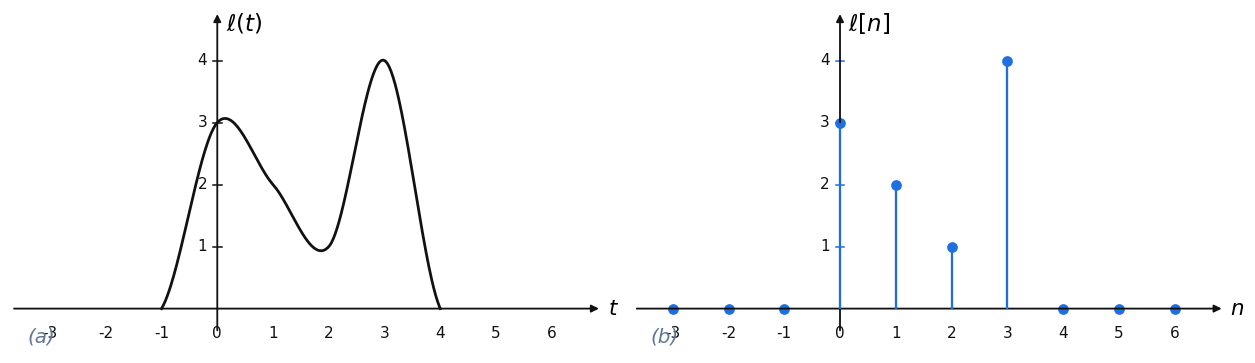
A one-dimensional **continuous** signal $\ell(t)$ is defined for every real $t$; sampling it on an integer grid gives the **discrete** signal $\ell[n]$. Images are just 2-D discrete signals $\ell[n,m]$.
**Figure 15.1: a continuous signal and its discrete samples.**
> *Book Figure 15.1: computed here.*
```python theme={null}
# Figure 15.1: a continuous signal ℓ(t) and its discrete samples ℓ[n]. The discrete signal is
# the continuous one read off at the integers; here ℓ[n] = [3, 2, 1, 4] at n = 0..3 and zero
# elsewhere. A Catmull-Rom spline through those support points stands in for the continuous ℓ(t).
n = torch.arange(-3, 7)
ell = torch.zeros(10); ell[3:7] = torch.tensor([3.0, 2.0, 1.0, 4.0]) # samples at n = 0,1,2,3
cps = torch.tensor([[-2, 0], [-1, 0], [0, 3], [1, 2], [2, 1], [3, 4], [4, 0], [5, 0]], dtype=torch.float32)
u = torch.linspace(0, 1, 60).unsqueeze(1)
seg = lambda P0, P1, P2, P3: 0.5 * (2*P1 + (-P0+P2)*u + (2*P0-5*P1+4*P2-P3)*u**2 + (-P0+3*P1-3*P2+P3)*u**3)
curve = torch.cat([seg(cps[i-1], cps[i], cps[i+1], cps[i+2]) for i in range(1, len(cps) - 2)])
print(f"discrete samples ℓ[0..3] = {ell[3:7].tolist()}")
```
```output theme={null}
discrete samples ℓ[0..3] = [3.0, 2.0, 1.0, 4.0]
```
*This section was written by [Kimberly Milner](https://github.com/rollingcoconut) ([pull request #51](https://github.com/pantelis/eng-ai-agents/pull/51)), with help from an AI coding agent on the code. It reproduces the ideas of Chapter 15 of [*Foundations of Computer Vision*](https://visionbook.mit.edu/linear_image_filtering.html) by Antonio Torralba, Phillip Isola, and William T. Freeman. The book's own figures are not reproduced here, because the book's license covers only the work in full; links point to them instead.*
Image filtering is the workhorse of low-level vision: blurring, sharpening, edge detection, and template matching are all the *same* operation, the **convolution** of an image with a small kernel. This section regenerates the figures in PyTorch and Kornia, building from continuous and discrete signals, through linear translation-invariant (LTI) systems and convolution, to cross-correlation and template matching.
**The thread through the section.** A *system* maps an input signal to an output. The systems worth studying are **linear and translation-invariant**, and every LTI system is completely described by a single **impulse response** $h$, applied everywhere by convolution: $\ell_\text{out} = \ell_\text{in} * h$. Cross-correlation is the same computation without flipping the kernel, which is what template matching uses.
Where the book shows a photograph or a hand sketch, a link points to it, and the filtering *operations* run on scikit-image test images instead.
```python theme={null}
import torch
import kornia
import matplotlib.pyplot as plt
from matplotlib.patches import Rectangle, FancyArrowPatch
DEVICE = "cuda" if torch.cuda.is_available() else "cpu"
_ = torch.manual_seed(0)
plt.rcParams.update({"figure.dpi": 110, "axes.grid": False})
print(f"torch {torch.__version__} on {DEVICE} | kornia {kornia.__version__}")
```
```output theme={null}
torch 2.11.0+cu130 on cuda | kornia 0.8.3
```
**Images replaced for licensing.** The book is published under a CC BY-NC-ND license, which covers only the book as a whole and not its individual images, so this page does not republish the book's photographs. License-free images stand in for them:
* The *coffee* photograph (scikit-image) stands in for [a photograph of birds in flight (Figure 15.5)](https://visionbook.mit.edu/figures/linear_image_filtering/fredo_birds1.jpg).
* The *astronaut* photograph (scikit-image) stands in for [a photograph of a zebra (Figure 15.10)](https://visionbook.mit.edu/linear_image_filtering.html#fig-boundaries).
If you use the book for non-commercial purposes, you can swap the originals back in: each line that loads a stand-in carries the original's link in a comment.
```python theme={null}
# Shared palette, a consistent set of colors across the chapter's figures.
COLORS = {
"dark": "#111111", # axes, primary lines, text
"gray": "#555555", # secondary lines / text
"blue": "#1f6fe0", # signals, rays
"red": "#c0392b", # highlights, kernels, brackets
"green": "#3a8b3a", # secondary highlight
"cyan": "#2997ff", # reference lines
"panel": "#5f7695", # panel labels "(a)", "(b)"
}
```
## Signals and images
A one-dimensional **continuous** signal $\ell(t)$ is defined for every real $t$; sampling it on an integer grid gives the **discrete** signal $\ell[n]$. Images are just 2-D discrete signals $\ell[n,m]$.
**Figure 15.1: a continuous signal and its discrete samples.**
> *Book Figure 15.1: computed here.*
```python theme={null}
# Figure 15.1: a continuous signal ℓ(t) and its discrete samples ℓ[n]. The discrete signal is
# the continuous one read off at the integers; here ℓ[n] = [3, 2, 1, 4] at n = 0..3 and zero
# elsewhere. A Catmull-Rom spline through those support points stands in for the continuous ℓ(t).
n = torch.arange(-3, 7)
ell = torch.zeros(10); ell[3:7] = torch.tensor([3.0, 2.0, 1.0, 4.0]) # samples at n = 0,1,2,3
cps = torch.tensor([[-2, 0], [-1, 0], [0, 3], [1, 2], [2, 1], [3, 4], [4, 0], [5, 0]], dtype=torch.float32)
u = torch.linspace(0, 1, 60).unsqueeze(1)
seg = lambda P0, P1, P2, P3: 0.5 * (2*P1 + (-P0+P2)*u + (2*P0-5*P1+4*P2-P3)*u**2 + (-P0+3*P1-3*P2+P3)*u**3)
curve = torch.cat([seg(cps[i-1], cps[i], cps[i+1], cps[i+2]) for i in range(1, len(cps) - 2)])
print(f"discrete samples ℓ[0..3] = {ell[3:7].tolist()}")
```
```output theme={null}
discrete samples ℓ[0..3] = [3.0, 2.0, 1.0, 4.0]
```
 ## Systems
A system $f$ maps an input signal to an output signal. The systems that matter here are **linear** (they respect scaling and superposition) and **translation-invariant** (shifting the input just shifts the output).
**Figure 15.2: a system maps an input signal to an output.**
> *Book Figure 15.2: drawn as a schematic.*
## Systems
A system $f$ maps an input signal to an output signal. The systems that matter here are **linear** (they respect scaling and superposition) and **translation-invariant** (shifting the input just shifts the output).
**Figure 15.2: a system maps an input signal to an output.**
> *Book Figure 15.2: drawn as a schematic.*
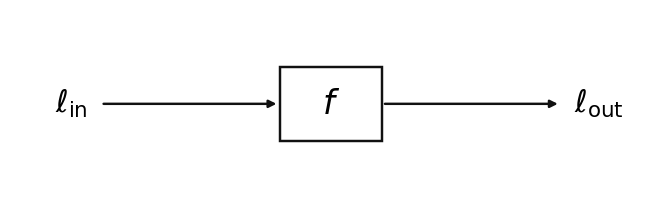 **Figure 15.3: which of these image transforms are linear?.**
> *Book Figure 15.3: applied with Kornia.*
```python theme={null}
# Figure 15.3: apply four transforms to one image and ask which are LINEAR systems (respecting
# scaling and superposition of pixel values). rgb→gray (a fixed weighted channel sum) and defocus
# (a blur, i.e. a convolution) are linear; rotation and scaling remap pixel *locations*, linear
# maps but not translation-invariant, the distinction the chapter draws out.
from skimage.data import astronaut
img = torch.as_tensor(astronaut() / 255.0, dtype=torch.float32).permute(2, 0, 1)[None].to(DEVICE) # (1,3,H,W)
rot = kornia.geometry.transform.rotate(img, torch.tensor([30.0], device=DEVICE))
small = kornia.geometry.transform.rescale(img, 0.5) # scale down, then re-center on black
scal = torch.zeros_like(img); H, W = img.shape[-2:]; h, w = small.shape[-2:]
scal[..., (H - h) // 2:(H - h) // 2 + h, (W - w) // 2:(W - w) // 2 + w] = small
gray = kornia.color.rgb_to_grayscale(img).repeat(1, 3, 1, 1) # linear channel mix
blur = kornia.filters.gaussian_blur2d(img, (31, 31), (9.0, 9.0)) # defocus = convolution (linear)
print(f"image {tuple(img.shape[-2:])}; transforms: rotation, scaling, rgb2gray, defocus")
```
```output theme={null}
image (512, 512); transforms: rotation, scaling, rgb2gray, defocus
```
**Figure 15.3: which of these image transforms are linear?.**
> *Book Figure 15.3: applied with Kornia.*
```python theme={null}
# Figure 15.3: apply four transforms to one image and ask which are LINEAR systems (respecting
# scaling and superposition of pixel values). rgb→gray (a fixed weighted channel sum) and defocus
# (a blur, i.e. a convolution) are linear; rotation and scaling remap pixel *locations*, linear
# maps but not translation-invariant, the distinction the chapter draws out.
from skimage.data import astronaut
img = torch.as_tensor(astronaut() / 255.0, dtype=torch.float32).permute(2, 0, 1)[None].to(DEVICE) # (1,3,H,W)
rot = kornia.geometry.transform.rotate(img, torch.tensor([30.0], device=DEVICE))
small = kornia.geometry.transform.rescale(img, 0.5) # scale down, then re-center on black
scal = torch.zeros_like(img); H, W = img.shape[-2:]; h, w = small.shape[-2:]
scal[..., (H - h) // 2:(H - h) // 2 + h, (W - w) // 2:(W - w) // 2 + w] = small
gray = kornia.color.rgb_to_grayscale(img).repeat(1, 3, 1, 1) # linear channel mix
blur = kornia.filters.gaussian_blur2d(img, (31, 31), (9.0, 9.0)) # defocus = convolution (linear)
print(f"image {tuple(img.shape[-2:])}; transforms: rotation, scaling, rgb2gray, defocus")
```
```output theme={null}
image (512, 512); transforms: rotation, scaling, rgb2gray, defocus
```
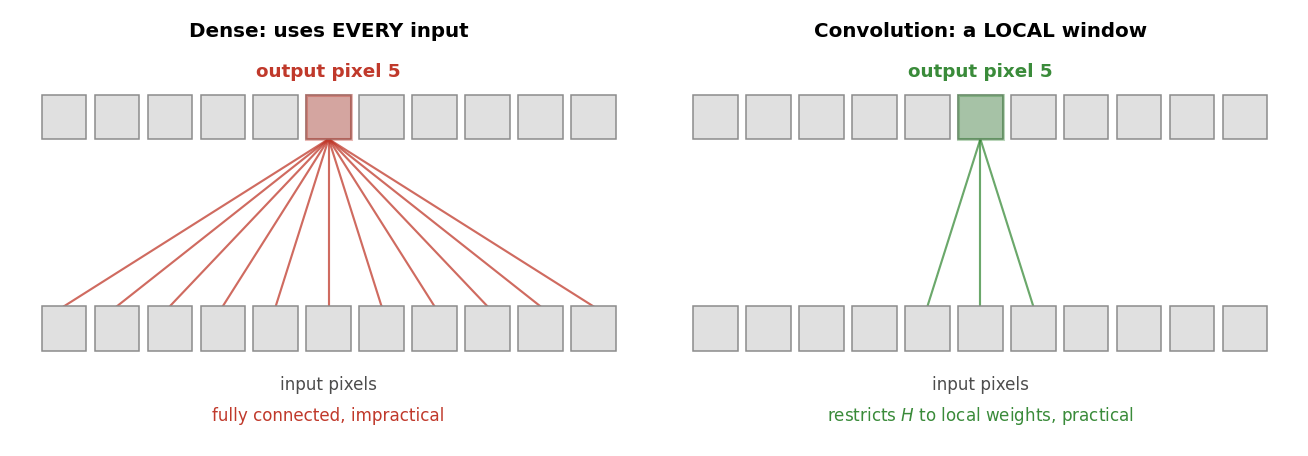
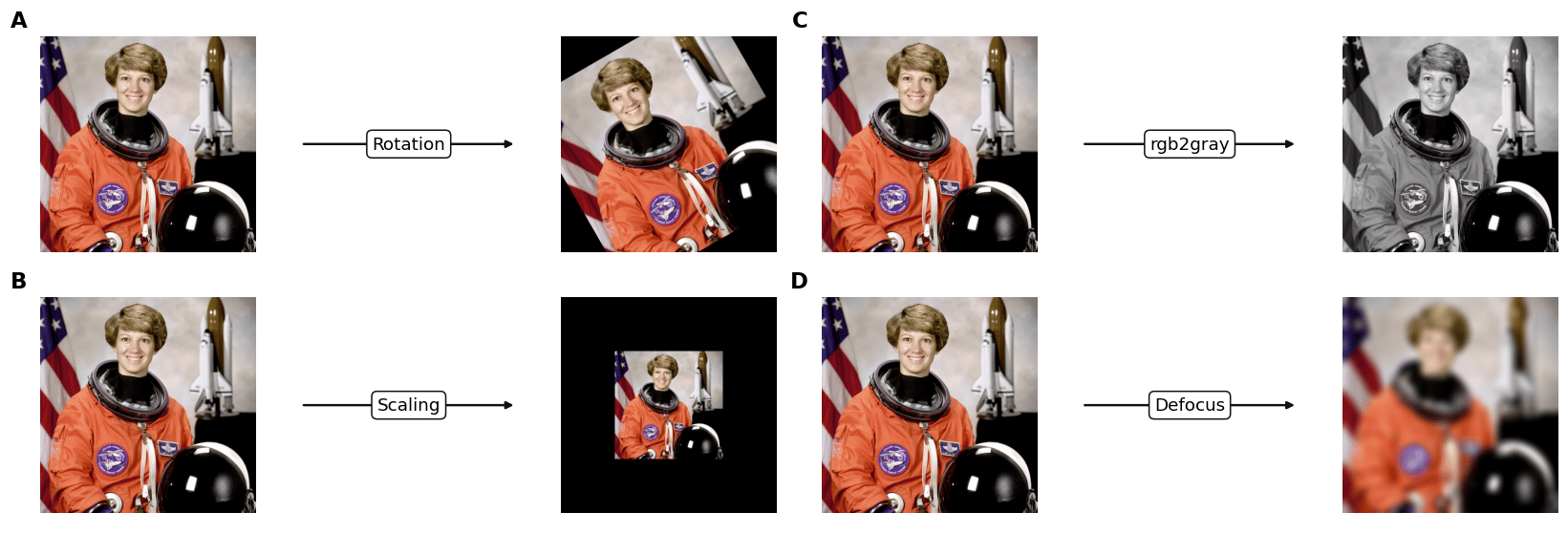 **Figure 15.4: dense vs. local connectivity.** A general linear filter is a matrix multiply $y = Hx$ in which every output pixel depends on every input pixel (a *fully-connected* layer). **Convolution restricts $H$ to local connections**: each output uses only a small window of nearby inputs, which is what makes filtering practical. *(Book Figure 15.4: computed here.)*
```python theme={null}
# Figure 15.4: the same linear system y = H·x, two ways. A DENSE operator lets output pixel 5
# depend on every input pixel (row 5 of H is all-nonzero). A CONVOLUTION restricts H to a local
# band, output 5 depends only on a small window, which is why convolution is practical.
N = 11
H_dense = torch.randn(N, N) # dense: row 5 touches all inputs
k = torch.tensor([0.25, 0.5, 0.25]) # 3-tap kernel
H_conv = torch.zeros(N, N) # convolution: banded (each row = shifted kernel)
for i in range(N):
for j, w in zip((i - 1, i, i + 1), k):
if 0 <= j < N: H_conv[i, j] = w
print(f"output pixel 5 depends on {int((H_dense[5] != 0).sum())} inputs (dense) "
f"vs {int((H_conv[5] != 0).sum())} inputs (convolution)")
```
```output theme={null}
output pixel 5 depends on 11 inputs (dense) vs 3 inputs (convolution)
```
**Figure 15.4: dense vs. local connectivity.** A general linear filter is a matrix multiply $y = Hx$ in which every output pixel depends on every input pixel (a *fully-connected* layer). **Convolution restricts $H$ to local connections**: each output uses only a small window of nearby inputs, which is what makes filtering practical. *(Book Figure 15.4: computed here.)*
```python theme={null}
# Figure 15.4: the same linear system y = H·x, two ways. A DENSE operator lets output pixel 5
# depend on every input pixel (row 5 of H is all-nonzero). A CONVOLUTION restricts H to a local
# band, output 5 depends only on a small window, which is why convolution is practical.
N = 11
H_dense = torch.randn(N, N) # dense: row 5 touches all inputs
k = torch.tensor([0.25, 0.5, 0.25]) # 3-tap kernel
H_conv = torch.zeros(N, N) # convolution: banded (each row = shifted kernel)
for i in range(N):
for j, w in zip((i - 1, i, i + 1), k):
if 0 <= j < N: H_conv[i, j] = w
print(f"output pixel 5 depends on {int((H_dense[5] != 0).sum())} inputs (dense) "
f"vs {int((H_conv[5] != 0).sum())} inputs (convolution)")
```
```output theme={null}
output pixel 5 depends on 11 inputs (dense) vs 3 inputs (convolution)
```
 ## Convolution
An LTI system applies one **impulse response** $h$ at every position: the output is the input **convolved** with $h$. Convolution flips the kernel and slides it; it is linear, translation-invariant, commutative and associative.
**Figure 15.5: translation invariance.** An object looks the same wherever it appears in the frame, so a useful filter must respond identically at every position: shifting the input just shifts the output, $f(\text{shift}(x)) = \text{shift}(f(x))$. The book shows this with a [photograph of birds](https://visionbook.mit.edu/linear_image_filtering.html#fig-translationInvar); here the same blur runs on a scikit-image photograph.
```python theme={null}
# Figure 15.5: translation invariance. An object looks the same wherever it is in the frame, so a
# useful filter must respond the same way at every position, shifting the input just shifts the
# output. Blur a photo, then blur a shifted copy; the second is the first shifted by the
# same amount, f(shift(x)) = shift(f(x)), verified below on the interior.
import torch.nn.functional as F
from skimage.data import coffee
# stand-in for a photograph of birds in flight in the book; original: https://visionbook.mit.edu/figures/linear_image_filtering/fredo_birds1.jpg
x = torch.as_tensor(coffee() / 255.0, dtype=torch.float32).permute(2, 0, 1)[None].to(DEVICE) # 400 x 600
shift = (0, 190) # (dy, dx) pixels
xs = torch.roll(x, shifts=shift, dims=(-2, -1))
blur = lambda im: kornia.filters.gaussian_blur2d(im, (21, 21), (6.0, 6.0), border_type="circular")
y, ys = blur(x), blur(xs)
resid = (ys - torch.roll(y, shift, (-2, -1)))[..., 12:-12, 12:-12].abs().max()
print(f"image {tuple(x.shape[-2:])}; shift {shift}px; interior |f(shift x) - shift f(x)| = {resid:.1e} (translation invariant)")
```
```output theme={null}
image (400, 600); shift (0, 190)px; interior |f(shift x) - shift f(x)| = 0.0e+00 (translation invariant)
```
## Convolution
An LTI system applies one **impulse response** $h$ at every position: the output is the input **convolved** with $h$. Convolution flips the kernel and slides it; it is linear, translation-invariant, commutative and associative.
**Figure 15.5: translation invariance.** An object looks the same wherever it appears in the frame, so a useful filter must respond identically at every position: shifting the input just shifts the output, $f(\text{shift}(x)) = \text{shift}(f(x))$. The book shows this with a [photograph of birds](https://visionbook.mit.edu/linear_image_filtering.html#fig-translationInvar); here the same blur runs on a scikit-image photograph.
```python theme={null}
# Figure 15.5: translation invariance. An object looks the same wherever it is in the frame, so a
# useful filter must respond the same way at every position, shifting the input just shifts the
# output. Blur a photo, then blur a shifted copy; the second is the first shifted by the
# same amount, f(shift(x)) = shift(f(x)), verified below on the interior.
import torch.nn.functional as F
from skimage.data import coffee
# stand-in for a photograph of birds in flight in the book; original: https://visionbook.mit.edu/figures/linear_image_filtering/fredo_birds1.jpg
x = torch.as_tensor(coffee() / 255.0, dtype=torch.float32).permute(2, 0, 1)[None].to(DEVICE) # 400 x 600
shift = (0, 190) # (dy, dx) pixels
xs = torch.roll(x, shifts=shift, dims=(-2, -1))
blur = lambda im: kornia.filters.gaussian_blur2d(im, (21, 21), (6.0, 6.0), border_type="circular")
y, ys = blur(x), blur(xs)
resid = (ys - torch.roll(y, shift, (-2, -1)))[..., 12:-12, 12:-12].abs().max()
print(f"image {tuple(x.shape[-2:])}; shift {shift}px; interior |f(shift x) - shift f(x)| = {resid:.1e} (translation invariant)")
```
```output theme={null}
image (400, 600); shift (0, 190)px; interior |f(shift x) - shift f(x)| = 0.0e+00 (translation invariant)
```
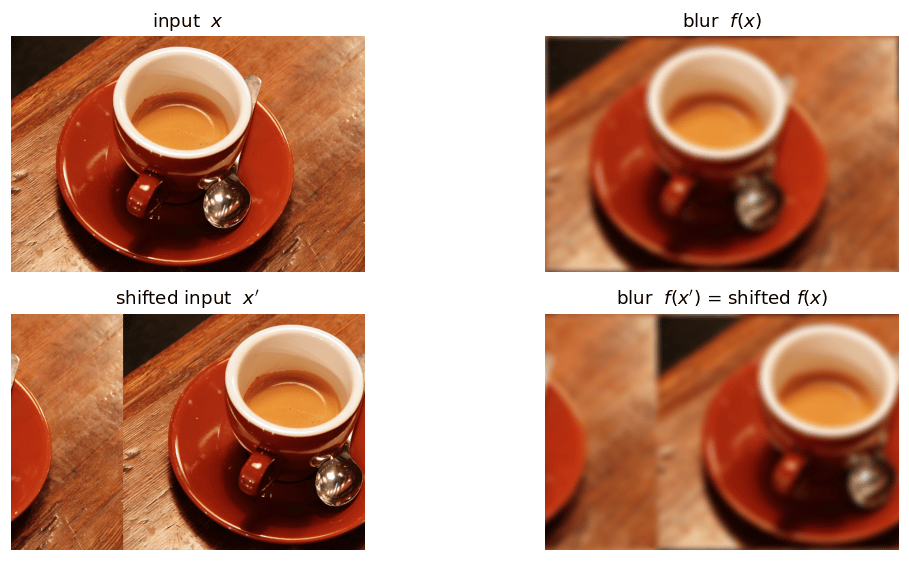 **Figure 15.6: convolution is weight sharing.** Where 15.4's dense operator wires each output to *every* input, a convolution wires each output to a small local window using the **same kernel weights at every position**. That one shared, shifted kernel is exactly what a banded Toeplitz matrix encodes, and it is what makes the filter translation-invariant. *(Book Figure 15.6: computed here.)*
```python theme={null}
# Figure 15.6: a convolution is a linear system whose operator H shares ONE small kernel across
# every output: row k uses the same weights h = [h[-1], h[0], h[1]] as every other row, just shifted.
# That weight sharing, the same kernel everywhere, is what makes convolution translation-invariant.
N = 11
h = torch.tensor([0.25, 0.5, 0.25]) # the shared 3-tap kernel: h[-1], h[0], h[1]
H = torch.zeros(N, N)
for i in range(N): # each output row = the same kernel, shifted
for j, w in zip((i - 1, i, i + 1), h):
if 0 <= j < N: H[i, j] = w
print(f"one shared kernel {h.tolist()} -> {int((H != 0).sum())} nonzeros in {N}x{N} H (a narrow band)")
```
```output theme={null}
one shared kernel [0.25, 0.5, 0.25] -> 31 nonzeros in 11x11 H (a narrow band)
```
**Figure 15.6: convolution is weight sharing.** Where 15.4's dense operator wires each output to *every* input, a convolution wires each output to a small local window using the **same kernel weights at every position**. That one shared, shifted kernel is exactly what a banded Toeplitz matrix encodes, and it is what makes the filter translation-invariant. *(Book Figure 15.6: computed here.)*
```python theme={null}
# Figure 15.6: a convolution is a linear system whose operator H shares ONE small kernel across
# every output: row k uses the same weights h = [h[-1], h[0], h[1]] as every other row, just shifted.
# That weight sharing, the same kernel everywhere, is what makes convolution translation-invariant.
N = 11
h = torch.tensor([0.25, 0.5, 0.25]) # the shared 3-tap kernel: h[-1], h[0], h[1]
H = torch.zeros(N, N)
for i in range(N): # each output row = the same kernel, shifted
for j, w in zip((i - 1, i, i + 1), h):
if 0 <= j < N: H[i, j] = w
print(f"one shared kernel {h.tolist()} -> {int((H != 0).sum())} nonzeros in {N}x{N} H (a narrow band)")
```
```output theme={null}
one shared kernel [0.25, 0.5, 0.25] -> 31 nonzeros in 11x11 H (a narrow band)
```
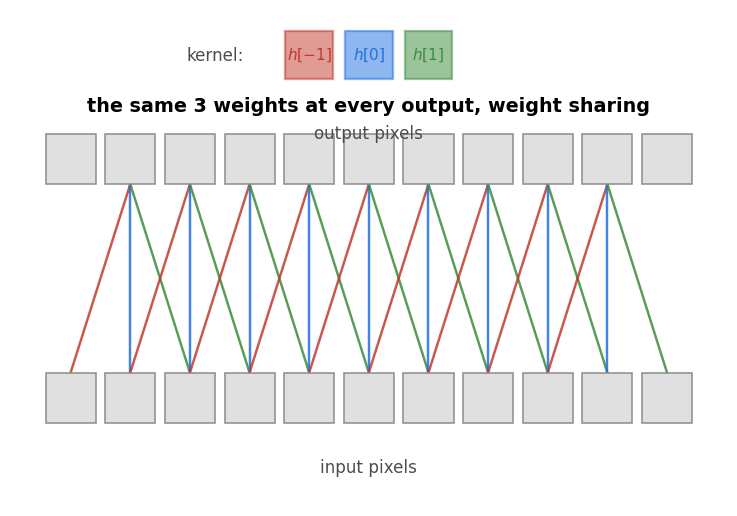 **Figure 15.7: 2-D convolution of a 9×9 image with a 3×3 kernel, step by step.**
> *Book Figure 15.7: computed here.*
```python theme={null}
# Figure 15.7: 2-D convolution, step by step. The input ℓ_in is a 9×9 binary disc indexed by
# (n, m); the kernel h is a 3×3 edge filter centered at the origin (n, m ∈ {−1,0,1}). Convolution
# FLIPS the kernel (h[−n,−m]) and slides it: each output pixel is the sum of the flipped kernel
# times the overlapping input patch. Flat regions of the input give exactly 0 in the output.
import torch.nn.functional as F
mm, nn = torch.meshgrid(torch.arange(9.0), torch.arange(9.0), indexing="ij")
Lin = ((nn - 4) ** 2 + (mm - 4) ** 2 <= 2.6 ** 2).float() # 9×9 disc of ones
h = torch.tensor([[1.0, 0.0, -1.0], [1.0, 0.0, -1.0], [1.0, 0.0, -1.0]]) # vertical-edge kernel (book: 1 at n=-1, -1 at n=1)
h_flip = torch.flip(h, dims=(0, 1)) # h[−n,−m]
Lout = F.conv2d(Lin[None, None], h_flip[None, None], padding=1)[0, 0] # ℓ_out = ℓ_in * h
print(f"ℓ_in disc: {int(Lin.sum())} ones; ℓ_out range [{Lout.min():.0f}, {Lout.max():.0f}]; zeros: {int((Lout==0).sum())}")
```
```output theme={null}
ℓ_in disc: 21 ones; ℓ_out range [-3, 3]; zeros: 45
```
**Figure 15.7: 2-D convolution of a 9×9 image with a 3×3 kernel, step by step.**
> *Book Figure 15.7: computed here.*
```python theme={null}
# Figure 15.7: 2-D convolution, step by step. The input ℓ_in is a 9×9 binary disc indexed by
# (n, m); the kernel h is a 3×3 edge filter centered at the origin (n, m ∈ {−1,0,1}). Convolution
# FLIPS the kernel (h[−n,−m]) and slides it: each output pixel is the sum of the flipped kernel
# times the overlapping input patch. Flat regions of the input give exactly 0 in the output.
import torch.nn.functional as F
mm, nn = torch.meshgrid(torch.arange(9.0), torch.arange(9.0), indexing="ij")
Lin = ((nn - 4) ** 2 + (mm - 4) ** 2 <= 2.6 ** 2).float() # 9×9 disc of ones
h = torch.tensor([[1.0, 0.0, -1.0], [1.0, 0.0, -1.0], [1.0, 0.0, -1.0]]) # vertical-edge kernel (book: 1 at n=-1, -1 at n=1)
h_flip = torch.flip(h, dims=(0, 1)) # h[−n,−m]
Lout = F.conv2d(Lin[None, None], h_flip[None, None], padding=1)[0, 0] # ℓ_out = ℓ_in * h
print(f"ℓ_in disc: {int(Lin.sum())} ones; ℓ_out range [{Lout.min():.0f}, {Lout.max():.0f}]; zeros: {int((Lout==0).sum())}")
```
```output theme={null}
ℓ_in disc: 21 ones; ℓ_out range [-3, 3]; zeros: 45
```
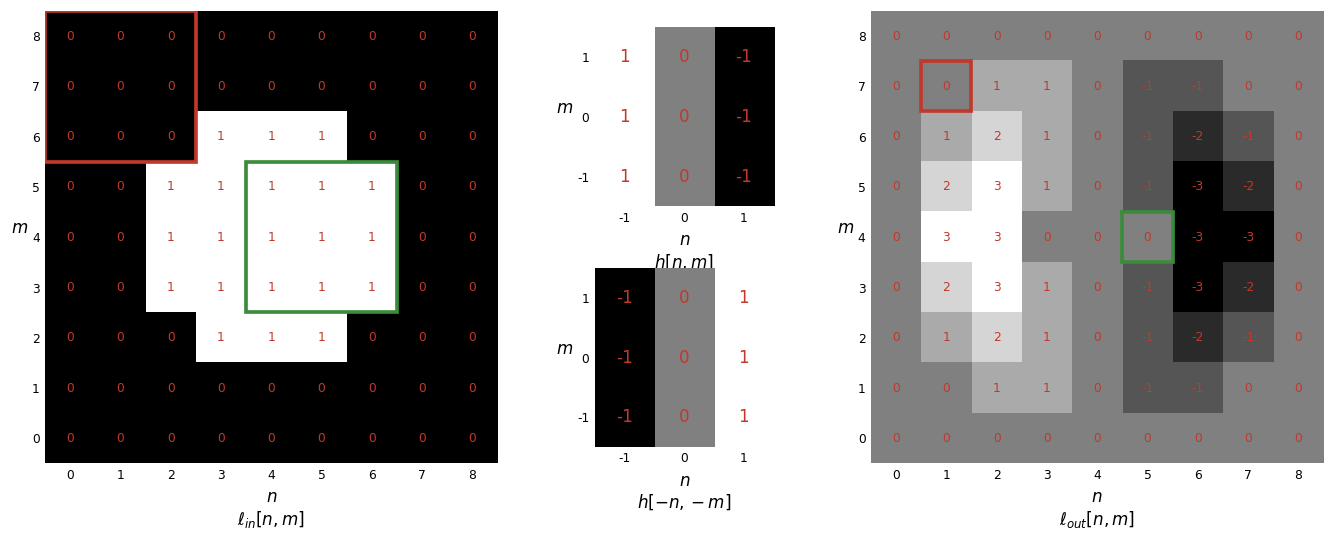 **Figure 15.8: defocus is a convolution; rotation is not.**
> *Book Figure 15.8: applied with Kornia.*
```python theme={null}
# Figure 15.8: is the transform a convolution? Defocus applies the SAME blur kernel at every
# position (translation-invariant → a convolution). Rotation sends a patch to a position that
# depends on where it started (not translation-invariant → not a convolution). We mark two patches
# and track where they land: unchanged locations under defocus, rotated locations under rotation.
import math
from skimage.data import astronaut
img = torch.as_tensor(astronaut() / 255.0, dtype=torch.float32).permute(2, 0, 1)[None].to(DEVICE)
blur = kornia.filters.gaussian_blur2d(img, (41, 41), (12.0, 12.0))
angle = 35.0
rot = kornia.geometry.transform.rotate(img, torch.tensor([angle], device=DEVICE))
H, W = img.shape[-2:]; cx, cy = (W - 1) / 2, (H - 1) / 2; th = math.radians(angle)
patches = [(150, 160), (360, 330)] # (row, col) patch centers on the input
rot_patches = [(math.sin(th) * (c - cx) + math.cos(th) * (r - cy) + cy, # where each patch lands after rotation
math.cos(th) * (c - cx) - math.sin(th) * (r - cy) + cx) for r, c in patches]
print(f"image {H}x{W}; defocus keeps patch locations; rotation moves them by {angle}°")
```
```output theme={null}
image 512x512; defocus keeps patch locations; rotation moves them by 35.0°
```
**Figure 15.8: defocus is a convolution; rotation is not.**
> *Book Figure 15.8: applied with Kornia.*
```python theme={null}
# Figure 15.8: is the transform a convolution? Defocus applies the SAME blur kernel at every
# position (translation-invariant → a convolution). Rotation sends a patch to a position that
# depends on where it started (not translation-invariant → not a convolution). We mark two patches
# and track where they land: unchanged locations under defocus, rotated locations under rotation.
import math
from skimage.data import astronaut
img = torch.as_tensor(astronaut() / 255.0, dtype=torch.float32).permute(2, 0, 1)[None].to(DEVICE)
blur = kornia.filters.gaussian_blur2d(img, (41, 41), (12.0, 12.0))
angle = 35.0
rot = kornia.geometry.transform.rotate(img, torch.tensor([angle], device=DEVICE))
H, W = img.shape[-2:]; cx, cy = (W - 1) / 2, (H - 1) / 2; th = math.radians(angle)
patches = [(150, 160), (360, 330)] # (row, col) patch centers on the input
rot_patches = [(math.sin(th) * (c - cx) + math.cos(th) * (r - cy) + cy, # where each patch lands after rotation
math.cos(th) * (c - cx) - math.sin(th) * (r - cy) + cx) for r, c in patches]
print(f"image {H}x{W}; defocus keeps patch locations; rotation moves them by {angle}°")
```
```output theme={null}
image 512x512; defocus keeps patch locations; rotation moves them by 35.0°
```
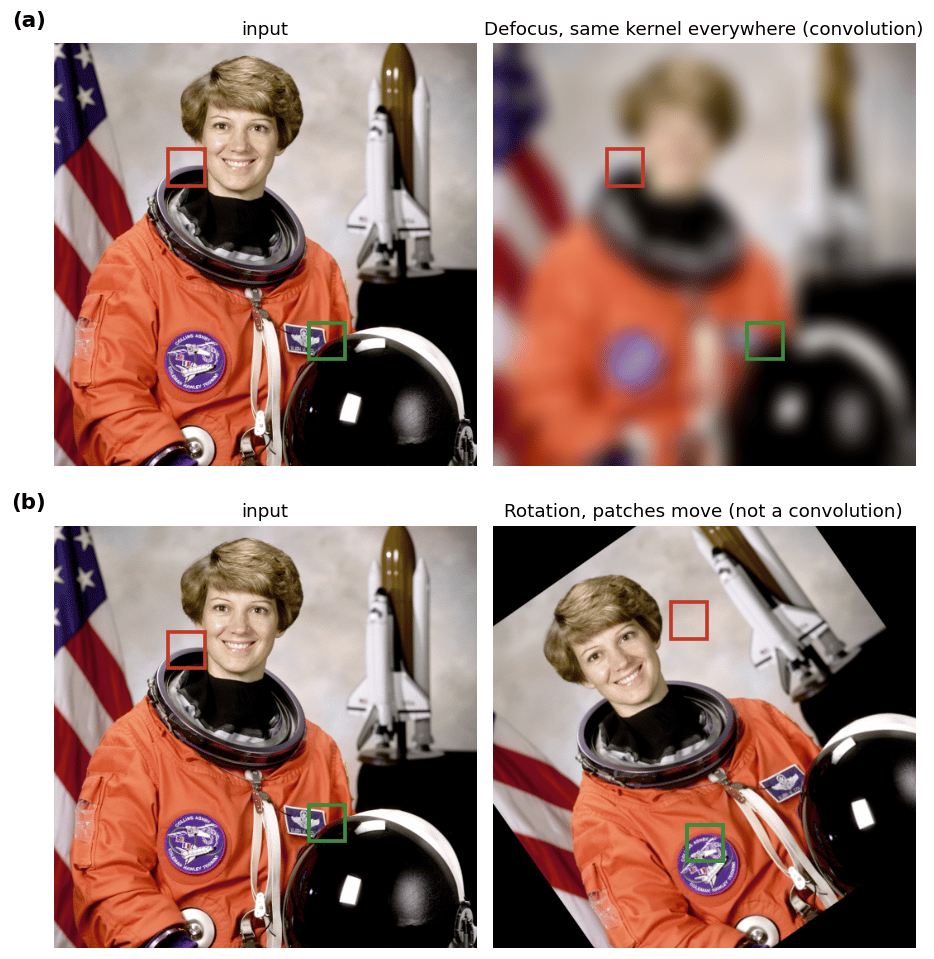 **Figure 15.9: four convolutions: identity, shift, superposition, averaging.**
> *Book Figure 15.9: applied with Kornia.*
```python theme={null}
# Figure 15.9: four convolutions of one image, each set by a 5×5 kernel whose values are shown.
# A single 1 at the center is the identity; an off-center 1 shifts the image; two 0.5's superpose
# the image with a shifted copy; a flat 1/25 box averages a neighborhood (blur). (A small image is
# used so the small kernel's shift is visible.)
import torch.nn.functional as F
from skimage.data import astronaut
img = torch.as_tensor(astronaut() / 255.0, dtype=torch.float32).permute(2, 0, 1)[None].to(DEVICE)
img = F.interpolate(img, size=(96, 96), mode="area")
K = torch.zeros(4, 5, 5)
K[0, 2, 2] = 1.0 # identity
K[1, 2, 4] = 1.0 # shift (one step right, per the book)
K[2, 0, 0] = 0.5; K[2, 4, 4] = 0.5 # superposition (two opposite corners, per the book)
K[3] = torch.ones(5, 5) / 25.0 # 5×5 box average
outs = [kornia.filters.filter2d(img, k[None].to(DEVICE), border_type="replicate") for k in K]
print("kernels: identity, shift, superposition, 1/25 box, values shown on each 5x5 grid")
```
```output theme={null}
kernels: identity, shift, superposition, 1/25 box, values shown on each 5x5 grid
```
**Figure 15.9: four convolutions: identity, shift, superposition, averaging.**
> *Book Figure 15.9: applied with Kornia.*
```python theme={null}
# Figure 15.9: four convolutions of one image, each set by a 5×5 kernel whose values are shown.
# A single 1 at the center is the identity; an off-center 1 shifts the image; two 0.5's superpose
# the image with a shifted copy; a flat 1/25 box averages a neighborhood (blur). (A small image is
# used so the small kernel's shift is visible.)
import torch.nn.functional as F
from skimage.data import astronaut
img = torch.as_tensor(astronaut() / 255.0, dtype=torch.float32).permute(2, 0, 1)[None].to(DEVICE)
img = F.interpolate(img, size=(96, 96), mode="area")
K = torch.zeros(4, 5, 5)
K[0, 2, 2] = 1.0 # identity
K[1, 2, 4] = 1.0 # shift (one step right, per the book)
K[2, 0, 0] = 0.5; K[2, 4, 4] = 0.5 # superposition (two opposite corners, per the book)
K[3] = torch.ones(5, 5) / 25.0 # 5×5 box average
outs = [kornia.filters.filter2d(img, k[None].to(DEVICE), border_type="replicate") for k in K]
print("kernels: identity, shift, superposition, 1/25 box, values shown on each 5x5 grid")
```
```output theme={null}
kernels: identity, shift, superposition, 1/25 box, values shown on each 5x5 grid
```
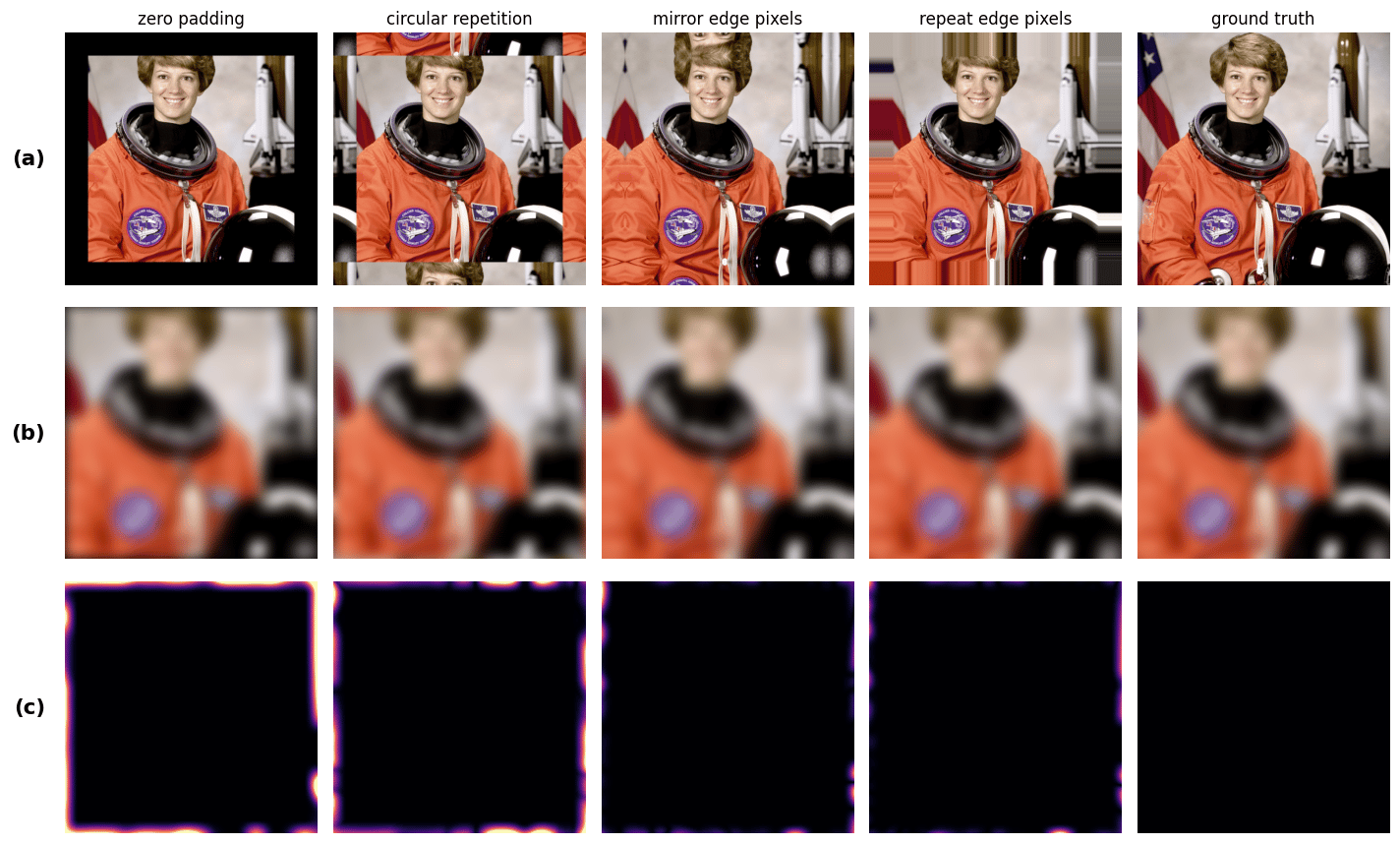
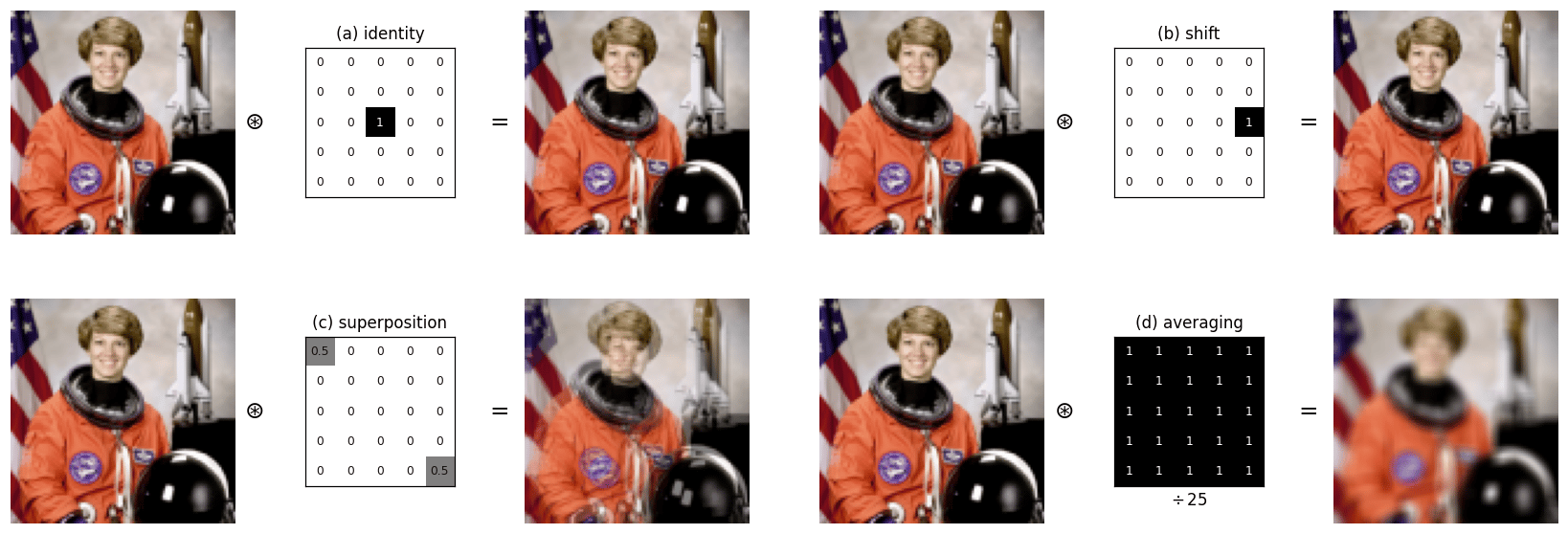 **Figure 15.10: handling boundaries: zero, circular, mirror and replicate padding.**
> *Book Figure 15.10: applied with Kornia.*
```python theme={null}
# Figure 15.10: a kernel needs pixels beyond the image edge. Four ways to invent them, zero,
# circular wrap, mirror, and edge-replicate padding, give different results near the border.
# Crop an inner window (so the true surround is known), blur it under each padding, and compare to
# the ground-truth blur that uses the real neighboring pixels.
import torch.nn.functional as F
from skimage.data import astronaut
# stand-in for a photograph of a zebra in the book; original: https://visionbook.mit.edu/linear_image_filtering.html#fig-boundaries
big = torch.as_tensor(astronaut() / 255.0, dtype=torch.float32).permute(2, 0, 1)[None].to(DEVICE) # 512 x 512
a, b, pad, ks, sig = 60, 452, 44, 41, 10.0 # inner window, pad width, blur kernel/sigma
inner = big[..., a:b, a:b]
gt = kornia.filters.gaussian_blur2d(big, (ks, ks), (sig, sig))[..., a:b, a:b] # blur using REAL neighbors
modes = [("zero padding", "constant"), ("circular repetition", "circular"),
("mirror edge pixels", "reflect"), ("repeat edge pixels", "replicate")]
padded = [F.pad(inner, (pad,) * 4, mode=("constant" if m == "constant" else m)) for _, m in modes]
blurred = [kornia.filters.gaussian_blur2d(inner, (ks, ks), (sig, sig), border_type=m) for _, m in modes]
errs = [(o - gt).abs().mean(1, keepdim=True) for o in blurred]
print(f"inner {inner.shape[-1]}px; boundary error (mean abs) per mode: " +
", ".join(f"{n.split()[0]}={e.mean():.3f}" for (n, _), e in zip(modes, errs)))
```
```output theme={null}
inner 392px; boundary error (mean abs) per mode: zero=0.016, circular=0.011, mirror=0.003, repeat=0.002
```
**Figure 15.10: handling boundaries: zero, circular, mirror and replicate padding.**
> *Book Figure 15.10: applied with Kornia.*
```python theme={null}
# Figure 15.10: a kernel needs pixels beyond the image edge. Four ways to invent them, zero,
# circular wrap, mirror, and edge-replicate padding, give different results near the border.
# Crop an inner window (so the true surround is known), blur it under each padding, and compare to
# the ground-truth blur that uses the real neighboring pixels.
import torch.nn.functional as F
from skimage.data import astronaut
# stand-in for a photograph of a zebra in the book; original: https://visionbook.mit.edu/linear_image_filtering.html#fig-boundaries
big = torch.as_tensor(astronaut() / 255.0, dtype=torch.float32).permute(2, 0, 1)[None].to(DEVICE) # 512 x 512
a, b, pad, ks, sig = 60, 452, 44, 41, 10.0 # inner window, pad width, blur kernel/sigma
inner = big[..., a:b, a:b]
gt = kornia.filters.gaussian_blur2d(big, (ks, ks), (sig, sig))[..., a:b, a:b] # blur using REAL neighbors
modes = [("zero padding", "constant"), ("circular repetition", "circular"),
("mirror edge pixels", "reflect"), ("repeat edge pixels", "replicate")]
padded = [F.pad(inner, (pad,) * 4, mode=("constant" if m == "constant" else m)) for _, m in modes]
blurred = [kornia.filters.gaussian_blur2d(inner, (ks, ks), (sig, sig), border_type=m) for _, m in modes]
errs = [(o - gt).abs().mean(1, keepdim=True) for o in blurred]
print(f"inner {inner.shape[-1]}px; boundary error (mean abs) per mode: " +
", ".join(f"{n.split()[0]}={e.mean():.3f}" for (n, _), e in zip(modes, errs)))
```
```output theme={null}
inner 392px; boundary error (mean abs) per mode: zero=0.016, circular=0.011, mirror=0.003, repeat=0.002
```
 ## Cross-correlation versus convolution
Cross-correlation is convolution **without** flipping the kernel. For template matching you slide a template over the image and measure similarity; **normalized** cross-correlation removes the effect of local brightness.
**Figure 15.11: cross-correlation vs. convolution (kernel orientation).**
> *Book Figure 15.11: computed here.*
```python theme={null}
# Figure 15.11: cross-correlation is convolution WITHOUT flipping the kernel. With an asymmetric
# triangle kernel, convolving an impulse image reproduces the kernel upright, while correlating it
# reproduces the kernel flipped (pointing down). On real shapes, correlation is the matched filter:
# it peaks where the image looks like the (unflipped) kernel.
import torch.nn.functional as F
def triangle(S, up=True): # filled triangle, apex up or down
t = torch.zeros(S, S)
for i in range(S):
w = int((i if up else S - 1 - i) * 0.5)
t[i, S // 2 - w:S // 2 + w + 1] = 1.0
return t
K = triangle(15, up=True) # asymmetric kernel (top ≠ bottom)
impulses = torch.zeros(1, 1, 90, 90)
for (r, c, a) in [(20, 20, 1.0), (26, 62, 0.55), (58, 33, 0.8), (68, 70, 0.65)]: impulses[0, 0, r, c] = a
shapes = torch.zeros(1, 1, 90, 90) # a few up/down triangles in the scene
for (r, c, up) in [(14, 16, True), (18, 55, False), (52, 36, True)]:
shapes[0, 0, r:r + 15, c:c + 15] = triangle(15, up)
conv = lambda x: F.conv2d(x, torch.flip(K, (0, 1))[None, None], padding=7) # convolution flips the kernel
corr = lambda x: F.conv2d(x, K[None, None], padding=7) # cross-correlation does not
print(f"kernel 15×15 up-triangle; convolution keeps it upright, correlation flips it")
```
```output theme={null}
kernel 15×15 up-triangle; convolution keeps it upright, correlation flips it
```
## Cross-correlation versus convolution
Cross-correlation is convolution **without** flipping the kernel. For template matching you slide a template over the image and measure similarity; **normalized** cross-correlation removes the effect of local brightness.
**Figure 15.11: cross-correlation vs. convolution (kernel orientation).**
> *Book Figure 15.11: computed here.*
```python theme={null}
# Figure 15.11: cross-correlation is convolution WITHOUT flipping the kernel. With an asymmetric
# triangle kernel, convolving an impulse image reproduces the kernel upright, while correlating it
# reproduces the kernel flipped (pointing down). On real shapes, correlation is the matched filter:
# it peaks where the image looks like the (unflipped) kernel.
import torch.nn.functional as F
def triangle(S, up=True): # filled triangle, apex up or down
t = torch.zeros(S, S)
for i in range(S):
w = int((i if up else S - 1 - i) * 0.5)
t[i, S // 2 - w:S // 2 + w + 1] = 1.0
return t
K = triangle(15, up=True) # asymmetric kernel (top ≠ bottom)
impulses = torch.zeros(1, 1, 90, 90)
for (r, c, a) in [(20, 20, 1.0), (26, 62, 0.55), (58, 33, 0.8), (68, 70, 0.65)]: impulses[0, 0, r, c] = a
shapes = torch.zeros(1, 1, 90, 90) # a few up/down triangles in the scene
for (r, c, up) in [(14, 16, True), (18, 55, False), (52, 36, True)]:
shapes[0, 0, r:r + 15, c:c + 15] = triangle(15, up)
conv = lambda x: F.conv2d(x, torch.flip(K, (0, 1))[None, None], padding=7) # convolution flips the kernel
corr = lambda x: F.conv2d(x, K[None, None], padding=7) # cross-correlation does not
print(f"kernel 15×15 up-triangle; convolution keeps it upright, correlation flips it")
```
```output theme={null}
kernel 15×15 up-triangle; convolution keeps it upright, correlation flips it
```
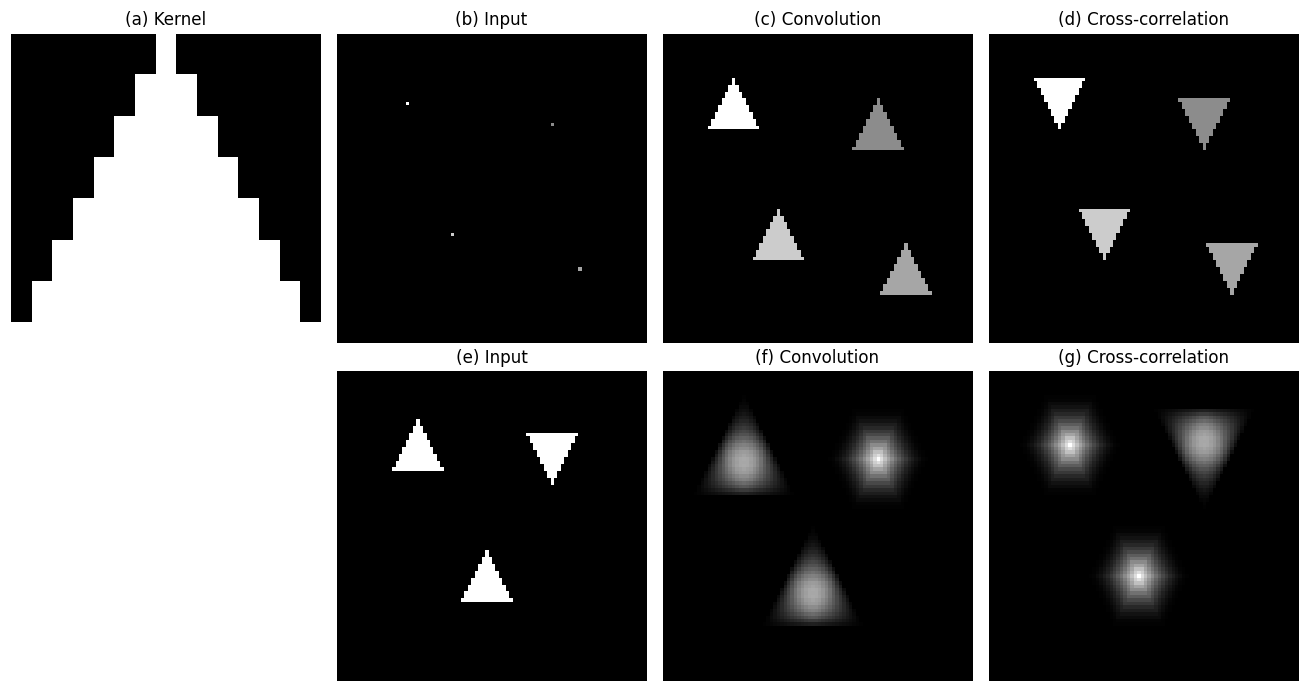 **Figure 15.12: template matching for the letter “a” via normalized cross-correlation.**
> *Book Figure 15.12: computed here.*
```python theme={null}
# Figure 15.12: template matching. We slide a template of the letter "a" over a page of text and
# score the match. Raw cross-correlation is fooled by brightness, a shading gradient makes bright
# regions score high regardless of content. NORMALIZED cross-correlation subtracts the local mean
# and divides by the local contrast, so it responds to the letter's SHAPE and finds every "a".
import torch.nn.functional as F
from PIL import Image, ImageDraw, ImageFont
import matplotlib.font_manager as fm
font = ImageFont.truetype(fm.findfont("DejaVu Sans Mono"), 22)
def render(text, size, xy=(6, 4)):
im = Image.new("L", size, 255); ImageDraw.Draw(im).multiline_text(xy, text, fill=0, font=font, spacing=10)
return 1.0 - torch.frombuffer(bytearray(im.tobytes()), dtype=torch.uint8).reshape(size[1], size[0]).float() / 255.0
page = render("a fast cat sat\non a flat mat and\nate a salad again\nas a happy animal", (280, 150))
grad = torch.linspace(1.0, 0.25, page.shape[1])[None, :] # left-bright -> right-dark shading
img = (page * grad)[None, None] # the shaded text image
a = render("a", (18, 26)); ys, xs = torch.where(a > 0.4); templ = a[ys.min():ys.max()+1, xs.min():xs.max()+1][None, None]
th, tw = templ.shape[-2:]; N = th * tw
t0 = templ - templ.mean() # zero-mean template
ones = torch.ones(1, 1, th, tw)
num = F.conv2d(img, t0, padding=(th // 2, tw // 2))
ex, ex2 = F.conv2d(img, ones, padding=(th // 2, tw // 2)) / N, F.conv2d(img ** 2, ones, padding=(th // 2, tw // 2)) / N
raw = F.conv2d(img, templ, padding=(th // 2, tw // 2)) # raw cross-correlation
ncc = num / ((ex2 - ex ** 2).clamp(min=2e-3).sqrt() * (N ** 0.5) * t0.norm() + 1e-6) # normalized xcorr
peaks = (ncc == F.max_pool2d(ncc, 9, 1, 4)) & (ncc > 0.70) # local maxima above threshold
py, px = torch.where(peaks[0, 0])
print(f"template {th}x{tw}; NCC peaks (detected 'a's): {len(py)}")
```
```output theme={null}
template 12x10; NCC peaks (detected 'a's): 19
```
**Figure 15.12: template matching for the letter “a” via normalized cross-correlation.**
> *Book Figure 15.12: computed here.*
```python theme={null}
# Figure 15.12: template matching. We slide a template of the letter "a" over a page of text and
# score the match. Raw cross-correlation is fooled by brightness, a shading gradient makes bright
# regions score high regardless of content. NORMALIZED cross-correlation subtracts the local mean
# and divides by the local contrast, so it responds to the letter's SHAPE and finds every "a".
import torch.nn.functional as F
from PIL import Image, ImageDraw, ImageFont
import matplotlib.font_manager as fm
font = ImageFont.truetype(fm.findfont("DejaVu Sans Mono"), 22)
def render(text, size, xy=(6, 4)):
im = Image.new("L", size, 255); ImageDraw.Draw(im).multiline_text(xy, text, fill=0, font=font, spacing=10)
return 1.0 - torch.frombuffer(bytearray(im.tobytes()), dtype=torch.uint8).reshape(size[1], size[0]).float() / 255.0
page = render("a fast cat sat\non a flat mat and\nate a salad again\nas a happy animal", (280, 150))
grad = torch.linspace(1.0, 0.25, page.shape[1])[None, :] # left-bright -> right-dark shading
img = (page * grad)[None, None] # the shaded text image
a = render("a", (18, 26)); ys, xs = torch.where(a > 0.4); templ = a[ys.min():ys.max()+1, xs.min():xs.max()+1][None, None]
th, tw = templ.shape[-2:]; N = th * tw
t0 = templ - templ.mean() # zero-mean template
ones = torch.ones(1, 1, th, tw)
num = F.conv2d(img, t0, padding=(th // 2, tw // 2))
ex, ex2 = F.conv2d(img, ones, padding=(th // 2, tw // 2)) / N, F.conv2d(img ** 2, ones, padding=(th // 2, tw // 2)) / N
raw = F.conv2d(img, templ, padding=(th // 2, tw // 2)) # raw cross-correlation
ncc = num / ((ex2 - ex ** 2).clamp(min=2e-3).sqrt() * (N ** 0.5) * t0.norm() + 1e-6) # normalized xcorr
peaks = (ncc == F.max_pool2d(ncc, 9, 1, 4)) & (ncc > 0.70) # local maxima above threshold
py, px = torch.where(peaks[0, 0])
print(f"template {th}x{tw}; NCC peaks (detected 'a's): {len(py)}")
```
```output theme={null}
template 12x10; NCC peaks (detected 'a's): 19
```
 ## System identification
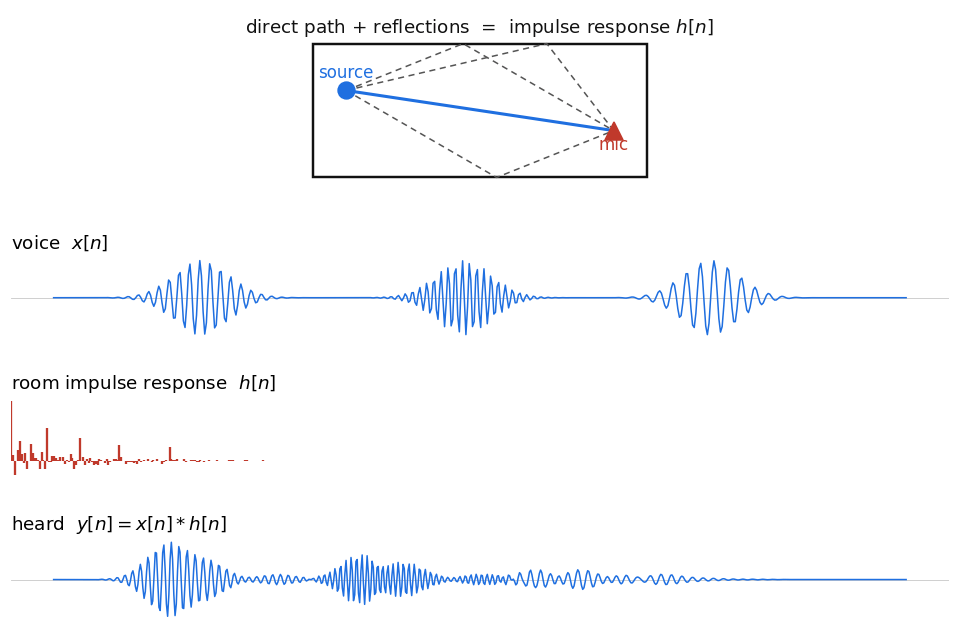
An LTI system is identified by its impulse response: feed in an impulse $\delta[n]$ and read out $h[n]$. A room's acoustics are an LTI system: a clap measures its impulse response, and any sound is that sound convolved with $h$.
**Figure 15.13: an LTI system is fully described by its impulse response $h[n]$.**
> *Book Figure 15.13: drawn as a schematic.*
## System identification
An LTI system is identified by its impulse response: feed in an impulse $\delta[n]$ and read out $h[n]$. A room's acoustics are an LTI system: a clap measures its impulse response, and any sound is that sound convolved with $h$.
**Figure 15.13: an LTI system is fully described by its impulse response $h[n]$.**
> *Book Figure 15.13: drawn as a schematic.*
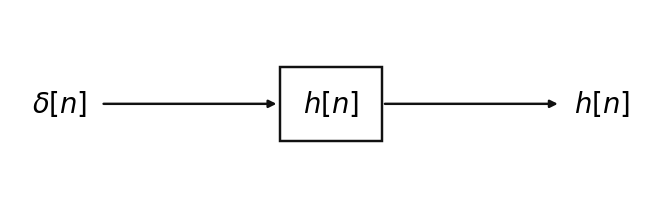 **Figure 15.14: room acoustics.** Sound reaches a microphone along many paths, a direct one and many reflections. The book shows this with a [sketch of a room](https://visionbook.mit.edu/linear_image_filtering.html#fig-impulse_response_room_a).
**Figure 15.15: measuring a room's impulse response.** A short, loud sound such as a clap is close to an impulse, so what the microphone records is the room's impulse response. The book shows the [measurement setup](https://visionbook.mit.edu/linear_image_filtering.html#fig-impulse_response_room_a2).
**Figure 15.16: a voice signal convolved with a room impulse response.**
> *Book Figure 15.16: computed here.*
```python theme={null}
# Figure 15.16: a room is an LTI system: the sound you hear is the source convolved with the
# room's impulse response h (direct arrival + a few reflections + a decaying reverberant tail).
# We build a toy voice signal, a room h, and their convolution y = x * h, the reverberant signal.
import torch.nn.functional as F
n = torch.arange(520).float()
x = sum(torch.exp(-((n - c) / 24) ** 2) * torch.sin(2 * torch.pi * f * n) for c, f in [(90, 0.16), (250, 0.23), (400, 0.12)])
L = 170 # room impulse response
h = torch.zeros(L); h[0] = 1.0
for d, a in [(20, 0.6), (38, 0.45), (60, 0.32), (88, 0.24)]: h[d] = a # early reflections
h = h + torch.randn(L) * torch.exp(-torch.arange(L) / 42.0) * 0.14; h[0] = 1.0 # decaying reverberant tail
y = F.conv1d(x[None, None], h.flip(0)[None, None], padding=L - 1)[0, 0] # y = x * h (full convolution)
print(f"voice {len(x)} samples, room h {L} taps -> reverberant y {len(y)} samples")
```
```output theme={null}
voice 520 samples, room h 170 taps -> reverberant y 689 samples
```
**Figure 15.14: room acoustics.** Sound reaches a microphone along many paths, a direct one and many reflections. The book shows this with a [sketch of a room](https://visionbook.mit.edu/linear_image_filtering.html#fig-impulse_response_room_a).
**Figure 15.15: measuring a room's impulse response.** A short, loud sound such as a clap is close to an impulse, so what the microphone records is the room's impulse response. The book shows the [measurement setup](https://visionbook.mit.edu/linear_image_filtering.html#fig-impulse_response_room_a2).
**Figure 15.16: a voice signal convolved with a room impulse response.**
> *Book Figure 15.16: computed here.*
```python theme={null}
# Figure 15.16: a room is an LTI system: the sound you hear is the source convolved with the
# room's impulse response h (direct arrival + a few reflections + a decaying reverberant tail).
# We build a toy voice signal, a room h, and their convolution y = x * h, the reverberant signal.
import torch.nn.functional as F
n = torch.arange(520).float()
x = sum(torch.exp(-((n - c) / 24) ** 2) * torch.sin(2 * torch.pi * f * n) for c, f in [(90, 0.16), (250, 0.23), (400, 0.12)])
L = 170 # room impulse response
h = torch.zeros(L); h[0] = 1.0
for d, a in [(20, 0.6), (38, 0.45), (60, 0.32), (88, 0.24)]: h[d] = a # early reflections
h = h + torch.randn(L) * torch.exp(-torch.arange(L) / 42.0) * 0.14; h[0] = 1.0 # decaying reverberant tail
y = F.conv1d(x[None, None], h.flip(0)[None, None], padding=L - 1)[0, 0] # y = x * h (full convolution)
print(f"voice {len(x)} samples, room h {L} taps -> reverberant y {len(y)} samples")
```
```output theme={null}
voice 520 samples, room h 170 taps -> reverberant y 689 samples
```
 ## Concluding remarks
Every operation in this section is one idea in different forms. A **linear translation-invariant** system is a matrix multiply whose matrix is banded and Toeplitz (Figures 15.4 and 15.6). Equivalently, it is a **convolution** with a single kernel, the impulse response, applied at every position (Figures 15.6 to 15.9). Blurring, shifting, averaging, edge detection, and template matching are all just different kernels. **Cross-correlation** is the same computation without the flip (Figure 15.11), and with local normalization it becomes a robust template detector (Figure 15.12). Because an LTI system is fully described by its impulse response, you can *identify* it by measuring that response, whether the system is a lens, a filter, or a room (Figures 15.13 to 15.16).
***
[Edit this page on GitHub](https://github.com/aegean-ai/eaia/edit/main/src/aiml-common/lectures/image-processing/linear-filtering/index.mdx) or [file an issue](https://github.com/aegean-ai/eaia/issues/new/choose).
## Concluding remarks
Every operation in this section is one idea in different forms. A **linear translation-invariant** system is a matrix multiply whose matrix is banded and Toeplitz (Figures 15.4 and 15.6). Equivalently, it is a **convolution** with a single kernel, the impulse response, applied at every position (Figures 15.6 to 15.9). Blurring, shifting, averaging, edge detection, and template matching are all just different kernels. **Cross-correlation** is the same computation without the flip (Figure 15.11), and with local normalization it becomes a robust template detector (Figure 15.12). Because an LTI system is fully described by its impulse response, you can *identify* it by measuring that response, whether the system is a lens, a filter, or a room (Figures 15.13 to 15.16).
***
[Edit this page on GitHub](https://github.com/aegean-ai/eaia/edit/main/src/aiml-common/lectures/image-processing/linear-filtering/index.mdx) or [file an issue](https://github.com/aegean-ai/eaia/issues/new/choose).