> ## Documentation Index
> Fetch the complete documentation index at: https://aegean.ai/llms.txt
> Use this file to discover all available pages before exploring further.
# Synthesizing Textures
> Textures as statistics: synthesis by cropping, by Heeger-Bergen histogram matching, and by Efros-Leung neighborhood copying.
 *This section was written by [Kaushik Kachireddy](https://github.com/kaushik0x7d2) ([pull request #80](https://github.com/pantelis/eng-ai-agents/pull/80)), with help from an AI coding agent (Claude Code) on the code. It reproduces the ideas of Chapter 28 of [*Foundations of Computer Vision*](https://visionbook.mit.edu/textures.html) by Antonio Torralba, Phillip Isola, and William T. Freeman. The book's own figures are not reproduced here, because the book's license covers only the work in full; links point to them instead.*
A **texture** is an image made of many similar elements: what matters is the *statistics* of the elements, not their individual identity. This section builds the book's tools: generating an "infinite" texture by cropping, **Heeger-Bergen** synthesis by matching histograms of a multiscale decomposition, and **Efros-Leung** synthesis by copying pixels from matching neighborhoods.
The book demonstrates these on its own photographs of plums, a zebra, pebbles, and a stone wall. Here the same methods run on scikit-image test images (a stained-tissue image with blob-like cells, bricks, and gravel) and on a generated pattern of circles, and each figure links to the book's version.
```python theme={null}
import numpy as np
import matplotlib.pyplot as plt
from skimage import data, img_as_float
from scipy.ndimage import gaussian_filter
from skimage.transform import resize
np.random.seed(0)
plt.rcParams.update({'figure.dpi': 130, 'savefig.dpi': 130,
'image.cmap': 'gray', 'image.interpolation': 'nearest', 'axes.grid': False})
```
**Images replaced for licensing.** The book is published under a CC BY-NC-ND license, which covers only the book as a whole and not its individual images, so this page does not republish the book's photographs. License-free images stand in for them:
* The *immunohistochemistry* image (scikit-image) stands in for [a photograph of plums (Figures 28.1, 28.9, and 28.12)](https://visionbook.mit.edu/textures.html#fig-infinite_texture).
* The *brick* texture (scikit-image) stands in for [a photograph of a zebra (Figure 28.9)](https://visionbook.mit.edu/textures.html#fig-two_examples).
* The *gravel* texture (scikit-image) stands in for [a photograph of pebbles (Figure 28.12)](https://visionbook.mit.edu/textures.html#fig-efrosresult).
* The *gravel* texture (scikit-image) stands in for [a photograph of a stone wall (Figures 28.6 and 28.8)](https://visionbook.mit.edu/textures.html#fig-heeger_bergen_iterations).
* A generated grid of circles stands in for [an image of circles (Figure 28.11)](https://visionbook.mit.edu/figures/statistical_image_models/efros1a.jpg).
If you use the book for non-commercial purposes, you can swap the originals back in: each line that loads a stand-in carries the original's link in a comment.
```python theme={null}
def rgb(im):
"""float RGB in [0, 1] from a scikit-image array (grayscale is repeated over 3 channels)."""
im = img_as_float(im).astype(np.float32)
return np.repeat(im[..., None], 3, -1) if im.ndim == 2 else im[..., :3]
def circles(h=112, w=144, r=5, step=16, seed=0):
"""A regular grid of disks with small jitter: a texture whose layout matters."""
g = np.random.default_rng(seed); yy, xx = np.mgrid[0:h, 0:w]; out = np.zeros((h, w), np.float32)
for cy in range(step // 2, h, step):
for cx in range(step // 2, w, step):
dy, dx = g.integers(-1, 2, 2)
out[(yy - cy - dy) ** 2 + (xx - cx - dx) ** 2 <= r * r] = 1.0
return out
# stand-in for a photograph of plums in the book; original: https://visionbook.mit.edu/textures.html#fig-infinite_texture
PLUMS = rgb(data.immunohistochemistry()) # blob-like color texture (the book uses plums, 28.1, 28.9, 28.12)
# stand-in for a photograph of a zebra in the book; original: https://visionbook.mit.edu/textures.html#fig-two_examples
ZEBRA = rgb(data.brick()) # oriented structure (the book uses a zebra, 28.9)
# stand-in for a photograph of pebbles in the book; original: https://visionbook.mit.edu/textures.html#fig-efrosresult
PEBBLES = rgb(data.gravel()) # stony texture (the book uses pebbles, 28.12)
# stand-in for a photograph of a stone wall in the book; original: https://visionbook.mit.edu/textures.html#fig-heeger_bergen_iterations
STONE = rgb(data.gravel()) # the book's stone wall (28.6, 28.8)
# stand-in for an image of circles in the book; original: https://visionbook.mit.edu/figures/statistical_image_models/efros1a.jpg
CIRCLES = circles() # the book's circles (28.11)
print('tissue', PLUMS.shape, ' bricks', ZEBRA.shape, ' gravel', PEBBLES.shape, ' circles', CIRCLES.shape)
```
```output theme={null}
tissue (512, 512, 3) bricks (512, 512, 3) gravel (512, 512, 3) circles (112, 144)
```
## An 'infinite' texture by cropping
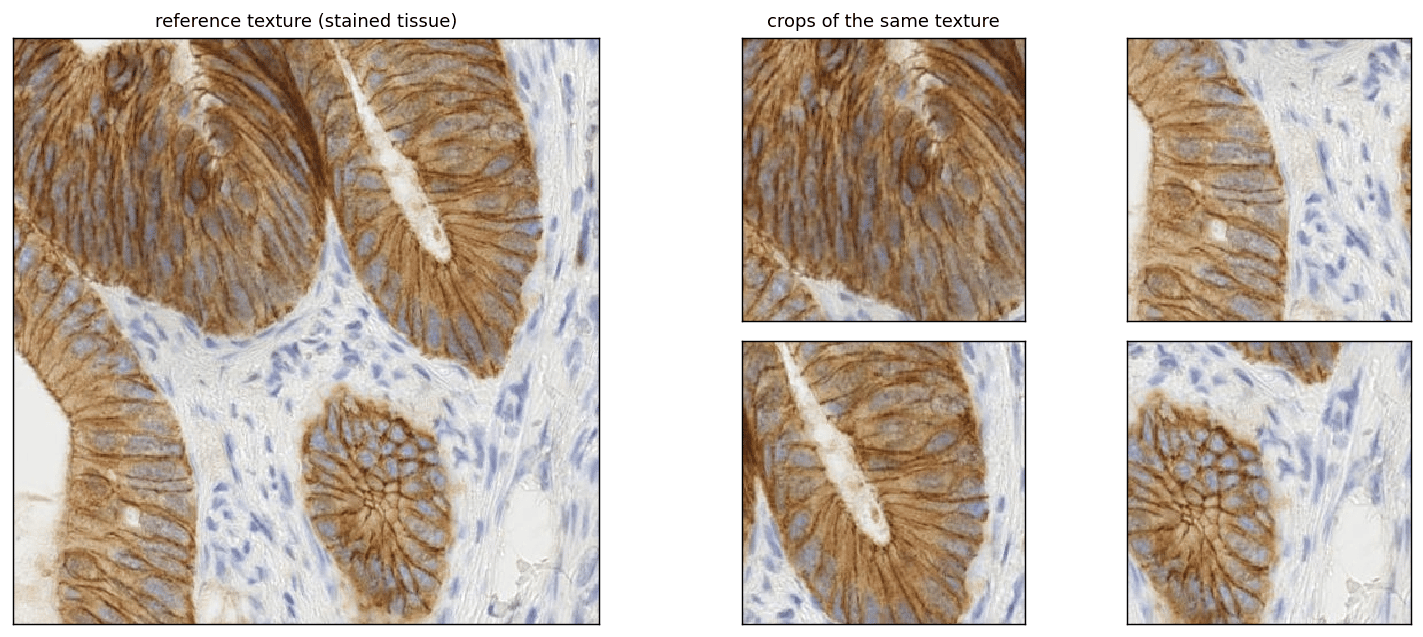
Because a texture is *stationary*, meaning its statistics are the same everywhere, you can generate endless new samples of it simply by **cropping different windows** from one large reference. Each crop looks like a different image of the same stuff. The book shows this on [a photograph of plums](https://visionbook.mit.edu/textures.html#fig-infinite_texture).
*This section was written by [Kaushik Kachireddy](https://github.com/kaushik0x7d2) ([pull request #80](https://github.com/pantelis/eng-ai-agents/pull/80)), with help from an AI coding agent (Claude Code) on the code. It reproduces the ideas of Chapter 28 of [*Foundations of Computer Vision*](https://visionbook.mit.edu/textures.html) by Antonio Torralba, Phillip Isola, and William T. Freeman. The book's own figures are not reproduced here, because the book's license covers only the work in full; links point to them instead.*
A **texture** is an image made of many similar elements: what matters is the *statistics* of the elements, not their individual identity. This section builds the book's tools: generating an "infinite" texture by cropping, **Heeger-Bergen** synthesis by matching histograms of a multiscale decomposition, and **Efros-Leung** synthesis by copying pixels from matching neighborhoods.
The book demonstrates these on its own photographs of plums, a zebra, pebbles, and a stone wall. Here the same methods run on scikit-image test images (a stained-tissue image with blob-like cells, bricks, and gravel) and on a generated pattern of circles, and each figure links to the book's version.
```python theme={null}
import numpy as np
import matplotlib.pyplot as plt
from skimage import data, img_as_float
from scipy.ndimage import gaussian_filter
from skimage.transform import resize
np.random.seed(0)
plt.rcParams.update({'figure.dpi': 130, 'savefig.dpi': 130,
'image.cmap': 'gray', 'image.interpolation': 'nearest', 'axes.grid': False})
```
**Images replaced for licensing.** The book is published under a CC BY-NC-ND license, which covers only the book as a whole and not its individual images, so this page does not republish the book's photographs. License-free images stand in for them:
* The *immunohistochemistry* image (scikit-image) stands in for [a photograph of plums (Figures 28.1, 28.9, and 28.12)](https://visionbook.mit.edu/textures.html#fig-infinite_texture).
* The *brick* texture (scikit-image) stands in for [a photograph of a zebra (Figure 28.9)](https://visionbook.mit.edu/textures.html#fig-two_examples).
* The *gravel* texture (scikit-image) stands in for [a photograph of pebbles (Figure 28.12)](https://visionbook.mit.edu/textures.html#fig-efrosresult).
* The *gravel* texture (scikit-image) stands in for [a photograph of a stone wall (Figures 28.6 and 28.8)](https://visionbook.mit.edu/textures.html#fig-heeger_bergen_iterations).
* A generated grid of circles stands in for [an image of circles (Figure 28.11)](https://visionbook.mit.edu/figures/statistical_image_models/efros1a.jpg).
If you use the book for non-commercial purposes, you can swap the originals back in: each line that loads a stand-in carries the original's link in a comment.
```python theme={null}
def rgb(im):
"""float RGB in [0, 1] from a scikit-image array (grayscale is repeated over 3 channels)."""
im = img_as_float(im).astype(np.float32)
return np.repeat(im[..., None], 3, -1) if im.ndim == 2 else im[..., :3]
def circles(h=112, w=144, r=5, step=16, seed=0):
"""A regular grid of disks with small jitter: a texture whose layout matters."""
g = np.random.default_rng(seed); yy, xx = np.mgrid[0:h, 0:w]; out = np.zeros((h, w), np.float32)
for cy in range(step // 2, h, step):
for cx in range(step // 2, w, step):
dy, dx = g.integers(-1, 2, 2)
out[(yy - cy - dy) ** 2 + (xx - cx - dx) ** 2 <= r * r] = 1.0
return out
# stand-in for a photograph of plums in the book; original: https://visionbook.mit.edu/textures.html#fig-infinite_texture
PLUMS = rgb(data.immunohistochemistry()) # blob-like color texture (the book uses plums, 28.1, 28.9, 28.12)
# stand-in for a photograph of a zebra in the book; original: https://visionbook.mit.edu/textures.html#fig-two_examples
ZEBRA = rgb(data.brick()) # oriented structure (the book uses a zebra, 28.9)
# stand-in for a photograph of pebbles in the book; original: https://visionbook.mit.edu/textures.html#fig-efrosresult
PEBBLES = rgb(data.gravel()) # stony texture (the book uses pebbles, 28.12)
# stand-in for a photograph of a stone wall in the book; original: https://visionbook.mit.edu/textures.html#fig-heeger_bergen_iterations
STONE = rgb(data.gravel()) # the book's stone wall (28.6, 28.8)
# stand-in for an image of circles in the book; original: https://visionbook.mit.edu/figures/statistical_image_models/efros1a.jpg
CIRCLES = circles() # the book's circles (28.11)
print('tissue', PLUMS.shape, ' bricks', ZEBRA.shape, ' gravel', PEBBLES.shape, ' circles', CIRCLES.shape)
```
```output theme={null}
tissue (512, 512, 3) bricks (512, 512, 3) gravel (512, 512, 3) circles (112, 144)
```
## An 'infinite' texture by cropping
Because a texture is *stationary*, meaning its statistics are the same everywhere, you can generate endless new samples of it simply by **cropping different windows** from one large reference. Each crop looks like a different image of the same stuff. The book shows this on [a photograph of plums](https://visionbook.mit.edu/textures.html#fig-infinite_texture).
 ## Texture = statistics: the Heeger-Bergen method
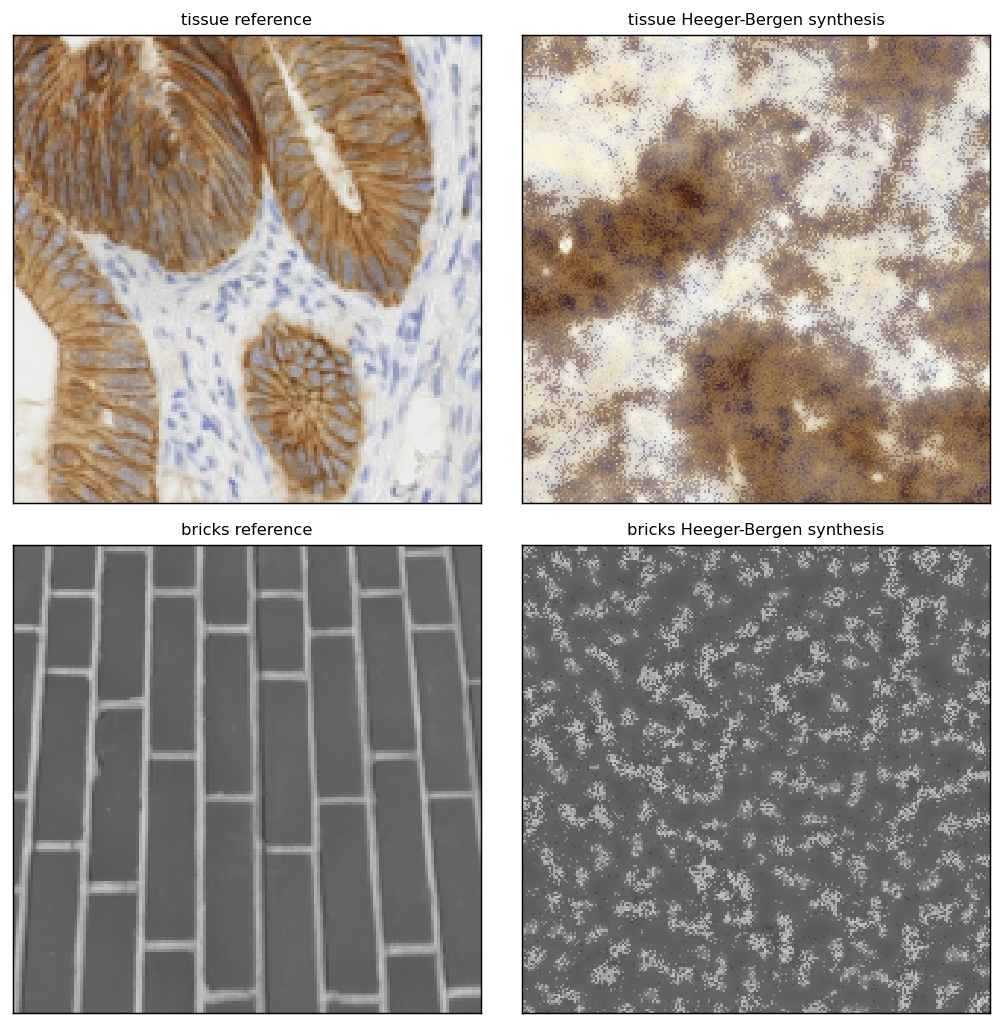
Heeger & Bergen model a texture by the **histograms** of a multi-scale, multi-orientation decomposition (a steerable pyramid) plus the pixel histogram. To *synthesize*, start from white noise and repeatedly force those histograms to match the reference. The code uses an isotropic **Laplacian pyramid** in place of the steerable pyramid, the same histogram-matching idea, and **decorrelate color with PCA** (as the book does), so the synthesis keeps the reference's colors instead of turning to rainbow noise.
```python theme={null}
def match_hist(src, ref):
"""Force src to have ref's histogram (exact, via sorted-value mapping)."""
s = src.ravel(); t = np.sort(ref.ravel())
order = np.argsort(np.argsort(s)) # rank of each src pixel
idx = np.floor(order * (len(t) - 1) / max(len(s) - 1, 1)).astype(int)
return t[idx].reshape(src.shape)
def lap_pyr(img, levels=4):
g = [img]
for _ in range(levels):
g.append(resize(gaussian_filter(g[-1], 2), (max(1, g[-1].shape[0] // 2),
max(1, g[-1].shape[1] // 2)), anti_aliasing=True))
lap = [g[i] - resize(g[i + 1], g[i].shape, anti_aliasing=True) for i in range(levels)]
lap.append(g[-1])
return lap
def reconstruct(lap):
img = lap[-1]
for i in range(len(lap) - 2, -1, -1):
img = resize(img, lap[i].shape, anti_aliasing=True) + lap[i]
return img
def heeger_bergen_gray(ref, out_shape, iters=10, levels=4, clip=True):
out = np.random.RandomState(0).rand(*out_shape) * (ref.max() - ref.min()) + ref.min()
ref_lap = lap_pyr(ref, levels)
for _ in range(iters):
out = match_hist(out, ref) # pixel histogram
out_lap = lap_pyr(out, levels)
out_lap = [match_hist(o, r) for o, r in zip(out_lap, ref_lap)] # subband histograms
out = reconstruct(out_lap)
out = match_hist(out, ref)
return np.clip(out, 0, 1) if clip else out
def heeger_bergen_color(ref_rgb, out_shape, iters=12, levels=4):
"""Color Heeger-Bergen: PCA-decorrelate the channels, synthesize each
(now-independent) component, rotate back. Avoids the rainbow noise you get
from synthesizing R,G,B separately.
"""
X = ref_rgb.reshape(-1, 3); mu = X.mean(0)
evals, evecs = np.linalg.eigh(np.cov((X - mu).T)) # evecs columns = color axes
ref_pca = ((X - mu) @ evecs).reshape(*ref_rgb.shape[:2], 3)
comps = [heeger_bergen_gray(ref_pca[..., c], out_shape, iters, levels, clip=False)
for c in range(3)]
out = np.stack(comps, -1).reshape(-1, 3) @ evecs.T + mu
return np.clip(out.reshape(*out_shape, 3), 0, 1)
# Figure 28.9: two Heeger-Bergen examples: a blob-like texture and an oriented one.
zebra_patch = ZEBRA[100:400, 100:400]
```
## Texture = statistics: the Heeger-Bergen method
Heeger & Bergen model a texture by the **histograms** of a multi-scale, multi-orientation decomposition (a steerable pyramid) plus the pixel histogram. To *synthesize*, start from white noise and repeatedly force those histograms to match the reference. The code uses an isotropic **Laplacian pyramid** in place of the steerable pyramid, the same histogram-matching idea, and **decorrelate color with PCA** (as the book does), so the synthesis keeps the reference's colors instead of turning to rainbow noise.
```python theme={null}
def match_hist(src, ref):
"""Force src to have ref's histogram (exact, via sorted-value mapping)."""
s = src.ravel(); t = np.sort(ref.ravel())
order = np.argsort(np.argsort(s)) # rank of each src pixel
idx = np.floor(order * (len(t) - 1) / max(len(s) - 1, 1)).astype(int)
return t[idx].reshape(src.shape)
def lap_pyr(img, levels=4):
g = [img]
for _ in range(levels):
g.append(resize(gaussian_filter(g[-1], 2), (max(1, g[-1].shape[0] // 2),
max(1, g[-1].shape[1] // 2)), anti_aliasing=True))
lap = [g[i] - resize(g[i + 1], g[i].shape, anti_aliasing=True) for i in range(levels)]
lap.append(g[-1])
return lap
def reconstruct(lap):
img = lap[-1]
for i in range(len(lap) - 2, -1, -1):
img = resize(img, lap[i].shape, anti_aliasing=True) + lap[i]
return img
def heeger_bergen_gray(ref, out_shape, iters=10, levels=4, clip=True):
out = np.random.RandomState(0).rand(*out_shape) * (ref.max() - ref.min()) + ref.min()
ref_lap = lap_pyr(ref, levels)
for _ in range(iters):
out = match_hist(out, ref) # pixel histogram
out_lap = lap_pyr(out, levels)
out_lap = [match_hist(o, r) for o, r in zip(out_lap, ref_lap)] # subband histograms
out = reconstruct(out_lap)
out = match_hist(out, ref)
return np.clip(out, 0, 1) if clip else out
def heeger_bergen_color(ref_rgb, out_shape, iters=12, levels=4):
"""Color Heeger-Bergen: PCA-decorrelate the channels, synthesize each
(now-independent) component, rotate back. Avoids the rainbow noise you get
from synthesizing R,G,B separately.
"""
X = ref_rgb.reshape(-1, 3); mu = X.mean(0)
evals, evecs = np.linalg.eigh(np.cov((X - mu).T)) # evecs columns = color axes
ref_pca = ((X - mu) @ evecs).reshape(*ref_rgb.shape[:2], 3)
comps = [heeger_bergen_gray(ref_pca[..., c], out_shape, iters, levels, clip=False)
for c in range(3)]
out = np.stack(comps, -1).reshape(-1, 3) @ evecs.T + mu
return np.clip(out.reshape(*out_shape, 3), 0, 1)
# Figure 28.9: two Heeger-Bergen examples: a blob-like texture and an oriented one.
zebra_patch = ZEBRA[100:400, 100:400]
```
 ```python theme={null}
# The blob-like texture synthesizes well; the bricks' oriented rows need an
# orientation-selective (steerable) pyramid, and this isotropic pyramid blurs them.
```
## Watching the synthesis converge
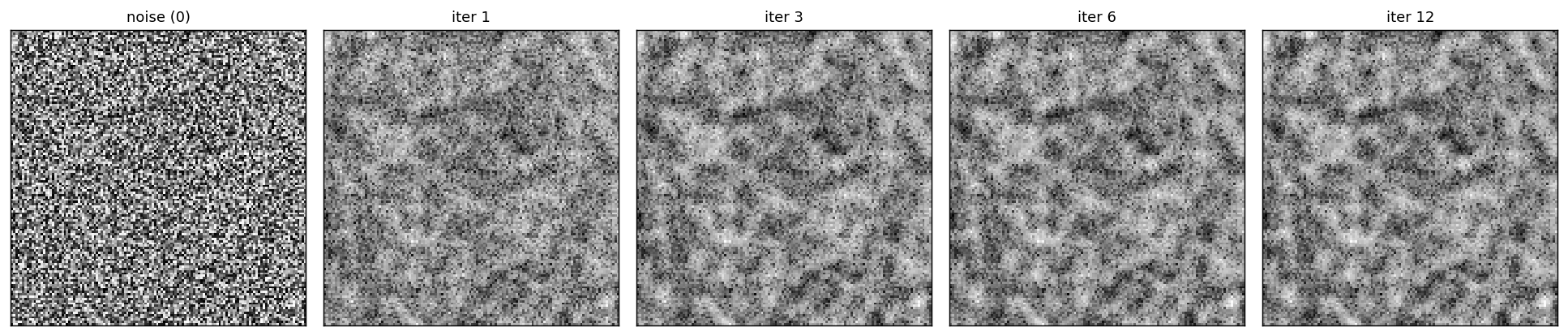
Starting from white noise, each round of histogram matching pushes the sample closer to the reference's statistics. After a handful of iterations the noise has become a convincing texture.
```python theme={null}
# Figure 28.6: white noise -> texture over Heeger-Bergen iterations.
g = resize(STONE[60:60 + 256, 100:100 + 256].mean(-1), (128, 128), anti_aliasing=True) # gravel
ref_lap = lap_pyr(g, 4)
out = np.random.rand(128, 128); snaps = [('noise (0)', out.copy())]
for it in range(1, 13):
out = match_hist(out, g)
out = reconstruct([match_hist(o, r) for o, r in zip(lap_pyr(out, 4), ref_lap)])
if it in (1, 3, 6, 12): snaps.append((f'iter {it}', np.clip(match_hist(out, g), 0, 1)))
```
```python theme={null}
# The blob-like texture synthesizes well; the bricks' oriented rows need an
# orientation-selective (steerable) pyramid, and this isotropic pyramid blurs them.
```
## Watching the synthesis converge
Starting from white noise, each round of histogram matching pushes the sample closer to the reference's statistics. After a handful of iterations the noise has become a convincing texture.
```python theme={null}
# Figure 28.6: white noise -> texture over Heeger-Bergen iterations.
g = resize(STONE[60:60 + 256, 100:100 + 256].mean(-1), (128, 128), anti_aliasing=True) # gravel
ref_lap = lap_pyr(g, 4)
out = np.random.rand(128, 128); snaps = [('noise (0)', out.copy())]
for it in range(1, 13):
out = match_hist(out, g)
out = reconstruct([match_hist(o, r) for o, r in zip(lap_pyr(out, 4), ref_lap)])
if it in (1, 3, 6, 12): snaps.append((f'iter {it}', np.clip(match_hist(out, g), 0, 1)))
```
 ## Histogram matching a single subband
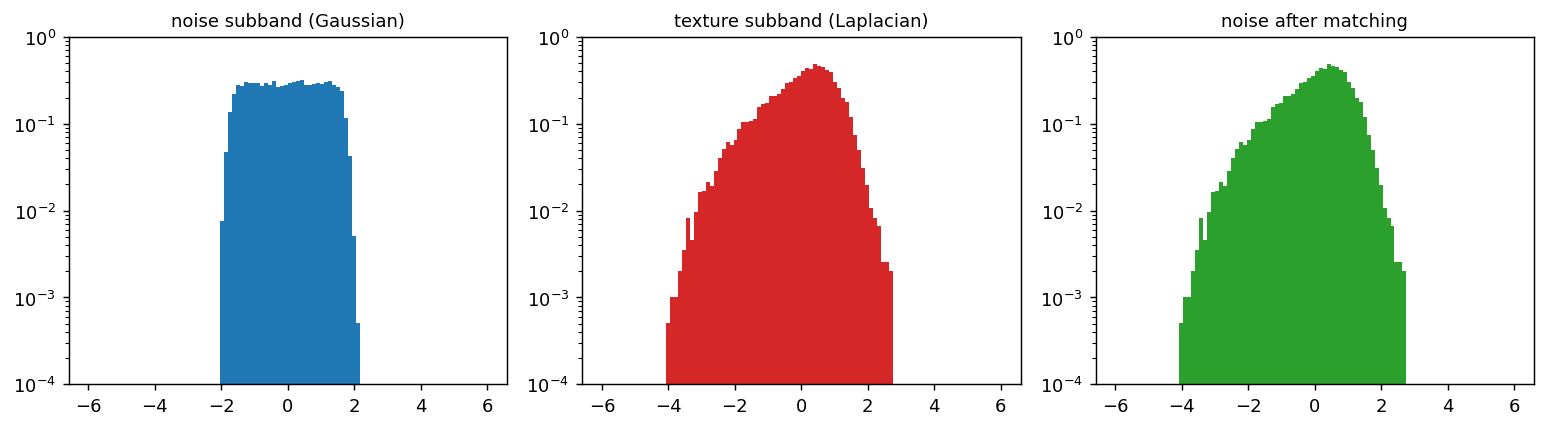
The core operation: a band-pass **subband of a texture** is heavy-tailed (Laplacian-like), while a subband of **white noise** is Gaussian. Histogram matching is a pointwise monotonic map that turns the Gaussian subband into the texture's heavy-tailed one.
```python theme={null}
# Figure 28.8: a noise subband (Gaussian) matched to a texture subband (Laplacian).
g = resize(STONE[60:60 + 256, 100:100 + 256].mean(-1), (128, 128), anti_aliasing=True)
tex_band = lap_pyr(g, 4)[0] # a band-pass texture subband
noise_band = lap_pyr(np.random.rand(128, 128), 4)[0]
matched = match_hist(noise_band, tex_band)
```
## Histogram matching a single subband
The core operation: a band-pass **subband of a texture** is heavy-tailed (Laplacian-like), while a subband of **white noise** is Gaussian. Histogram matching is a pointwise monotonic map that turns the Gaussian subband into the texture's heavy-tailed one.
```python theme={null}
# Figure 28.8: a noise subband (Gaussian) matched to a texture subband (Laplacian).
g = resize(STONE[60:60 + 256, 100:100 + 256].mean(-1), (128, 128), anti_aliasing=True)
tex_band = lap_pyr(g, 4)[0] # a band-pass texture subband
noise_band = lap_pyr(np.random.rand(128, 128), 4)[0]
matched = match_hist(noise_band, tex_band)
```
 ```python theme={null}
print('kurtosis noise: %.1f texture: %.1f matched: %.1f'
% tuple(float(((x - x.mean())**4).mean() / (x.var()**2)) for x in (noise_band, tex_band, matched)))
```
```output theme={null}
kurtosis noise: 1.8 texture: 3.3 matched: 3.3
```
## Efros-Leung: the context window controls everything
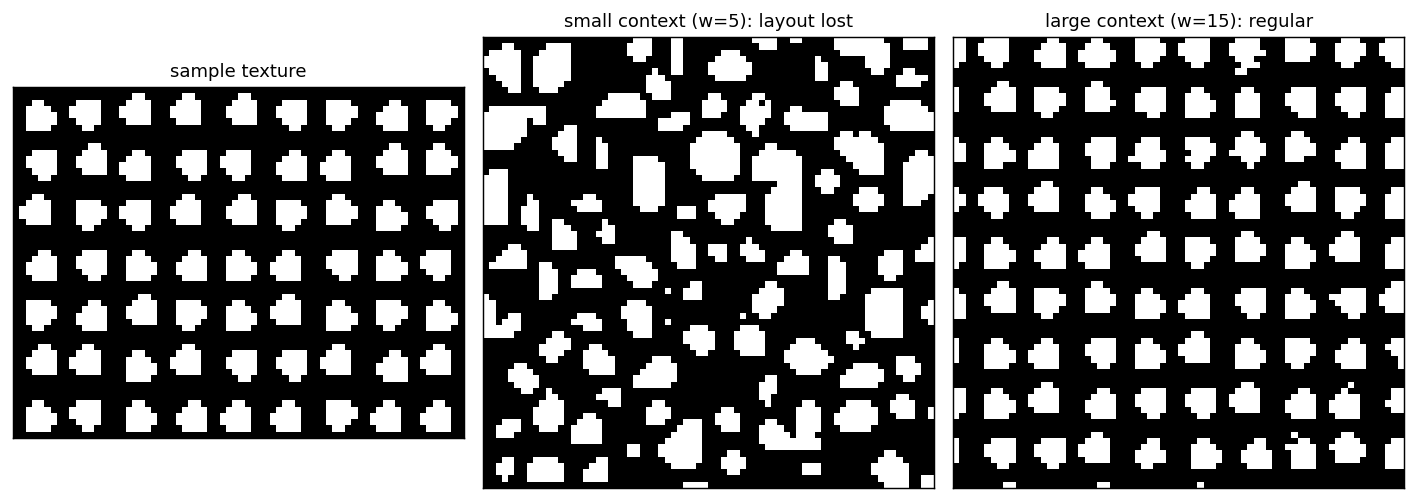
Efros & Leung grow a texture **one pixel at a time**: for each new pixel, search the sample for neighborhoods (an $w\times w$ window) similar to the already-synthesized context, and copy a matching center pixel. A **small** window reproduces local detail but loses the layout; a **large** window preserves the regular arrangement.
```python theme={null}
from numpy.lib.stride_tricks import sliding_window_view
from scipy.ndimage import binary_dilation, uniform_filter
def efros_leung(sample, out_size, w=11, seed=0):
"""Grow an out_size texture from a sample; works for gray (H,W) or color (H,W,3)."""
S = sample if sample.ndim == 3 else sample[..., None] # (Hs,Ws,C)
C = S.shape[2]; h = w // 2; rng = np.random.RandomState(seed)
P = sliding_window_view(S, (w, w), axis=(0, 1)) # (.,.,C,w,w)
P = P.transpose(0, 1, 3, 4, 2).reshape(-1, w, w, C) # (Np,w,w,C)
centers = P[:, h, h, :] # (Np,C)
out = np.full((out_size, out_size, C), np.nan)
fil = np.zeros((out_size, out_size), bool)
sy, sx = rng.randint(0, S.shape[0] - 3), rng.randint(0, S.shape[1] - 3)
c = out_size // 2 - 1
out[c:c + 3, c:c + 3] = S[sy:sy + 3, sx:sx + 3]; fil[c:c + 3, c:c + 3] = True
pad = np.pad(out, ((h, h), (h, h), (0, 0)), constant_values=0.0)
mpad = np.pad(fil, h, constant_values=False)
while not fil.all():
border = binary_dilation(fil) & ~fil
counts = uniform_filter(fil.astype(float), w, mode='constant')
ys, xs = np.where(border); order = np.argsort(-counts[ys, xs])
for k in order[:250]:
y, x = ys[k], xs[k]
win = np.nan_to_num(pad[y:y + w, x:x + w]) # (w,w,C)
mask = mpad[y:y + w, x:x + w].astype(float)[..., None]
if mask.sum() == 0: continue
ssd = (((P - win) ** 2) * mask).sum((1, 2, 3)) / (mask.sum() * C)
cand = np.where(ssd <= ssd.min() * 1.3 + 1e-6)[0]
val = centers[cand[rng.randint(len(cand))]]
out[y, x] = val; fil[y, x] = True; pad[y + h, x + h] = val; mpad[y + h, x + h] = True
return out[..., 0] if C == 1 else np.clip(out, 0, 1)
# Figure 28.11: same sample, small vs large context window (a generated pattern of circles).
samp = resize(CIRCLES, (56, 72), anti_aliasing=True)
samp = (samp > 0.5).astype(float) # clean binary circles
small = efros_leung(samp, 72, w=5)
large = efros_leung(samp, 72, w=15)
```
```python theme={null}
print('kurtosis noise: %.1f texture: %.1f matched: %.1f'
% tuple(float(((x - x.mean())**4).mean() / (x.var()**2)) for x in (noise_band, tex_band, matched)))
```
```output theme={null}
kurtosis noise: 1.8 texture: 3.3 matched: 3.3
```
## Efros-Leung: the context window controls everything
Efros & Leung grow a texture **one pixel at a time**: for each new pixel, search the sample for neighborhoods (an $w\times w$ window) similar to the already-synthesized context, and copy a matching center pixel. A **small** window reproduces local detail but loses the layout; a **large** window preserves the regular arrangement.
```python theme={null}
from numpy.lib.stride_tricks import sliding_window_view
from scipy.ndimage import binary_dilation, uniform_filter
def efros_leung(sample, out_size, w=11, seed=0):
"""Grow an out_size texture from a sample; works for gray (H,W) or color (H,W,3)."""
S = sample if sample.ndim == 3 else sample[..., None] # (Hs,Ws,C)
C = S.shape[2]; h = w // 2; rng = np.random.RandomState(seed)
P = sliding_window_view(S, (w, w), axis=(0, 1)) # (.,.,C,w,w)
P = P.transpose(0, 1, 3, 4, 2).reshape(-1, w, w, C) # (Np,w,w,C)
centers = P[:, h, h, :] # (Np,C)
out = np.full((out_size, out_size, C), np.nan)
fil = np.zeros((out_size, out_size), bool)
sy, sx = rng.randint(0, S.shape[0] - 3), rng.randint(0, S.shape[1] - 3)
c = out_size // 2 - 1
out[c:c + 3, c:c + 3] = S[sy:sy + 3, sx:sx + 3]; fil[c:c + 3, c:c + 3] = True
pad = np.pad(out, ((h, h), (h, h), (0, 0)), constant_values=0.0)
mpad = np.pad(fil, h, constant_values=False)
while not fil.all():
border = binary_dilation(fil) & ~fil
counts = uniform_filter(fil.astype(float), w, mode='constant')
ys, xs = np.where(border); order = np.argsort(-counts[ys, xs])
for k in order[:250]:
y, x = ys[k], xs[k]
win = np.nan_to_num(pad[y:y + w, x:x + w]) # (w,w,C)
mask = mpad[y:y + w, x:x + w].astype(float)[..., None]
if mask.sum() == 0: continue
ssd = (((P - win) ** 2) * mask).sum((1, 2, 3)) / (mask.sum() * C)
cand = np.where(ssd <= ssd.min() * 1.3 + 1e-6)[0]
val = centers[cand[rng.randint(len(cand))]]
out[y, x] = val; fil[y, x] = True; pad[y + h, x + h] = val; mpad[y + h, x + h] = True
return out[..., 0] if C == 1 else np.clip(out, 0, 1)
# Figure 28.11: same sample, small vs large context window (a generated pattern of circles).
samp = resize(CIRCLES, (56, 72), anti_aliasing=True)
samp = (samp > 0.5).astype(float) # clean binary circles
small = efros_leung(samp, 72, w=5)
large = efros_leung(samp, 72, w=15)
```
 ## Efros-Leung on a natural texture
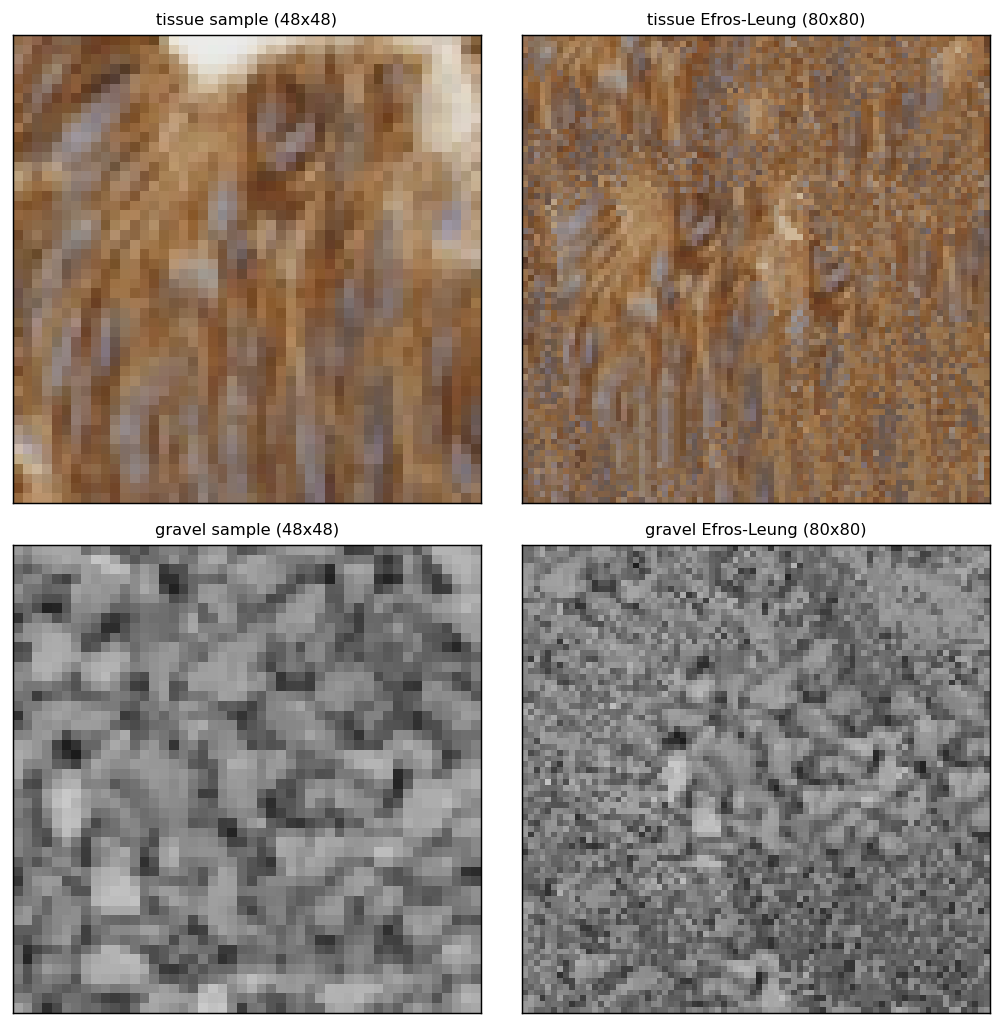
On a natural texture, a large enough context grows a larger image that **preserves the pebble structure**: coherent elements, not just matched statistics (contrast the Heeger-Bergen output above, which scrambles the arrangement).
```python theme={null}
# Figure 28.12: Efros-Leung on two natural textures (color).
```
## Efros-Leung on a natural texture
On a natural texture, a large enough context grows a larger image that **preserves the pebble structure**: coherent elements, not just matched statistics (contrast the Heeger-Bergen output above, which scrambles the arrangement).
```python theme={null}
# Figure 28.12: Efros-Leung on two natural textures (color).
```
 ## Concluding remarks
| Method | Idea | Strength / weakness |
| - | - | - |
| tiling | repeat a crop (mirror the seams) | trivial; globally periodic |
| Heeger-Bergen | match multi-scale + pixel **histograms** of noise | fast, parametric; scrambles global layout |
| Efros-Leung | copy pixels from matching **neighborhoods** | preserves structure; slow, can 'grow garbage' |
Texture is captured by **statistics of local elements**. Parametric (Heeger-Bergen) and nonparametric (Efros-Leung) synthesis trade speed against structural fidelity: the same tension that later reappears in learned (GAN / diffusion) texture and image models.
***
[Edit this page on GitHub](https://github.com/aegean-ai/eaia/edit/main/src/aiml-common/lectures/image-processing/textures/index.mdx) or [file an issue](https://github.com/aegean-ai/eaia/issues/new/choose).
## Concluding remarks
| Method | Idea | Strength / weakness |
| - | - | - |
| tiling | repeat a crop (mirror the seams) | trivial; globally periodic |
| Heeger-Bergen | match multi-scale + pixel **histograms** of noise | fast, parametric; scrambles global layout |
| Efros-Leung | copy pixels from matching **neighborhoods** | preserves structure; slow, can 'grow garbage' |
Texture is captured by **statistics of local elements**. Parametric (Heeger-Bergen) and nonparametric (Efros-Leung) synthesis trade speed against structural fidelity: the same tension that later reappears in learned (GAN / diffusion) texture and image models.
***
[Edit this page on GitHub](https://github.com/aegean-ai/eaia/edit/main/src/aiml-common/lectures/image-processing/textures/index.mdx) or [file an issue](https://github.com/aegean-ai/eaia/issues/new/choose).