

Repository: This project has its own public GitHub repo at github.com/aegean-ai/foreign-whispers. Clone it, file issues, and submit pull requests there.
What you are building
An open-source video dubbing pipeline that takes a YouTube video in English and produces a dubbed version in Spanish (or another target language), using only local GPU resources, no paid APIs. The full pipeline: Commercial dubbing services like ElevenLabs can take a video, transcribe it, translate it, clone the speaker’s voice, and return a dubbed video in the target language, watch their demo below:
You are going to build the same thing from open-source components. No API keys to a proprietary service. No per-minute billing. The entire pipeline runs on your own GPU server.
You will demonstrate your pipeline using the Foreign Whispers Dubbing Studio, a Next.js frontend at http://localhost:8501.
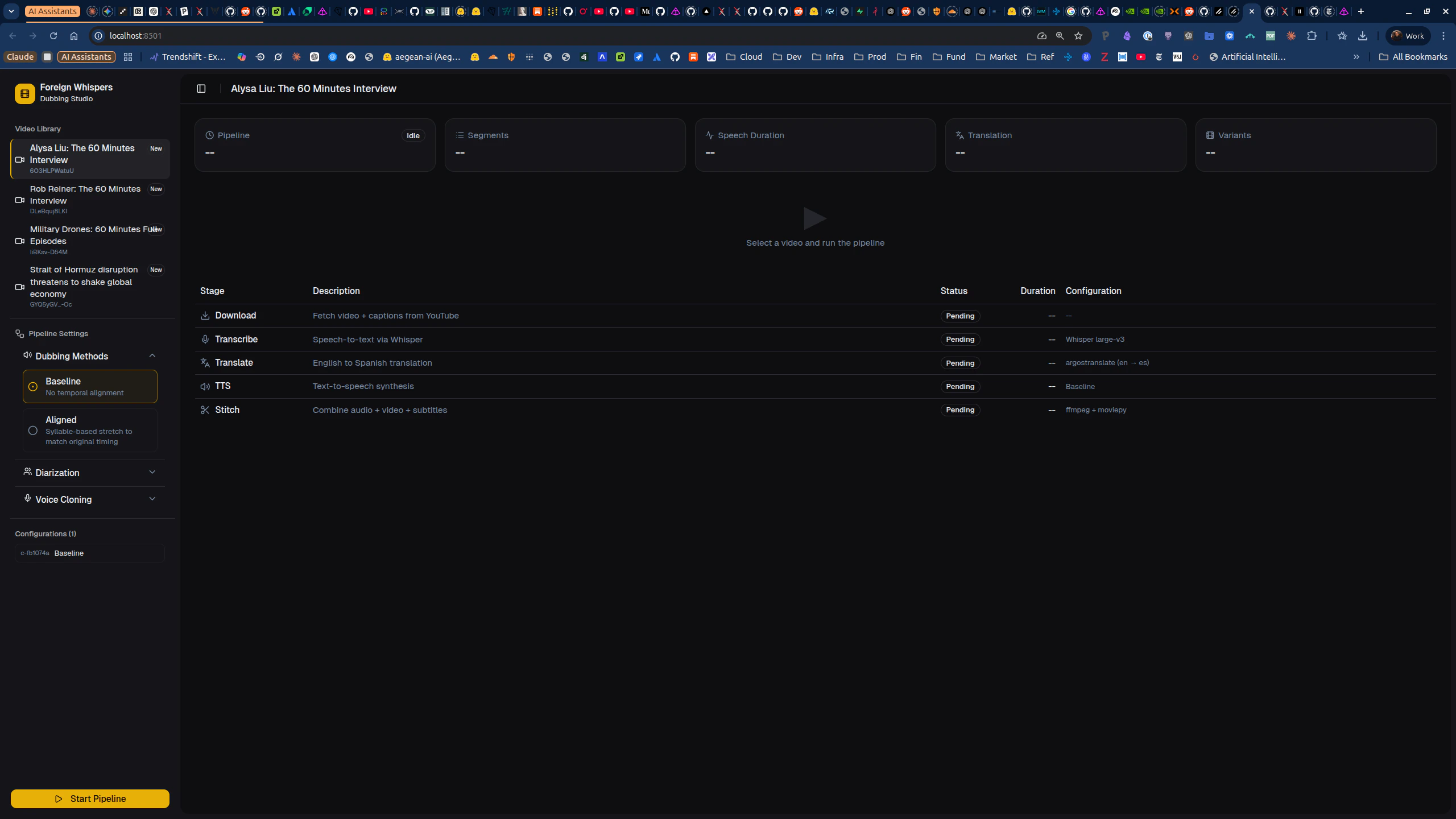
foreign_whispers Python library, it contains the alignment logic, evaluation metrics, and helper functions that the tasks ask you to implement or extend.
Architecture
| Layer | What it is | Where it runs |
|---|---|---|
| GPU services | Whisper STT (port 8000), Chatterbox TTS (port 8020) | Dedicated GPU containers |
| API | FastAPI orchestrator (port 8080), proxies to GPU services | CPU container |
foreign_whispers library | Alignment logic, metrics, evaluation | Pure Python, no GPU needed |
| Frontend | Next.js Dubbing Studio (port 8501) | Node container |
Per-stage deep-dives
Each pipeline stage has its own integration notebook with detailed analysis and tasks.End-to-end pipeline, from YouTube URL to dubbed video
End-to-end pipeline, from YouTube URL to dubbed video
Orchestrates the full pipeline (P1-P5) via the
FWClient SDK. Each step calls the FastAPI backend, which delegates GPU work to the STT and TTS containers. Results are cached on disk, re-running skips completed steps.Open the end-to-end pipeline notebookDownload, YouTube video and caption fetching
Download, YouTube video and caption fetching
Downloads the source video and closed captions via
yt-dlp through the FastAPI backend. Produces MP4 files and caption JSON in pipeline_data/api/.Open the download integration notebookTranscription, Whisper STT vs YouTube captions
Transcription, Whisper STT vs YouTube captions
Compares YouTube captions (fast, no GPU) against Whisper STT (slower, more accurate timestamps). Examines segment duration distributions and JSON structure.Open the transcription integration notebook
Diarization, speaker identification with pyannote
Diarization, speaker identification with pyannote
Wire pyannote speaker diarization into the pipeline so multi-speaker videos produce per-speaker labeled segments. Includes 5 tasks: merge function, API endpoint, transcription merge, frontend integration, and per-speaker TTS voice selection.Open the diarization integration notebook
Translation, argostranslate and duration-aware re-ranking
Translation, argostranslate and duration-aware re-ranking
Translates transcription segments from English to a target language using argostranslate. Analyzes translation length expansion and its impact on TTS timing budgets.Open the translation integration notebook
Alignment, temporal alignment metrics, policies, and global optimization
Alignment, temporal alignment metrics, policies, and global optimization
The hard problem: a 3-second English phrase might take 5 seconds in Spanish. Covers segment stretch metrics, fallback policy (accept / mild stretch / gap shift / request shorter / fail), and global timeline optimization.Open the alignment integration notebook
TTS, Chatterbox text-to-speech and voice cloning
TTS, Chatterbox text-to-speech and voice cloning
Synthesizes target-language speech using Chatterbox TTS. Compares baseline (no alignment) vs aligned (time-stretched) modes. Includes tasks for voice resolution and per-speaker voice assignment.Open the TTS integration notebook
Stitch, final video assembly with ffmpeg
Stitch, final video assembly with ffmpeg
Combines the original video with dubbed TTS audio and rolling two-line VTT captions. Uses audio-only remux (no video re-encoding) to preserve original video quality.Open the stitch integration notebook
Phase 1: Environment setup and end-to-end run
Step 1, Clone the repository
Step 2, Configure environment variables
Create a.env file at the project root:
Step 3, Start the Docker stack
The pipeline runs as four containers: an API orchestrator (CPU), a Whisper STT server (GPU), a Chatterbox TTS server (GPU), and a Next.js frontend.- API:
curl http://localhost:8080/healthz - Frontend: open
http://localhost:8501in your browser
Step 4, Install the local Python library
foreign_whispers Python package (alignment logic, metrics, evaluation) locally. No GPU needed for this package.
Step 5, (Optional) Set up Logfire observability
Step 6, Run the end-to-end pipeline notebook
Opennotebooks/pipeline_end_to_end/pipeline_end_to_end.ipynb and run all cells. This executes the five pipeline stages (P1-P5) on a sample YouTube video and produces a dubbed output. Watch the Dubbing Studio frontend at http://localhost:8501 to see the result.
Understand what each stage produces:
| Stage | What it does | Output location |
|---|---|---|
| P1, Download | Fetches video + YouTube captions via yt-dlp | pipeline_data/api/videos/, youtube_captions/ |
| P2, Transcribe | Runs Whisper STT on the audio track | pipeline_data/api/transcriptions/whisper/ |
| P3, Translate | Translates EN to ES via argostranslate | pipeline_data/api/translations/argos/ |
| P4, TTS | Synthesizes Spanish speech via Chatterbox | pipeline_data/api/tts_audio/chatterbox/ |
| P5, Stitch | Remuxes video with dubbed audio + VTT captions | pipeline_data/api/dubbed_videos/, dubbed_captions/ |
pipeline_data/api/. Re-running skips completed steps.
Phase 2: Integration notebooks
Work through these notebooks in order. Each one deep-dives into a pipeline stage and contains tasks markedYOUR CODE HERE.
Notebook 1: Download integration, how yt-dlp fetches video files and closed captions through the FastAPI backend
Notebook: notebooks/download_integration/download_integration.ipynb
You will inspect downloaded artifacts and visualize the caption timeline.
No coding tasks, this is an exploration notebook. Make sure you understand the data format (segment dicts with start, end, text fields) before moving on.
Notebook 2: Transcription integration, YouTube captions vs Whisper STT
Notebook:notebooks/transcription_integration/transcription_integration.ipynb
You will compare segment duration distributions between YouTube captions (fast, no GPU) and Whisper STT (slower, more accurate timestamps).
No coding tasks, but pay attention to the segment JSON structure. Every downstream stage consumes this format.
Notebook 3: Translation integration, unconstrained translation and its timing consequences
Notebook:notebooks/translation_integration/translation_integration.ipynb
argostranslate produces unconstrained translations. Some languages expand text by ~10-30% versus English, which causes timing problems for TTS.
Your task, Duration-aware re-ranking:
- File to modify:
foreign_whispers/reranking.py - Function:
get_shorter_translations(), currently a stub returning an empty list - Goal: Generate shorter Spanish translation candidates that fit within a TTS duration budget (~15 chars/second for Spanish)
- Approaches to consider: rule-based truncation, multi-backend translation (run the same text through different engines like argostranslate, MarianMT, and a local LLM, then pick the shortest candidate that preserves meaning), LLM candidate generation, or hybrid
Notebook 4: Diarization integration
Notebook:notebooks/diarization_integration/diarization_integration.ipynb
This is the largest notebook with 5 tasks. Work through them sequentially.
Task 1, assign_speakers merge function (pure Python, no GPU)
- File to modify:
foreign_whispers/diarization.py - Write a function that assigns speaker labels to transcription segments using temporal overlap with diarization output
- Tests are provided, run them first (TDD), implement, re-run until all 4 pass
- Files to create:
api/src/schemas/diarize.py,api/src/routers/diarize.py - Files to modify:
api/src/main.py,api/src/core/config.py - Create
POST /api/diarize/\{video_id\}that extracts audio, runs pyannote, caches results
- File to modify:
api/src/routers/diarize.py - After diarization, update the transcription JSON so each segment has a
speakerfield
- Files to modify:
frontend/src/lib/api.ts,frontend/src/lib/types.ts,frontend/src/hooks/use-pipeline.ts,frontend/src/components/pipeline-table.tsx,frontend/src/components/pipeline-status-bar.tsx - Add the diarize stage to the Next.js frontend between transcribe and translate
- Files to modify:
api/src/routers/tts.py,api/src/services/tts_service.py - When speaker labels exist, use different Chatterbox reference voices per speaker
Notebook 5: Alignment integration
Notebook:notebooks/alignment_integration/alignment_integration.ipynb
This is the most analytically demanding notebook with 4 tasks.
Task 1, Improve TTS duration prediction
- File to modify:
foreign_whispers/alignment.py, the_estimate_durationhelper - Replace the crude ~15 chars/s heuristic with a better predictor (syllable-based, regression model trained on ground-truth TTS durations)
- File to modify:
foreign_whispers/reranking.py - For segments tagged
REQUEST_SHORTER, generate shorter candidates that fit the timing budget
- File to modify:
foreign_whispers/alignment.py - Implement
global_align_dp()using DP, ILP, or beam search to beat the greedy left-to-right scheduler - Compare total drift, severe stretch count, and overlap count
- File to modify:
foreign_whispers/evaluation.py - Design a multi-dimensional evaluation: timing accuracy, intelligibility (STT round-trip), semantic fidelity (embedding similarity), naturalness (speaking rate variance)
Notebook 6: TTS integration, baseline vs aligned modes and voice cloning
Notebook:notebooks/tts_integration/tts_integration.ipynb
Task 1, Understand the Chatterbox client (read-only)
- Study how
tts.pyalready supportsspeaker_wavkwargs
- File to create:
foreign_whispers/voice_resolution.py - Implement
resolve_speaker_wav()with fallback chain: speaker-specific, then language default, then global default - 5 tests provided, run first, implement, re-run
speaker_wav to the TTS API
- Files to modify:
api/src/core/config.py,api/src/routers/tts.py,api/src/services/tts_service.py - Expose speaker selection as a query parameter
- File to modify:
api/src/routers/tts.py - When diarized segments exist, build a speaker-to-voice mapping and switch voices per segment
Notebook 7: Stitch integration, final assembly with ffmpeg audio remux and VTT captions
Notebook:notebooks/stitch_integration/stitch_integration.ipynb
The video track is copied as-is (no re-encoding); only the audio stream is replaced with TTS output. Rolling two-line VTT captions are generated alongside.
No coding tasks, verify your dubbed output plays correctly with captions.