> ## Documentation Index
> Fetch the complete documentation index at: https://aegean.ai/llms.txt
> Use this file to discover all available pages before exploring further.
# Foreign Whispers
> Build an open-source video dubbing pipeline from YouTube URL to dubbed output using Whisper, argostranslate, and Chatterbox TTS
> **Repository:** This project has its own public GitHub repo at
> [github.com/aegean-ai/foreign-whispers](https://github.com/aegean-ai/foreign-whispers).
> Clone it, file issues, and submit pull requests there.
## What you are building
An open-source video dubbing pipeline that takes a YouTube video in English and produces a dubbed version in Spanish (or another target language), using only local GPU resources, no paid APIs. The full pipeline:
```mermaid theme={null}
graph TB
URL[YouTube URL]
D[Download]
T[Transcribe]
TR[Translate]
TTS["TTS (+ alignment)"]
S[Stitch]
V[Dubbed Video]
URL -->|video + captions| D
D -->|MP4 + caption JSON| T
T -->|segments JSON| TR
TR -->|translated segments| TTS
TTS -->|aligned WAV| S
S -->|MP4 + VTT| V
```
Commercial dubbing services like [ElevenLabs](https://elevenlabs.io) can take a video, transcribe it, translate it, clone the speaker's voice, and return a dubbed video in the target language, watch their demo below:
You are going to build the same thing from open-source components. No API keys to a proprietary service. No per-minute billing. The entire pipeline runs on your own GPU server.
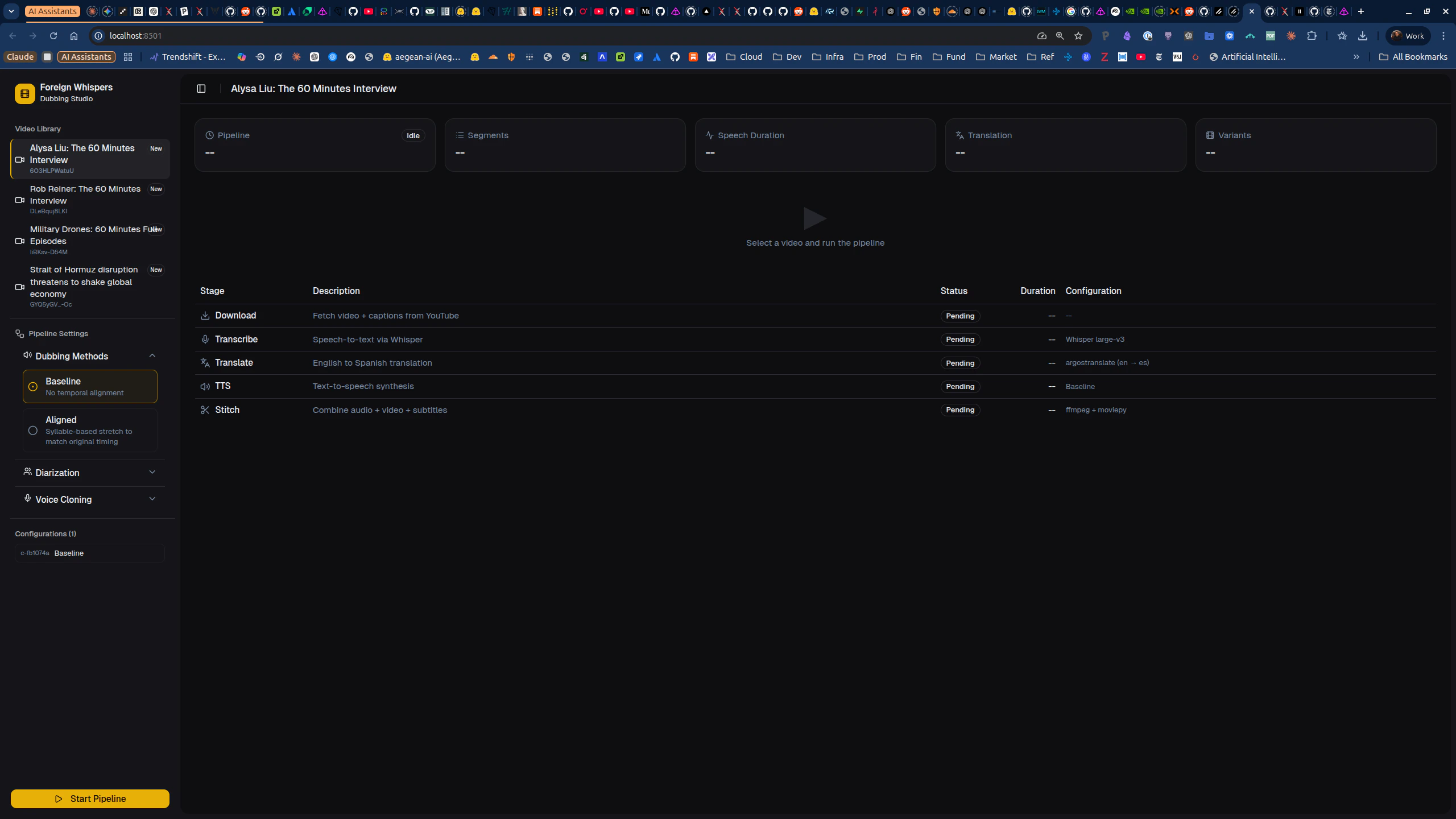
You will demonstrate your pipeline using the **Foreign Whispers Dubbing Studio**, a Next.js frontend at [http://localhost:8501](http://localhost:8501).
You will work through this in **two phases**: first run the provided end-to-end pipeline to understand how it works, then complete the tasks in the integration notebooks. Most notebooks import the `foreign_whispers` Python library, it contains the alignment logic, evaluation metrics, and helper functions that the tasks ask you to implement or extend.
## Architecture
| Layer | What it is | Where it runs |
| ------------------------------ | --------------------------------------------------------- | -------------------------- |
| **GPU services** | Whisper STT (port 8000), Chatterbox TTS (port 8020) | Dedicated GPU containers |
| **API** | FastAPI orchestrator (port 8080), proxies to GPU services | CPU container |
| **`foreign_whispers` library** | Alignment logic, metrics, evaluation | Pure Python, no GPU needed |
| **Frontend** | Next.js Dubbing Studio (port 8501) | Node container |
```mermaid theme={null}
graph TB
API["API, orchestrator CPU :8080"]
STT["STT, Whisper GPU :8000"]
TTS["TTS, Chatterbox GPU :8020"]
API -->|HTTP| STT
API -->|HTTP| TTS
```
## Per-stage deep-dives
Each pipeline stage has its own integration notebook with detailed analysis and tasks.
Orchestrates the full pipeline (P1-P5) via the `FWClient` SDK. Each step calls the FastAPI backend, which delegates GPU work to the STT and TTS containers. Results are cached on disk, re-running skips completed steps.
[Open the end-to-end pipeline notebook](/aiml-common/projects/nlp/foreign-whispers/pipeline_end_to_end/pipeline_end_to_end)
Downloads the source video and closed captions via `yt-dlp` through the FastAPI backend. Produces MP4 files and caption JSON in `pipeline_data/api/`.
[Open the download integration notebook](/aiml-common/projects/nlp/foreign-whispers/download_integration/download_integration)
Compares YouTube captions (fast, no GPU) against Whisper STT (slower, more accurate timestamps). Examines segment duration distributions and JSON structure.
[Open the transcription integration notebook](/aiml-common/projects/nlp/foreign-whispers/transcription_integration/transcription_integration)
Wire pyannote speaker diarization into the pipeline so multi-speaker videos produce per-speaker labeled segments. Includes 5 tasks: merge function, API endpoint, transcription merge, frontend integration, and per-speaker TTS voice selection.
[Open the diarization integration notebook](/aiml-common/projects/nlp/foreign-whispers/diarization_integration/diarization_integration)
Translates transcription segments from English to a target language using argostranslate. Analyzes translation length expansion and its impact on TTS timing budgets.
[Open the translation integration notebook](/aiml-common/projects/nlp/foreign-whispers/translation_integration/translation_integration)
The hard problem: a 3-second English phrase might take 5 seconds in Spanish. Covers segment stretch metrics, fallback policy (accept / mild stretch / gap shift / request shorter / fail), and global timeline optimization.
[Open the alignment integration notebook](/aiml-common/projects/nlp/foreign-whispers/alignment_integration/alignment_integration)
Synthesizes target-language speech using Chatterbox TTS. Compares baseline (no alignment) vs aligned (time-stretched) modes. Includes tasks for voice resolution and per-speaker voice assignment.
[Open the TTS integration notebook](/aiml-common/projects/nlp/foreign-whispers/tts_integration/tts_integration)
Combines the original video with dubbed TTS audio and rolling two-line VTT captions. Uses audio-only remux (no video re-encoding) to preserve original video quality.
[Open the stitch integration notebook](/aiml-common/projects/nlp/foreign-whispers/stitch_integration/stitch_integration)
## Phase 1: Environment setup and end-to-end run
### Step 1, Clone the repository
```bash theme={null}
git clone https://github.com/aegean-ai/foreign-whispers.git
cd foreign-whispers
```
Read the README.md file.
### Step 2, Configure environment variables
Create a `.env` file at the project root:
```bash theme={null}
# Required for diarization (Task in diarization notebook)
FW_HF_TOKEN=hf_your_token_here
# Optional, enables Logfire observability dashboard
LOGFIRE_TOKEN=your_logfire_token
```
You need a HuggingFace token with access to [pyannote/speaker-diarization-3.1](https://huggingface.co/pyannote/speaker-diarization-3.1), accept the model license on HuggingFace before proceeding.
### Step 3, Start the Docker stack
The pipeline runs as four containers: an API orchestrator (CPU), a Whisper STT server (GPU), a Chatterbox TTS server (GPU), and a Next.js frontend.
```bash theme={null}
docker compose --profile nvidia up -d
```
Verify all services are healthy:
* **API**: `curl http://localhost:8080/healthz`
* **Frontend**: open `http://localhost:8501` in your browser
### Step 4, Install the local Python library
```bash theme={null}
uv sync
```
This installs the `foreign_whispers` Python package (alignment logic, metrics, evaluation) locally. No GPU needed for this package.
### Step 5, (Optional) Set up Logfire observability
```bash theme={null}
uv run logfire auth
```
This enables structured tracing for every pipeline call. Very helpful for debugging timing issues. Watch [this Logfire intro](https://www.youtube.com/watch?v=on5RKukQzIg) to understand what it gives you.
### Step 6, Run the end-to-end pipeline notebook
Open `notebooks/pipeline_end_to_end/pipeline_end_to_end.ipynb` and run all cells. This executes the five pipeline stages (P1-P5) on a sample YouTube video and produces a dubbed output. Watch the Dubbing Studio frontend at `http://localhost:8501` to see the result.
Understand what each stage produces:
| Stage | What it does | Output location |
| -------------- | ---------------------------------------------- | ------------------------------------------------------ |
| P1, Download | Fetches video + YouTube captions via `yt-dlp` | `pipeline_data/api/videos/`, `youtube_captions/` |
| P2, Transcribe | Runs Whisper STT on the audio track | `pipeline_data/api/transcriptions/whisper/` |
| P3, Translate | Translates EN to ES via argostranslate | `pipeline_data/api/translations/argos/` |
| P4, TTS | Synthesizes Spanish speech via Chatterbox | `pipeline_data/api/tts_audio/chatterbox/` |
| P5, Stitch | Remuxes video with dubbed audio + VTT captions | `pipeline_data/api/dubbed_videos/`, `dubbed_captions/` |
All artifacts are cached in `pipeline_data/api/`. Re-running skips completed steps.
## Phase 2: Integration notebooks
Work through these notebooks **in order**. Each one deep-dives into a pipeline stage and contains tasks marked `YOUR CODE HERE`.
### Notebook 1: Download integration, how `yt-dlp` fetches video files and closed captions through the FastAPI backend
**Notebook:** `notebooks/download_integration/download_integration.ipynb`
You will inspect downloaded artifacts and visualize the caption timeline.
**No coding tasks**, this is an exploration notebook. Make sure you understand the data format (segment dicts with `start`, `end`, `text` fields) before moving on.
### Notebook 2: Transcription integration, YouTube captions vs Whisper STT
**Notebook:** `notebooks/transcription_integration/transcription_integration.ipynb`
You will compare segment duration distributions between YouTube captions (fast, no GPU) and Whisper STT (slower, more accurate timestamps).
**No coding tasks**, but pay attention to the segment JSON structure. Every downstream stage consumes this format.
### Notebook 3: Translation integration, unconstrained translation and its timing consequences
**Notebook:** `notebooks/translation_integration/translation_integration.ipynb`
argostranslate produces unconstrained translations. Some languages expand text by \~10-30% versus English, which causes timing problems for TTS.
**Your task, Duration-aware re-ranking:**
* **File to modify:** `foreign_whispers/reranking.py`
* **Function:** `get_shorter_translations()`, currently a stub returning an empty list
* **Goal:** Generate shorter Spanish translation candidates that fit within a TTS duration budget (\~15 chars/second for Spanish)
* **Approaches to consider:** rule-based truncation, multi-backend translation (run the same text through different engines like argostranslate, MarianMT, and a local LLM, then pick the shortest candidate that preserves meaning), LLM candidate generation, or hybrid
### Notebook 4: Diarization integration
**Notebook:** `notebooks/diarization_integration/diarization_integration.ipynb`
This is the largest notebook with 5 tasks. Work through them sequentially.
**Task 1, `assign_speakers` merge function** (pure Python, no GPU)
* **File to modify:** `foreign_whispers/diarization.py`
* Write a function that assigns speaker labels to transcription segments using temporal overlap with diarization output
* Tests are provided, run them first (TDD), implement, re-run until all 4 pass
**Task 2, Diarize API endpoint**
* **Files to create:** `api/src/schemas/diarize.py`, `api/src/routers/diarize.py`
* **Files to modify:** `api/src/main.py`, `api/src/core/config.py`
* Create `POST /api/diarize/\{video_id\}` that extracts audio, runs pyannote, caches results
**Task 3, Merge speaker labels into transcription**
* **File to modify:** `api/src/routers/diarize.py`
* After diarization, update the transcription JSON so each segment has a `speaker` field
**Task 4, Frontend pipeline integration**
* **Files to modify:** `frontend/src/lib/api.ts`, `frontend/src/lib/types.ts`, `frontend/src/hooks/use-pipeline.ts`, `frontend/src/components/pipeline-table.tsx`, `frontend/src/components/pipeline-status-bar.tsx`
* Add the diarize stage to the Next.js frontend between transcribe and translate
**Task 5, Per-speaker TTS voice selection**
* **Files to modify:** `api/src/routers/tts.py`, `api/src/services/tts_service.py`
* When speaker labels exist, use different Chatterbox reference voices per speaker
### Notebook 5: Alignment integration
**Notebook:** `notebooks/alignment_integration/alignment_integration.ipynb`
This is the most analytically demanding notebook with 4 tasks.
**Task 1, Improve TTS duration prediction**
* **File to modify:** `foreign_whispers/alignment.py`, the `_estimate_duration` helper
* Replace the crude \~15 chars/s heuristic with a better predictor (syllable-based, regression model trained on ground-truth TTS durations)
**Task 2, Duration-aware translation re-ranking** (same stub as translation notebook)
* **File to modify:** `foreign_whispers/reranking.py`
* For segments tagged `REQUEST_SHORTER`, generate shorter candidates that fit the timing budget
**Task 3, Beat the greedy optimizer**
* **File to modify:** `foreign_whispers/alignment.py`
* Implement `global_align_dp()` using DP, ILP, or beam search to beat the greedy left-to-right scheduler
* Compare total drift, severe stretch count, and overlap count
**Task 4, Dubbing quality scorecard**
* **File to modify:** `foreign_whispers/evaluation.py`
* Design a multi-dimensional evaluation: timing accuracy, intelligibility (STT round-trip), semantic fidelity (embedding similarity), naturalness (speaking rate variance)
### Notebook 6: TTS integration, baseline vs aligned modes and voice cloning
**Notebook:** `notebooks/tts_integration/tts_integration.ipynb`
**Task 1, Understand the Chatterbox client** (read-only)
* Study how `tts.py` already supports `speaker_wav` kwargs
**Task 2, Voice resolution function** (TDD)
* **File to create:** `foreign_whispers/voice_resolution.py`
* Implement `resolve_speaker_wav()` with fallback chain: speaker-specific, then language default, then global default
* 5 tests provided, run first, implement, re-run
**Task 3, Add `speaker_wav` to the TTS API**
* **Files to modify:** `api/src/core/config.py`, `api/src/routers/tts.py`, `api/src/services/tts_service.py`
* Expose speaker selection as a query parameter
**Task 4, Per-speaker voice assignment**
* **File to modify:** `api/src/routers/tts.py`
* When diarized segments exist, build a speaker-to-voice mapping and switch voices per segment
### Notebook 7: Stitch integration, final assembly with ffmpeg audio remux and VTT captions
**Notebook:** `notebooks/stitch_integration/stitch_integration.ipynb`
The video track is copied as-is (no re-encoding); only the audio stream is replaced with TTS output. Rolling two-line VTT captions are generated alongside.
**No coding tasks**, verify your dubbed output plays correctly with captions.
***
[Edit this page on GitHub](https://github.com/aegean-ai/eaia/edit/main/src/aiml-common/projects/nlp/foreign-whispers/index.mdx) or [file an issue](https://github.com/aegean-ai/eaia/issues/new/choose).
 You will work through this in **two phases**: first run the provided end-to-end pipeline to understand how it works, then complete the tasks in the integration notebooks. Most notebooks import the `foreign_whispers` Python library, it contains the alignment logic, evaluation metrics, and helper functions that the tasks ask you to implement or extend.
## Architecture
| Layer | What it is | Where it runs |
| ------------------------------ | --------------------------------------------------------- | -------------------------- |
| **GPU services** | Whisper STT (port 8000), Chatterbox TTS (port 8020) | Dedicated GPU containers |
| **API** | FastAPI orchestrator (port 8080), proxies to GPU services | CPU container |
| **`foreign_whispers` library** | Alignment logic, metrics, evaluation | Pure Python, no GPU needed |
| **Frontend** | Next.js Dubbing Studio (port 8501) | Node container |
```mermaid theme={null}
graph TB
API["API, orchestrator
You will work through this in **two phases**: first run the provided end-to-end pipeline to understand how it works, then complete the tasks in the integration notebooks. Most notebooks import the `foreign_whispers` Python library, it contains the alignment logic, evaluation metrics, and helper functions that the tasks ask you to implement or extend.
## Architecture
| Layer | What it is | Where it runs |
| ------------------------------ | --------------------------------------------------------- | -------------------------- |
| **GPU services** | Whisper STT (port 8000), Chatterbox TTS (port 8020) | Dedicated GPU containers |
| **API** | FastAPI orchestrator (port 8080), proxies to GPU services | CPU container |
| **`foreign_whispers` library** | Alignment logic, metrics, evaluation | Pure Python, no GPU needed |
| **Frontend** | Next.js Dubbing Studio (port 8501) | Node container |
```mermaid theme={null}
graph TB
API["API, orchestrator