> ## Documentation Index
> Fetch the complete documentation index at: https://aegean.ai/llms.txt
> Use this file to discover all available pages before exploring further.
# How to Use AI with Your Course Content
> Connect aegean.ai documentation to AI assistants for real-time answers about course material.
This guide shows you how to connect our course documentation directly to AI tools, giving you instant access to explanations, examples, and answers while studying or coding.
## Quick Start
Every page on aegean.ai has a **contextual menu** (top-right corner) with options to:
* **Open in Claude** - Start a conversation with the page content loaded
* **Open in Perplexity** - Search and discuss the topic with web context
* **Connect to VS Code** - Install our MCP server for real-time doc access
* **Connect to Cursor** - One-click MCP integration for Cursor IDE
## VS Code Integration (Recommended)
For the best experience while coding, connect our documentation directly to VS Code using the Model Context Protocol (MCP).
### Demo: Asking About CNN Filters
Once connected, you can ask questions directly in VS Code Chat. Here's an example asking "how the depth of the output feature map of a CNN is determined":
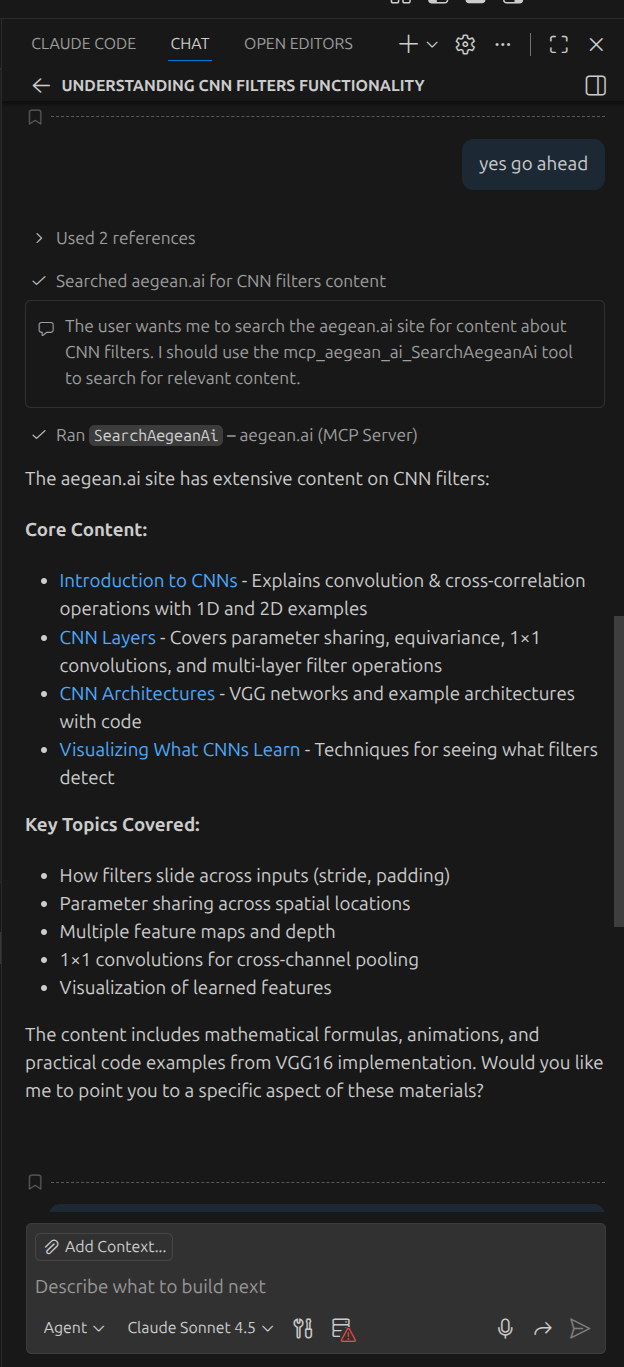 *The AI searches aegean.ai using the MCP server and finds relevant content from the CNN Layers lecture*
The AI retrieves content from our documentation and provides a detailed answer with references:
*The AI searches aegean.ai using the MCP server and finds relevant content from the CNN Layers lecture*
The AI retrieves content from our documentation and provides a detailed answer with references:
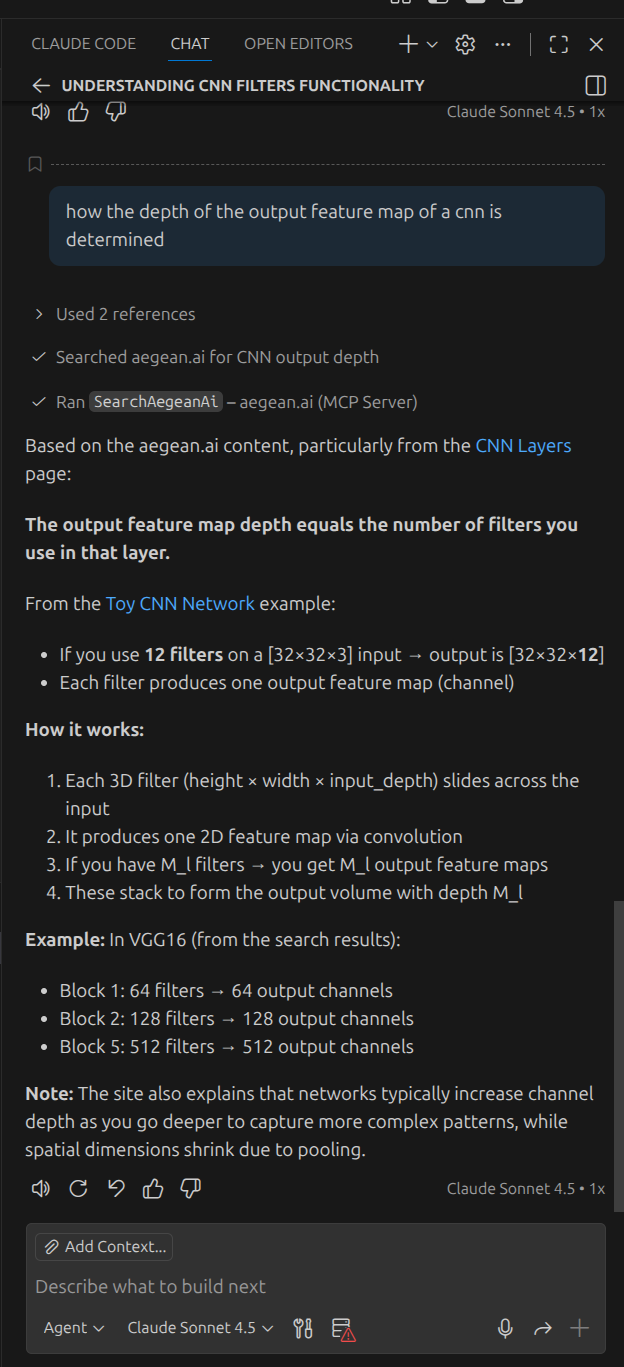 *The response includes links to specific lectures and explains the relationship between filters and output depth*
### Option 1: One-Click Install
1. Navigate to any page on aegean.ai
2. Click the contextual menu (top-right)
3. Select **Connect to VS Code**
4. VS Code will prompt you to install the MCP server
### Option 2: Manual Configuration
Create or edit `.vscode/mcp.json` in your workspace:
```json theme={null}
{
"servers": {
"aegean-docs": {
"type": "http",
"url": "https://aegean.ai/mcp"
}
}
}
```
Once connected, VS Code's AI features (Copilot Chat, etc.) can search our documentation in real-time.
## Claude Code Integration
If you use [Claude Code](https://docs.anthropic.com/en/docs/claude-code) (Anthropic's CLI), add our MCP server:
```bash theme={null}
# Add to current project
claude mcp add --transport http docs-aegean https://aegean.ai/mcp
# Or add globally (available in all projects)
claude mcp add --transport http --scope user docs-aegean https://aegean.ai/mcp
# Verify connection
claude mcp list
```
In your next Claude Code session, you can ask questions like:
* "How do transformers compute attention?"
* "Explain the policy gradient theorem"
* "What is the difference between object detection and semantic segmentation?"
## Cursor IDE Integration
### Option 1: One-Click Install
1. Navigate to any page on aegean.ai
2. Click the contextual menu (top-right)
3. Select **Connect to Cursor**
### Option 2: Manual Configuration
1. Open Command Palette (`Cmd+Shift+P` / `Ctrl+Shift+P`)
2. Search for **Open MCP settings**
3. Select **Add custom MCP**
4. Add to `mcp.json`:
```json theme={null}
{
"aegean-docs": {
"type": "http",
"url": "https://aegean.ai/mcp"
}
}
```
## Claude Desktop Integration
1. Open Claude Desktop settings
2. Navigate to **Connectors**
3. Select **Add custom connector**
4. Enter:
* **Name:** `aegean.ai docs`
* **URL:** `https://aegean.ai/mcp`
5. Select **Add**
When chatting, click the attachments button (plus icon) and select the aegean.ai connector to search our docs.
## Open in Claude / Perplexity
For quick questions about a specific page:
1. Navigate to the relevant page (e.g., a lecture on CNNs)
2. Click the contextual menu (top-right)
3. Select **Open in Claude** or **Open in Perplexity**
4. A new conversation opens with the page content already loaded
**Open in Claude** works best because Claude can fetch and read the page content directly. Use this when you want to discuss a specific lecture or topic in depth.
## What You Can Ask
Once connected, try questions like:
| Topic | Example Questions |
| -------------------------- | ------------------------------------------------------------------------------ |
| **Deep Learning** | "How does backpropagation work?", "Explain batch normalization" |
| **CNNs** | "How do pooling layers reduce dimensionality?", "What is a receptive field?" |
| **NLP** | "How does self-attention scale?", "Explain positional encoding" |
| **Reinforcement Learning** | "What is the Bellman equation?", "Compare value iteration vs policy iteration" |
| **Robotics** | "Explain forward kinematics", "What is SLAM?" |
| **Computer Vision** | "How does YOLO detect objects?", "Explain semantic segmentation" |
## Available Resources
| Resource | URL | Description |
| -------------- | ------------------------------------------------ | ----------------------------------------------------------- |
| **MCP Server** | `https://aegean.ai/mcp` | Real-time doc search for AI tools (includes course content) |
| **llms.txt** | [aegean.ai/llms.txt](https://aegean.ai/llms.txt) | Public documentation index |
Course lecture content (under aiml-common/) is available through the MCP server for authenticated AI tool access, but is not included in the public llms.txt index.
## Tips for Effective Use
Instead of "explain neural networks", ask "how does a CNN produce an output feature map with depth D using multiple filters?"
Ask "based on the CNN layers lecture, how does stride affect output dimensions?"
Ask "show me PyTorch code for implementing attention based on the transformers lecture"
Ask "compare policy gradient methods vs Q-learning based on the RL lectures"
## Troubleshooting
Verify the URL is correct: `https://aegean.ai/mcp`. Check your network connection and try restarting your IDE.
MCP tools load at session startup. Run `claude mcp list` to verify the server is connected, then start a new session.
Ensure you have the latest VS Code with AI features enabled. The MCP integration requires Copilot or similar AI extension.
***
[Edit this page on GitHub](https://github.com/aegean-ai/eaia/edit/main/src/aiml-common/resources/environment/how-to-use-ai.mdx) or [file an issue](https://github.com/aegean-ai/eaia/issues/new/choose).
*The response includes links to specific lectures and explains the relationship between filters and output depth*
### Option 1: One-Click Install
1. Navigate to any page on aegean.ai
2. Click the contextual menu (top-right)
3. Select **Connect to VS Code**
4. VS Code will prompt you to install the MCP server
### Option 2: Manual Configuration
Create or edit `.vscode/mcp.json` in your workspace:
```json theme={null}
{
"servers": {
"aegean-docs": {
"type": "http",
"url": "https://aegean.ai/mcp"
}
}
}
```
Once connected, VS Code's AI features (Copilot Chat, etc.) can search our documentation in real-time.
## Claude Code Integration
If you use [Claude Code](https://docs.anthropic.com/en/docs/claude-code) (Anthropic's CLI), add our MCP server:
```bash theme={null}
# Add to current project
claude mcp add --transport http docs-aegean https://aegean.ai/mcp
# Or add globally (available in all projects)
claude mcp add --transport http --scope user docs-aegean https://aegean.ai/mcp
# Verify connection
claude mcp list
```
In your next Claude Code session, you can ask questions like:
* "How do transformers compute attention?"
* "Explain the policy gradient theorem"
* "What is the difference between object detection and semantic segmentation?"
## Cursor IDE Integration
### Option 1: One-Click Install
1. Navigate to any page on aegean.ai
2. Click the contextual menu (top-right)
3. Select **Connect to Cursor**
### Option 2: Manual Configuration
1. Open Command Palette (`Cmd+Shift+P` / `Ctrl+Shift+P`)
2. Search for **Open MCP settings**
3. Select **Add custom MCP**
4. Add to `mcp.json`:
```json theme={null}
{
"aegean-docs": {
"type": "http",
"url": "https://aegean.ai/mcp"
}
}
```
## Claude Desktop Integration
1. Open Claude Desktop settings
2. Navigate to **Connectors**
3. Select **Add custom connector**
4. Enter:
* **Name:** `aegean.ai docs`
* **URL:** `https://aegean.ai/mcp`
5. Select **Add**
When chatting, click the attachments button (plus icon) and select the aegean.ai connector to search our docs.
## Open in Claude / Perplexity
For quick questions about a specific page:
1. Navigate to the relevant page (e.g., a lecture on CNNs)
2. Click the contextual menu (top-right)
3. Select **Open in Claude** or **Open in Perplexity**
4. A new conversation opens with the page content already loaded
**Open in Claude** works best because Claude can fetch and read the page content directly. Use this when you want to discuss a specific lecture or topic in depth.
## What You Can Ask
Once connected, try questions like:
| Topic | Example Questions |
| -------------------------- | ------------------------------------------------------------------------------ |
| **Deep Learning** | "How does backpropagation work?", "Explain batch normalization" |
| **CNNs** | "How do pooling layers reduce dimensionality?", "What is a receptive field?" |
| **NLP** | "How does self-attention scale?", "Explain positional encoding" |
| **Reinforcement Learning** | "What is the Bellman equation?", "Compare value iteration vs policy iteration" |
| **Robotics** | "Explain forward kinematics", "What is SLAM?" |
| **Computer Vision** | "How does YOLO detect objects?", "Explain semantic segmentation" |
## Available Resources
| Resource | URL | Description |
| -------------- | ------------------------------------------------ | ----------------------------------------------------------- |
| **MCP Server** | `https://aegean.ai/mcp` | Real-time doc search for AI tools (includes course content) |
| **llms.txt** | [aegean.ai/llms.txt](https://aegean.ai/llms.txt) | Public documentation index |
Course lecture content (under aiml-common/) is available through the MCP server for authenticated AI tool access, but is not included in the public llms.txt index.
## Tips for Effective Use
Instead of "explain neural networks", ask "how does a CNN produce an output feature map with depth D using multiple filters?"
Ask "based on the CNN layers lecture, how does stride affect output dimensions?"
Ask "show me PyTorch code for implementing attention based on the transformers lecture"
Ask "compare policy gradient methods vs Q-learning based on the RL lectures"
## Troubleshooting
Verify the URL is correct: `https://aegean.ai/mcp`. Check your network connection and try restarting your IDE.
MCP tools load at session startup. Run `claude mcp list` to verify the server is connected, then start a new session.
Ensure you have the latest VS Code with AI features enabled. The MCP integration requires Copilot or similar AI extension.
***
[Edit this page on GitHub](https://github.com/aegean-ai/eaia/edit/main/src/aiml-common/resources/environment/how-to-use-ai.mdx) or [file an issue](https://github.com/aegean-ai/eaia/issues/new/choose).