> ## Documentation Index
> Fetch the complete documentation index at: https://aegean.ai/llms.txt
> Use this file to discover all available pages before exploring further.
# Stream COCO for object detection training with Hugging Face datasets
> Train an object detection model on COCO without downloading the full dataset, using Hugging Face datasets streaming and PyTorch DataLoaders.
 The COCO dataset is a cornerstone benchmark for object detection, but at \~20 GB it takes
significant time and disk space to download. **Hugging Face datasets streaming** lets you
train on COCO without downloading the full dataset, images are fetched on-the-fly as your
training loop requests them.
In this tutorial you will:
1. Stream COCO from the [`detection-datasets/coco`](https://huggingface.co/datasets/detection-datasets/coco) repository
2. Build a PyTorch `DataLoader` that works with the streaming `IterableDataset`
3. Fine-tune a Faster R-CNN model for 100 training steps
4. Run inference and visualize predictions with bounding box overlays
## Prerequisites
Install the required packages (if not already present):
```python theme={null}
%pip install -q datasets torch torchvision matplotlib
```
```output theme={null}
Note: you may need to restart the kernel to use updated packages.
```
## Load COCO with streaming
With `streaming=True`, no data is downloaded upfront. The dataset returns an
`IterableDataset` that fetches examples on demand.
```python theme={null}
from datasets import load_dataset
ds = load_dataset("detection-datasets/coco", split="train", streaming=True)
print(ds)
```
```output theme={null}
/workspaces/eng-ai-agents/.venv/lib/python3.11/site-packages/tqdm/auto.py:21: TqdmWarning: IProgress not found. Please update jupyter and ipywidgets. See https://ipywidgets.readthedocs.io/en/stable/user_install.html
from .autonotebook import tqdm as notebook_tqdm
```
```output theme={null}
Warning: You are sending unauthenticated requests to the HF Hub. Please set a HF_TOKEN to enable higher rate limits and faster downloads.
```
```output theme={null}
IterableDataset({
features: ['image_id', 'image', 'width', 'height', 'objects'],
num_shards: 40
})
```
Let's peek at the schema by grabbing one example.
```python theme={null}
sample = next(iter(ds))
print("Keys:", list(sample.keys()))
print("Image size:", sample["image"].size)
print("Number of objects:", len(sample["objects"]["bbox"]))
print("First bbox (COCO xywh):", sample["objects"]["bbox"][0])
print("Categories:", sample["objects"]["category"][:5])
```
```output theme={null}
Keys: ['image_id', 'image', 'width', 'height', 'objects']
Image size: (640, 480)
Number of objects: 8
First bbox (COCO xywh): [1.08, 187.69, 612.6700000000001, 473.53]
Categories: [45, 45, 50, 45, 49]
```
## Preprocess for detection
Faster R-CNN expects:
* Images as `float32` tensors in `[0, 1]` range
* Targets as a list of dicts with `boxes` (xyxy format) and `labels`
COCO bounding boxes are in `[x, y, width, height]` format, so we convert to
`[x1, y1, x2, y2]`.
```python theme={null}
import torch
from torchvision import transforms
from torchvision.transforms import functional as F
RESIZE = 640
def transform_example(example):
"""Convert a single HF dataset example to Faster R-CNN format."""
img = example["image"].convert("RGB")
orig_w, orig_h = img.size
# Resize image
img = F.resize(img, [RESIZE, RESIZE])
img_tensor = F.to_tensor(img) # [C, H, W] in [0, 1]
# Scale factors for bbox adjustment
sx = RESIZE / orig_w
sy = RESIZE / orig_h
# Convert COCO xywh -> xyxy and scale
boxes = []
for bbox in example["objects"]["bbox"]:
x, y, w, h = bbox
boxes.append([x * sx, y * sy, (x + w) * sx, (y + h) * sy])
# Category IDs (shift by +1 since 0 is background in torchvision)
labels = [cat + 1 for cat in example["objects"]["category"]]
target = {
"boxes": torch.tensor(boxes, dtype=torch.float32),
"labels": torch.tensor(labels, dtype=torch.int64),
}
return img_tensor, target
```
## Build a streaming DataLoader
Since `IterableDataset` from HF `datasets` inherits from `torch.utils.data.IterableDataset`,
we can pass it directly to a `DataLoader`. We use a custom collate function because detection
targets have variable-length box lists.
```python theme={null}
from torch.utils.data import DataLoader
class COCOStreamDataset(torch.utils.data.IterableDataset):
"""Wraps the HF streaming dataset with detection preprocessing."""
def __init__(self, hf_dataset):
self.hf_dataset = hf_dataset
def __iter__(self):
for example in self.hf_dataset:
img, target = transform_example(example)
# Skip examples with no boxes
if target["boxes"].numel() > 0:
yield img, target
def collate_fn(batch):
"""Custom collate, detection targets are variable-length."""
images = [item[0] for item in batch]
targets = [item[1] for item in batch]
return images, targets
stream_ds = COCOStreamDataset(ds.shuffle(seed=42, buffer_size=1000))
dataloader = DataLoader(stream_ds, batch_size=4, collate_fn=collate_fn)
# Quick sanity check
images, targets = next(iter(dataloader))
print(f"Batch: {len(images)} images")
print(f"First image shape: {images[0].shape}")
print(f"First target boxes: {targets[0]['boxes'].shape}")
```
```output theme={null}
Batch: 4 images
First image shape: torch.Size([3, 640, 640])
First target boxes: torch.Size([1, 4])
```
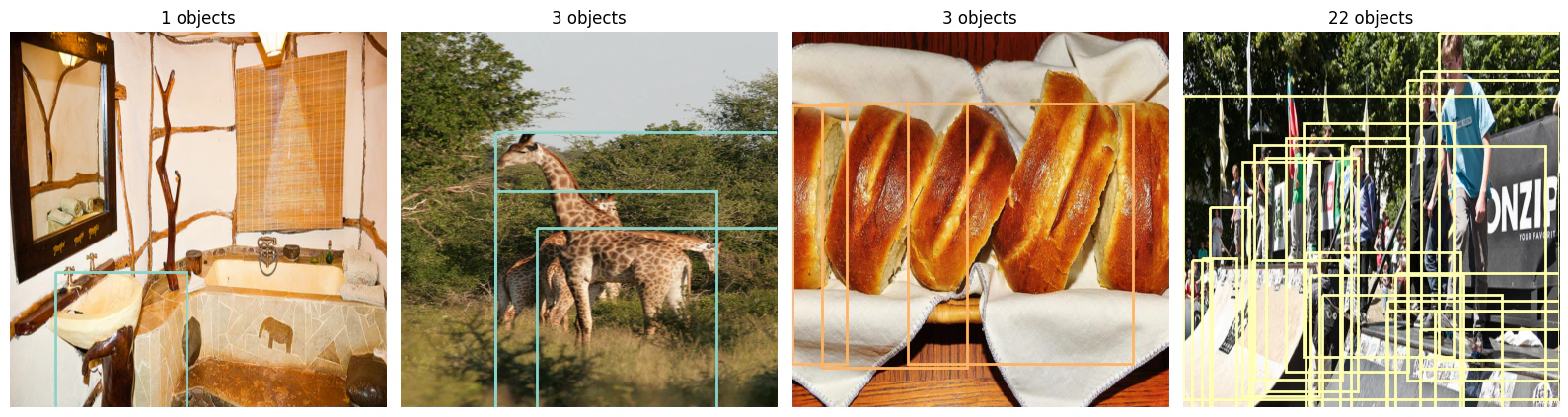
## Visualize a batch
Let's draw bounding boxes on a batch of images to verify the preprocessing.
```python theme={null}
import matplotlib.pyplot as plt
import matplotlib.patches as patches
import numpy as np
def show_batch(images, targets, max_images=4):
"""Display images with bounding box overlays."""
fig, axes = plt.subplots(1, min(len(images), max_images), figsize=(16, 5))
if not isinstance(axes, np.ndarray):
axes = [axes]
colors = plt.cm.Set3(np.linspace(0, 1, 12))
for ax, img, tgt in zip(axes, images, targets):
ax.imshow(img.permute(1, 2, 0).numpy())
for i, (box, label) in enumerate(zip(tgt["boxes"], tgt["labels"])):
x1, y1, x2, y2 = box.tolist()
color = colors[label.item() % len(colors)]
rect = patches.Rectangle(
(x1, y1), x2 - x1, y2 - y1,
linewidth=2, edgecolor=color, facecolor="none"
)
ax.add_patch(rect)
ax.set_title(f"{len(tgt['boxes'])} objects")
ax.axis("off")
plt.tight_layout()
plt.show()
show_batch(images, targets)
```
The COCO dataset is a cornerstone benchmark for object detection, but at \~20 GB it takes
significant time and disk space to download. **Hugging Face datasets streaming** lets you
train on COCO without downloading the full dataset, images are fetched on-the-fly as your
training loop requests them.
In this tutorial you will:
1. Stream COCO from the [`detection-datasets/coco`](https://huggingface.co/datasets/detection-datasets/coco) repository
2. Build a PyTorch `DataLoader` that works with the streaming `IterableDataset`
3. Fine-tune a Faster R-CNN model for 100 training steps
4. Run inference and visualize predictions with bounding box overlays
## Prerequisites
Install the required packages (if not already present):
```python theme={null}
%pip install -q datasets torch torchvision matplotlib
```
```output theme={null}
Note: you may need to restart the kernel to use updated packages.
```
## Load COCO with streaming
With `streaming=True`, no data is downloaded upfront. The dataset returns an
`IterableDataset` that fetches examples on demand.
```python theme={null}
from datasets import load_dataset
ds = load_dataset("detection-datasets/coco", split="train", streaming=True)
print(ds)
```
```output theme={null}
/workspaces/eng-ai-agents/.venv/lib/python3.11/site-packages/tqdm/auto.py:21: TqdmWarning: IProgress not found. Please update jupyter and ipywidgets. See https://ipywidgets.readthedocs.io/en/stable/user_install.html
from .autonotebook import tqdm as notebook_tqdm
```
```output theme={null}
Warning: You are sending unauthenticated requests to the HF Hub. Please set a HF_TOKEN to enable higher rate limits and faster downloads.
```
```output theme={null}
IterableDataset({
features: ['image_id', 'image', 'width', 'height', 'objects'],
num_shards: 40
})
```
Let's peek at the schema by grabbing one example.
```python theme={null}
sample = next(iter(ds))
print("Keys:", list(sample.keys()))
print("Image size:", sample["image"].size)
print("Number of objects:", len(sample["objects"]["bbox"]))
print("First bbox (COCO xywh):", sample["objects"]["bbox"][0])
print("Categories:", sample["objects"]["category"][:5])
```
```output theme={null}
Keys: ['image_id', 'image', 'width', 'height', 'objects']
Image size: (640, 480)
Number of objects: 8
First bbox (COCO xywh): [1.08, 187.69, 612.6700000000001, 473.53]
Categories: [45, 45, 50, 45, 49]
```
## Preprocess for detection
Faster R-CNN expects:
* Images as `float32` tensors in `[0, 1]` range
* Targets as a list of dicts with `boxes` (xyxy format) and `labels`
COCO bounding boxes are in `[x, y, width, height]` format, so we convert to
`[x1, y1, x2, y2]`.
```python theme={null}
import torch
from torchvision import transforms
from torchvision.transforms import functional as F
RESIZE = 640
def transform_example(example):
"""Convert a single HF dataset example to Faster R-CNN format."""
img = example["image"].convert("RGB")
orig_w, orig_h = img.size
# Resize image
img = F.resize(img, [RESIZE, RESIZE])
img_tensor = F.to_tensor(img) # [C, H, W] in [0, 1]
# Scale factors for bbox adjustment
sx = RESIZE / orig_w
sy = RESIZE / orig_h
# Convert COCO xywh -> xyxy and scale
boxes = []
for bbox in example["objects"]["bbox"]:
x, y, w, h = bbox
boxes.append([x * sx, y * sy, (x + w) * sx, (y + h) * sy])
# Category IDs (shift by +1 since 0 is background in torchvision)
labels = [cat + 1 for cat in example["objects"]["category"]]
target = {
"boxes": torch.tensor(boxes, dtype=torch.float32),
"labels": torch.tensor(labels, dtype=torch.int64),
}
return img_tensor, target
```
## Build a streaming DataLoader
Since `IterableDataset` from HF `datasets` inherits from `torch.utils.data.IterableDataset`,
we can pass it directly to a `DataLoader`. We use a custom collate function because detection
targets have variable-length box lists.
```python theme={null}
from torch.utils.data import DataLoader
class COCOStreamDataset(torch.utils.data.IterableDataset):
"""Wraps the HF streaming dataset with detection preprocessing."""
def __init__(self, hf_dataset):
self.hf_dataset = hf_dataset
def __iter__(self):
for example in self.hf_dataset:
img, target = transform_example(example)
# Skip examples with no boxes
if target["boxes"].numel() > 0:
yield img, target
def collate_fn(batch):
"""Custom collate, detection targets are variable-length."""
images = [item[0] for item in batch]
targets = [item[1] for item in batch]
return images, targets
stream_ds = COCOStreamDataset(ds.shuffle(seed=42, buffer_size=1000))
dataloader = DataLoader(stream_ds, batch_size=4, collate_fn=collate_fn)
# Quick sanity check
images, targets = next(iter(dataloader))
print(f"Batch: {len(images)} images")
print(f"First image shape: {images[0].shape}")
print(f"First target boxes: {targets[0]['boxes'].shape}")
```
```output theme={null}
Batch: 4 images
First image shape: torch.Size([3, 640, 640])
First target boxes: torch.Size([1, 4])
```
## Visualize a batch
Let's draw bounding boxes on a batch of images to verify the preprocessing.
```python theme={null}
import matplotlib.pyplot as plt
import matplotlib.patches as patches
import numpy as np
def show_batch(images, targets, max_images=4):
"""Display images with bounding box overlays."""
fig, axes = plt.subplots(1, min(len(images), max_images), figsize=(16, 5))
if not isinstance(axes, np.ndarray):
axes = [axes]
colors = plt.cm.Set3(np.linspace(0, 1, 12))
for ax, img, tgt in zip(axes, images, targets):
ax.imshow(img.permute(1, 2, 0).numpy())
for i, (box, label) in enumerate(zip(tgt["boxes"], tgt["labels"])):
x1, y1, x2, y2 = box.tolist()
color = colors[label.item() % len(colors)]
rect = patches.Rectangle(
(x1, y1), x2 - x1, y2 - y1,
linewidth=2, edgecolor=color, facecolor="none"
)
ax.add_patch(rect)
ax.set_title(f"{len(tgt['boxes'])} objects")
ax.axis("off")
plt.tight_layout()
plt.show()
show_batch(images, targets)
```
 ## Train with Faster R-CNN
We use `fasterrcnn_resnet50_fpn_v2` pretrained on COCO and fine-tune for 100 steps
as a demonstration. In a real scenario you would train for many more steps and
evaluate on the validation split.
```python theme={null}
from torchvision.models.detection import fasterrcnn_resnet50_fpn_v2, FasterRCNN_ResNet50_FPN_V2_Weights
device = torch.device("cuda" if torch.cuda.is_available() else "cpu")
print(f"Using device: {device}")
model = fasterrcnn_resnet50_fpn_v2(weights=FasterRCNN_ResNet50_FPN_V2_Weights.DEFAULT)
model.to(device)
model.train()
optimizer = torch.optim.SGD(
model.parameters(), lr=0.001, momentum=0.9, weight_decay=0.0005
)
NUM_STEPS = 100
LOG_EVERY = 10
# Rebuild the dataloader for training (fresh iterator)
train_ds = COCOStreamDataset(
load_dataset("detection-datasets/coco", split="train", streaming=True)
.shuffle(seed=42, buffer_size=1000)
)
train_loader = DataLoader(train_ds, batch_size=4, collate_fn=collate_fn)
running_loss = 0.0
for step, (imgs, tgts) in enumerate(train_loader):
if step >= NUM_STEPS:
break
imgs = [img.to(device) for img in imgs]
tgts = [{k: v.to(device) for k, v in t.items()} for t in tgts]
loss_dict = model(imgs, tgts)
losses = sum(loss for loss in loss_dict.values())
optimizer.zero_grad()
losses.backward()
optimizer.step()
running_loss += losses.item()
if (step + 1) % LOG_EVERY == 0:
avg_loss = running_loss / LOG_EVERY
print(f"Step [{step + 1}/{NUM_STEPS}] Loss: {avg_loss:.4f}")
running_loss = 0.0
print("Training complete.")
```
```output theme={null}
Using device: cuda
```
```output theme={null}
Downloading: "https://download.pytorch.org/models/fasterrcnn_resnet50_fpn_v2_coco-dd69338a.pth" to /home/vscode/.cache/torch/hub/checkpoints/fasterrcnn_resnet50_fpn_v2_coco-dd69338a.pth
```
```output theme={null}
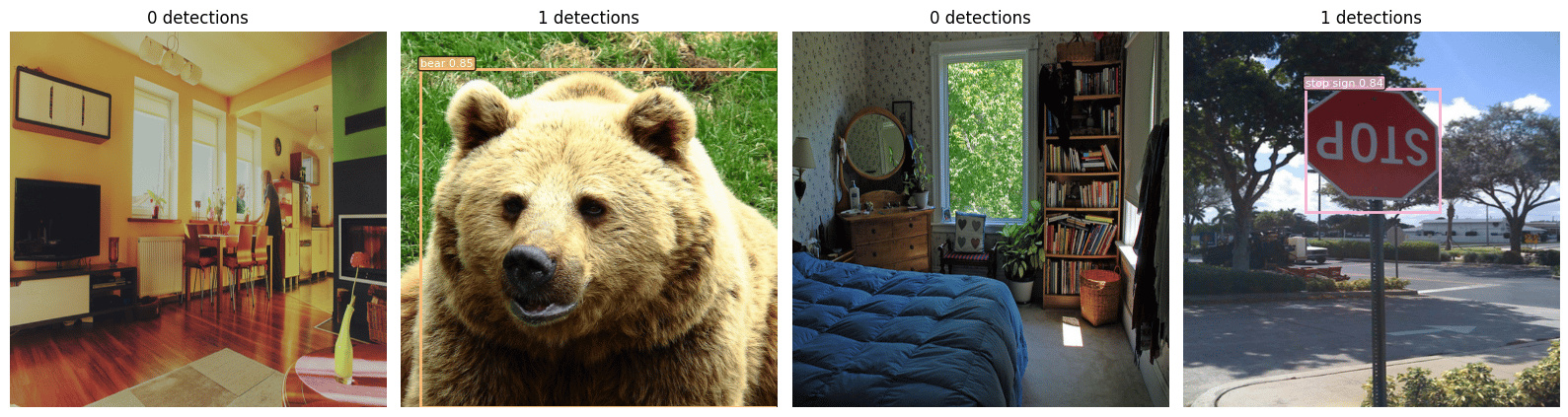
0%| | 0.00/167M [00:00 0.5.
```python theme={null}
# COCO category names (91 categories, index 0 = background)
COCO_NAMES = [
"__background__", "person", "bicycle", "car", "motorcycle", "airplane", "bus",
"train", "truck", "boat", "traffic light", "fire hydrant", "N/A", "stop sign",
"parking meter", "bench", "bird", "cat", "dog", "horse", "sheep", "cow",
"elephant", "bear", "zebra", "giraffe", "N/A", "backpack", "umbrella", "N/A",
"N/A", "handbag", "tie", "suitcase", "frisbee", "skis", "snowboard",
"sports ball", "kite", "baseball bat", "baseball glove", "skateboard",
"surfboard", "tennis racket", "bottle", "N/A", "wine glass", "cup", "fork",
"knife", "spoon", "bowl", "banana", "apple", "sandwich", "orange", "broccoli",
"carrot", "hot dog", "pizza", "donut", "cake", "chair", "couch",
"potted plant", "bed", "N/A", "dining table", "N/A", "N/A", "toilet", "N/A",
"tv", "laptop", "mouse", "remote", "keyboard", "cell phone", "microwave",
"oven", "toaster", "sink", "refrigerator", "N/A", "book", "clock", "vase",
"scissors", "teddy bear", "hair drier", "toothbrush",
]
def show_predictions(images, predictions, score_threshold=0.5, max_images=4):
"""Display images with predicted bounding boxes and labels."""
fig, axes = plt.subplots(1, min(len(images), max_images), figsize=(16, 5))
if not isinstance(axes, np.ndarray):
axes = [axes]
colors = plt.cm.tab20(np.linspace(0, 1, 20))
for ax, img, pred in zip(axes, images, predictions):
ax.imshow(img.cpu().permute(1, 2, 0).numpy())
keep = pred["scores"] > score_threshold
boxes = pred["boxes"][keep]
labels = pred["labels"][keep]
scores = pred["scores"][keep]
for box, label, score in zip(boxes, labels, scores):
x1, y1, x2, y2 = box.cpu().tolist()
color = colors[label.item() % len(colors)]
rect = patches.Rectangle(
(x1, y1), x2 - x1, y2 - y1,
linewidth=2, edgecolor=color, facecolor="none"
)
ax.add_patch(rect)
name = COCO_NAMES[label.item()] if label.item() < len(COCO_NAMES) else str(label.item())
ax.text(
x1, y1 - 5, f"{name} {score:.2f}",
color="white", fontsize=8,
bbox=dict(boxstyle="round,pad=0.2", facecolor=color, alpha=0.8),
)
ax.set_title(f"{len(boxes)} detections")
ax.axis("off")
plt.tight_layout()
plt.show()
```
```python theme={null}
# Stream a few validation images for inference
val_ds = COCOStreamDataset(
load_dataset("detection-datasets/coco", split="val", streaming=True)
)
val_loader = DataLoader(val_ds, batch_size=4, collate_fn=collate_fn)
model.eval()
with torch.no_grad():
val_images, val_targets = next(iter(val_loader))
val_images_device = [img.to(device) for img in val_images]
predictions = model(val_images_device)
show_predictions(val_images_device, predictions, score_threshold=0.5)
```
## Train with Faster R-CNN
We use `fasterrcnn_resnet50_fpn_v2` pretrained on COCO and fine-tune for 100 steps
as a demonstration. In a real scenario you would train for many more steps and
evaluate on the validation split.
```python theme={null}
from torchvision.models.detection import fasterrcnn_resnet50_fpn_v2, FasterRCNN_ResNet50_FPN_V2_Weights
device = torch.device("cuda" if torch.cuda.is_available() else "cpu")
print(f"Using device: {device}")
model = fasterrcnn_resnet50_fpn_v2(weights=FasterRCNN_ResNet50_FPN_V2_Weights.DEFAULT)
model.to(device)
model.train()
optimizer = torch.optim.SGD(
model.parameters(), lr=0.001, momentum=0.9, weight_decay=0.0005
)
NUM_STEPS = 100
LOG_EVERY = 10
# Rebuild the dataloader for training (fresh iterator)
train_ds = COCOStreamDataset(
load_dataset("detection-datasets/coco", split="train", streaming=True)
.shuffle(seed=42, buffer_size=1000)
)
train_loader = DataLoader(train_ds, batch_size=4, collate_fn=collate_fn)
running_loss = 0.0
for step, (imgs, tgts) in enumerate(train_loader):
if step >= NUM_STEPS:
break
imgs = [img.to(device) for img in imgs]
tgts = [{k: v.to(device) for k, v in t.items()} for t in tgts]
loss_dict = model(imgs, tgts)
losses = sum(loss for loss in loss_dict.values())
optimizer.zero_grad()
losses.backward()
optimizer.step()
running_loss += losses.item()
if (step + 1) % LOG_EVERY == 0:
avg_loss = running_loss / LOG_EVERY
print(f"Step [{step + 1}/{NUM_STEPS}] Loss: {avg_loss:.4f}")
running_loss = 0.0
print("Training complete.")
```
```output theme={null}
Using device: cuda
```
```output theme={null}
Downloading: "https://download.pytorch.org/models/fasterrcnn_resnet50_fpn_v2_coco-dd69338a.pth" to /home/vscode/.cache/torch/hub/checkpoints/fasterrcnn_resnet50_fpn_v2_coco-dd69338a.pth
```
```output theme={null}
0%| | 0.00/167M [00:00 0.5.
```python theme={null}
# COCO category names (91 categories, index 0 = background)
COCO_NAMES = [
"__background__", "person", "bicycle", "car", "motorcycle", "airplane", "bus",
"train", "truck", "boat", "traffic light", "fire hydrant", "N/A", "stop sign",
"parking meter", "bench", "bird", "cat", "dog", "horse", "sheep", "cow",
"elephant", "bear", "zebra", "giraffe", "N/A", "backpack", "umbrella", "N/A",
"N/A", "handbag", "tie", "suitcase", "frisbee", "skis", "snowboard",
"sports ball", "kite", "baseball bat", "baseball glove", "skateboard",
"surfboard", "tennis racket", "bottle", "N/A", "wine glass", "cup", "fork",
"knife", "spoon", "bowl", "banana", "apple", "sandwich", "orange", "broccoli",
"carrot", "hot dog", "pizza", "donut", "cake", "chair", "couch",
"potted plant", "bed", "N/A", "dining table", "N/A", "N/A", "toilet", "N/A",
"tv", "laptop", "mouse", "remote", "keyboard", "cell phone", "microwave",
"oven", "toaster", "sink", "refrigerator", "N/A", "book", "clock", "vase",
"scissors", "teddy bear", "hair drier", "toothbrush",
]
def show_predictions(images, predictions, score_threshold=0.5, max_images=4):
"""Display images with predicted bounding boxes and labels."""
fig, axes = plt.subplots(1, min(len(images), max_images), figsize=(16, 5))
if not isinstance(axes, np.ndarray):
axes = [axes]
colors = plt.cm.tab20(np.linspace(0, 1, 20))
for ax, img, pred in zip(axes, images, predictions):
ax.imshow(img.cpu().permute(1, 2, 0).numpy())
keep = pred["scores"] > score_threshold
boxes = pred["boxes"][keep]
labels = pred["labels"][keep]
scores = pred["scores"][keep]
for box, label, score in zip(boxes, labels, scores):
x1, y1, x2, y2 = box.cpu().tolist()
color = colors[label.item() % len(colors)]
rect = patches.Rectangle(
(x1, y1), x2 - x1, y2 - y1,
linewidth=2, edgecolor=color, facecolor="none"
)
ax.add_patch(rect)
name = COCO_NAMES[label.item()] if label.item() < len(COCO_NAMES) else str(label.item())
ax.text(
x1, y1 - 5, f"{name} {score:.2f}",
color="white", fontsize=8,
bbox=dict(boxstyle="round,pad=0.2", facecolor=color, alpha=0.8),
)
ax.set_title(f"{len(boxes)} detections")
ax.axis("off")
plt.tight_layout()
plt.show()
```
```python theme={null}
# Stream a few validation images for inference
val_ds = COCOStreamDataset(
load_dataset("detection-datasets/coco", split="val", streaming=True)
)
val_loader = DataLoader(val_ds, batch_size=4, collate_fn=collate_fn)
model.eval()
with torch.no_grad():
val_images, val_targets = next(iter(val_loader))
val_images_device = [img.to(device) for img in val_images]
predictions = model(val_images_device)
show_predictions(val_images_device, predictions, score_threshold=0.5)
```
 ## Next steps
* **Scale up training**: increase `NUM_STEPS`, add a learning rate scheduler, and evaluate
on the full validation split with mAP metrics.
* **Try YOLOv11**: explore our YOLOv11 from-scratch notebooks for a different detection architecture built entirely in PyTorch
for a different detection architecture built entirely in PyTorch.
* **Explore HF streaming**: the
[Hugging Face datasets streaming guide](https://huggingface.co/docs/datasets/stream)
covers advanced features like multi-worker loading, shuffling strategies, and checkpoint
resumption with `StatefulDataLoader`.
***
[Edit this page on GitHub](https://github.com/aegean-ai/eaia/edit/main/src/blog/tutorials/hf-coco-streaming/index.mdx) or [file an issue](https://github.com/aegean-ai/eaia/issues/new/choose).
## Next steps
* **Scale up training**: increase `NUM_STEPS`, add a learning rate scheduler, and evaluate
on the full validation split with mAP metrics.
* **Try YOLOv11**: explore our YOLOv11 from-scratch notebooks for a different detection architecture built entirely in PyTorch
for a different detection architecture built entirely in PyTorch.
* **Explore HF streaming**: the
[Hugging Face datasets streaming guide](https://huggingface.co/docs/datasets/stream)
covers advanced features like multi-worker loading, shuffling strategies, and checkpoint
resumption with `StatefulDataLoader`.
***
[Edit this page on GitHub](https://github.com/aegean-ai/eaia/edit/main/src/blog/tutorials/hf-coco-streaming/index.mdx) or [file an issue](https://github.com/aegean-ai/eaia/issues/new/choose).