> ## Documentation Index
> Fetch the complete documentation index at: https://aegean.ai/llms.txt
> Use this file to discover all available pages before exploring further.
# GAIS Lakehouse
> GIS-specific data formats and the open lakehouse stack with DuckDB and RaQuet.
## Introduction
In this section we showcase how the AI agent helps maintain an *[open lakehouse stack](https://motherduck.com/blog/open-lakehouse-stack-duckdb-table-formats/)* specifically for GIS datasets. The agent is capable of ingesting, processing, and visualizing raster and vector data in a variety of formats, including COG GeoTIFF, RaQuet and GeoParquet.
### GIS-specific Dataset formats
The following video provides an overview of the plethora of dataformats we need to be able to use in GIS applications.
### Raster Data in the Open Lakehouse
RaQuet (pronounced "rock-et") is CARTO's new specification for storing raster data directly in Apache Parquet, the ubiquitous columnar format in modern data warehouses:
A RaQuet row is a single tile block identified by a Web Mercator z/x/y quadbin in a block column. The format includes per band binary blobs eg. columns band\_1, band\_2, … hold row-major-order pixel data (optionally gzip-compressed). Metadata are stored in the file itself - a special "block = 0x00" row stores JSON metadata (coverage area, resolution, data type), much like GeoParquet. The format allows in-memory databases such as DuckDB to use SELECT specific tiles or bands, join against vector tables, and leverage Parquet pruning & predicate pushdown.
### DuckDB Compute Engine
#### Predicate Pushdown Example
Parquet files are divided into *row groups*, and each row group carries metadata (min/max statistics) for every column. When you run a query with a `WHERE` clause, DuckDB will:
* Read *only* the metadata for the relevant column(s) from each row group.
* Use your filter predicate (e.g. `block = 12345`) to decide which row groups *could* contain matching rows.
* **Skip** scanning any row group whose metadata shows it can't match.
* Only actually read & decode the matching row groups.
This avoids reading, and decompressing, most of the file when your filter is selective.
Suppose you have a RaQuet/Parquet file named `raquet.parquet` with these columns:
* `block` (an integer quadbin ID)
* `band_1`, `band_2`, … (binary or numeric arrays)
Here's how you'd see predicate pushdown in action:
```sql theme={null}
-- Start DuckDB in a shell or Python REPL:
-- $ duckdb
-- 1) Enable query profiling to see how many row-groups are scanned:
PRAGMA show_progress = true;
-- 2) Run a filter that only hits one block:
SELECT COUNT(*)
FROM read_parquet('raquet.parquet')
WHERE block = 120124381;
```
**What you'll observe** in the console:
```
[ OK ] Scanned 1/10 row-groups ( 10%) | 0.003s
```
That line tells you DuckDB read just 1 of 10 row groups, skipping the other 90%, because only the one group could possibly contain `block = 120124381`. That's **predicate pushdown**.
#### Partition Pruning Example
If you organize your files in a directory structure that encodes a "partition" column, e.g.:
```
data/
block=12345/
part-000.parquet
block=67890/
part-001.parquet
```
, then DuckDB can inspect your `WHERE block = …` filter **before** even opening those files, and skip entire directories that don't match. That's partition pruning.
For example, if your tiles are laid out as:
```
tiles/
block=120124381/
part-000.parquet
block=120124382/
part-001.parquet
```
You could write:
```sql theme={null}
-- Point DuckDB at the directory:
CREATE TABLE raster AS
SELECT *
FROM read_parquet('tiles/');
-- Now run a query:
SELECT band_1
FROM raster
WHERE block = 120124382;
```
DuckDB will **never open** the `block=120124381/` folder, because it infers from the path that `block` there ≠ your filter value. That's **partition pruning**, whole files (or directories) are skipped up-front.
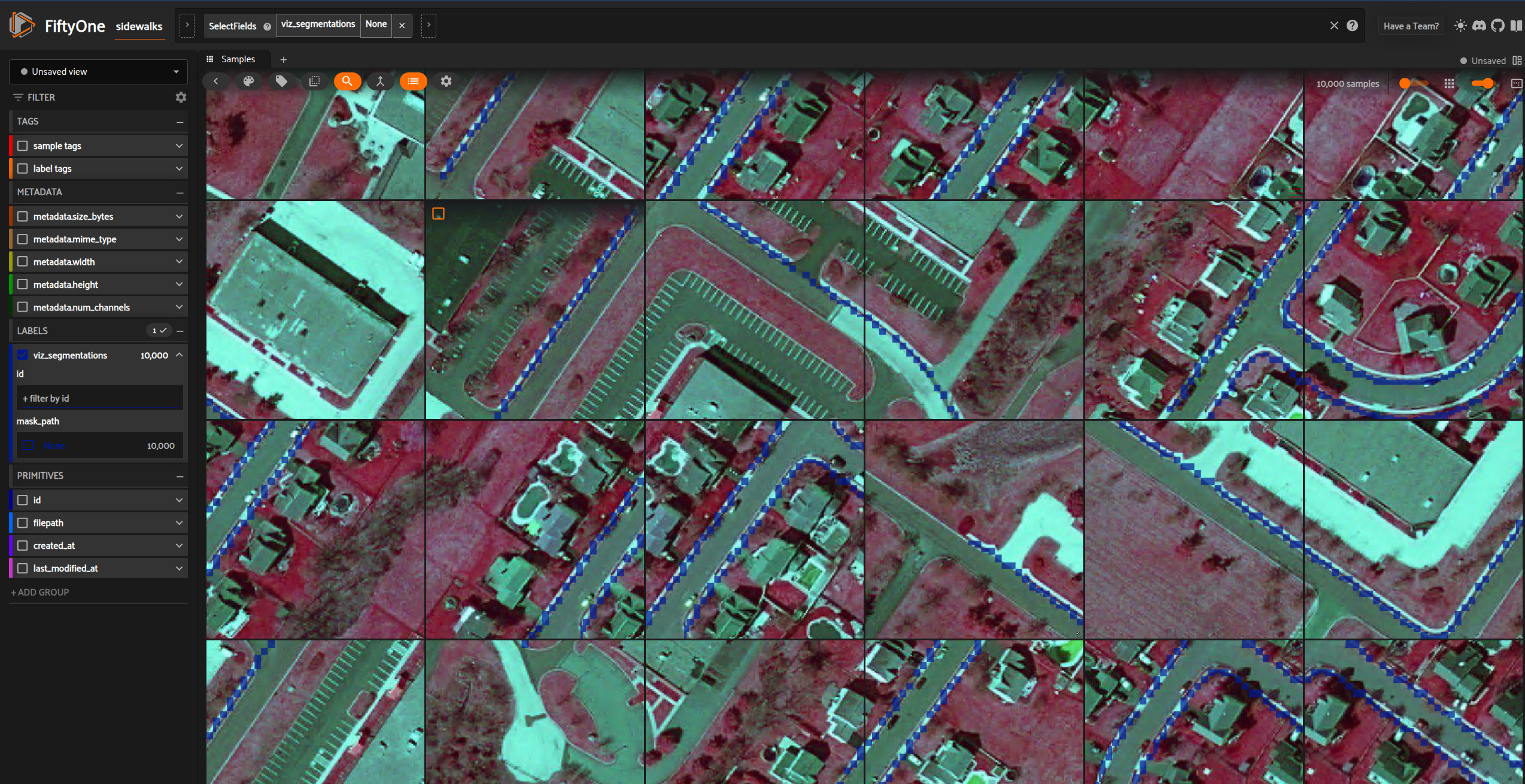
## Data Visualization
***
[Edit this page on GitHub](https://github.com/aegean-ai/eaia/edit/main/src/products/applications/remote-sensing/datasets/index.mdx) or [file an issue](https://github.com/aegean-ai/eaia/issues/new/choose).
 ## Introduction
In this section we showcase how the AI agent helps maintain an *[open lakehouse stack](https://motherduck.com/blog/open-lakehouse-stack-duckdb-table-formats/)* specifically for GIS datasets. The agent is capable of ingesting, processing, and visualizing raster and vector data in a variety of formats, including COG GeoTIFF, RaQuet and GeoParquet.
### GIS-specific Dataset formats
The following video provides an overview of the plethora of dataformats we need to be able to use in GIS applications.
### Raster Data in the Open Lakehouse
RaQuet (pronounced "rock-et") is CARTO's new specification for storing raster data directly in Apache Parquet, the ubiquitous columnar format in modern data warehouses:
A RaQuet row is a single tile block identified by a Web Mercator z/x/y quadbin in a block column. The format includes per band binary blobs eg. columns band\_1, band\_2, … hold row-major-order pixel data (optionally gzip-compressed). Metadata are stored in the file itself - a special "block = 0x00" row stores JSON metadata (coverage area, resolution, data type), much like GeoParquet. The format allows in-memory databases such as DuckDB to use SELECT specific tiles or bands, join against vector tables, and leverage Parquet pruning & predicate pushdown.
### DuckDB Compute Engine
#### Predicate Pushdown Example
Parquet files are divided into *row groups*, and each row group carries metadata (min/max statistics) for every column. When you run a query with a `WHERE` clause, DuckDB will:
* Read *only* the metadata for the relevant column(s) from each row group.
* Use your filter predicate (e.g. `block = 12345`) to decide which row groups *could* contain matching rows.
* **Skip** scanning any row group whose metadata shows it can't match.
* Only actually read & decode the matching row groups.
This avoids reading, and decompressing, most of the file when your filter is selective.
Suppose you have a RaQuet/Parquet file named `raquet.parquet` with these columns:
* `block` (an integer quadbin ID)
* `band_1`, `band_2`, … (binary or numeric arrays)
Here's how you'd see predicate pushdown in action:
```sql theme={null}
-- Start DuckDB in a shell or Python REPL:
-- $ duckdb
-- 1) Enable query profiling to see how many row-groups are scanned:
PRAGMA show_progress = true;
-- 2) Run a filter that only hits one block:
SELECT COUNT(*)
FROM read_parquet('raquet.parquet')
WHERE block = 120124381;
```
**What you'll observe** in the console:
```
[ OK ] Scanned 1/10 row-groups ( 10%) | 0.003s
```
That line tells you DuckDB read just 1 of 10 row groups, skipping the other 90%, because only the one group could possibly contain `block = 120124381`. That's **predicate pushdown**.
#### Partition Pruning Example
If you organize your files in a directory structure that encodes a "partition" column, e.g.:
```
data/
block=12345/
part-000.parquet
block=67890/
part-001.parquet
```
, then DuckDB can inspect your `WHERE block = …` filter **before** even opening those files, and skip entire directories that don't match. That's partition pruning.
For example, if your tiles are laid out as:
```
tiles/
block=120124381/
part-000.parquet
block=120124382/
part-001.parquet
```
You could write:
```sql theme={null}
-- Point DuckDB at the directory:
CREATE TABLE raster AS
SELECT *
FROM read_parquet('tiles/');
-- Now run a query:
SELECT band_1
FROM raster
WHERE block = 120124382;
```
DuckDB will **never open** the `block=120124381/` folder, because it infers from the path that `block` there ≠ your filter value. That's **partition pruning**, whole files (or directories) are skipped up-front.
## Data Visualization
## Introduction
In this section we showcase how the AI agent helps maintain an *[open lakehouse stack](https://motherduck.com/blog/open-lakehouse-stack-duckdb-table-formats/)* specifically for GIS datasets. The agent is capable of ingesting, processing, and visualizing raster and vector data in a variety of formats, including COG GeoTIFF, RaQuet and GeoParquet.
### GIS-specific Dataset formats
The following video provides an overview of the plethora of dataformats we need to be able to use in GIS applications.
### Raster Data in the Open Lakehouse
RaQuet (pronounced "rock-et") is CARTO's new specification for storing raster data directly in Apache Parquet, the ubiquitous columnar format in modern data warehouses:
A RaQuet row is a single tile block identified by a Web Mercator z/x/y quadbin in a block column. The format includes per band binary blobs eg. columns band\_1, band\_2, … hold row-major-order pixel data (optionally gzip-compressed). Metadata are stored in the file itself - a special "block = 0x00" row stores JSON metadata (coverage area, resolution, data type), much like GeoParquet. The format allows in-memory databases such as DuckDB to use SELECT specific tiles or bands, join against vector tables, and leverage Parquet pruning & predicate pushdown.
### DuckDB Compute Engine
#### Predicate Pushdown Example
Parquet files are divided into *row groups*, and each row group carries metadata (min/max statistics) for every column. When you run a query with a `WHERE` clause, DuckDB will:
* Read *only* the metadata for the relevant column(s) from each row group.
* Use your filter predicate (e.g. `block = 12345`) to decide which row groups *could* contain matching rows.
* **Skip** scanning any row group whose metadata shows it can't match.
* Only actually read & decode the matching row groups.
This avoids reading, and decompressing, most of the file when your filter is selective.
Suppose you have a RaQuet/Parquet file named `raquet.parquet` with these columns:
* `block` (an integer quadbin ID)
* `band_1`, `band_2`, … (binary or numeric arrays)
Here's how you'd see predicate pushdown in action:
```sql theme={null}
-- Start DuckDB in a shell or Python REPL:
-- $ duckdb
-- 1) Enable query profiling to see how many row-groups are scanned:
PRAGMA show_progress = true;
-- 2) Run a filter that only hits one block:
SELECT COUNT(*)
FROM read_parquet('raquet.parquet')
WHERE block = 120124381;
```
**What you'll observe** in the console:
```
[ OK ] Scanned 1/10 row-groups ( 10%) | 0.003s
```
That line tells you DuckDB read just 1 of 10 row groups, skipping the other 90%, because only the one group could possibly contain `block = 120124381`. That's **predicate pushdown**.
#### Partition Pruning Example
If you organize your files in a directory structure that encodes a "partition" column, e.g.:
```
data/
block=12345/
part-000.parquet
block=67890/
part-001.parquet
```
, then DuckDB can inspect your `WHERE block = …` filter **before** even opening those files, and skip entire directories that don't match. That's partition pruning.
For example, if your tiles are laid out as:
```
tiles/
block=120124381/
part-000.parquet
block=120124382/
part-001.parquet
```
You could write:
```sql theme={null}
-- Point DuckDB at the directory:
CREATE TABLE raster AS
SELECT *
FROM read_parquet('tiles/');
-- Now run a query:
SELECT band_1
FROM raster
WHERE block = 120124382;
```
DuckDB will **never open** the `block=120124381/` folder, because it infers from the path that `block` there ≠ your filter value. That's **partition pruning**, whole files (or directories) are skipped up-front.
## Data Visualization
 ***
***