

Open In Colab

Stream COCO for object detection training with Hugging Face datasets

The COCO dataset is a cornerstone benchmark for object detection, but at ~20 GB it takes significant time and disk space to download. Hugging Face datasets streaming lets you train on COCO without downloading the full dataset — images are fetched on-the-fly as your training loop requests them. In this tutorial you will:
  1. Stream COCO from the detection-datasets/coco repository
  2. Build a PyTorch DataLoader that works with the streaming IterableDataset
  3. Fine-tune a Faster R-CNN model for 100 training steps
  4. Run inference and visualize predictions with bounding box overlays

Prerequisites

Install the required packages (if not already present):
%pip install -q datasets torch torchvision matplotlib
Note: you may need to restart the kernel to use updated packages.

Load COCO with streaming

With streaming=True, no data is downloaded upfront. The dataset returns an IterableDataset that fetches examples on demand.
from datasets import load_dataset

ds = load_dataset("detection-datasets/coco", split="train", streaming=True)
print(ds)
/workspaces/eng-ai-agents/.venv/lib/python3.11/site-packages/tqdm/auto.py:21: TqdmWarning: IProgress not found. Please update jupyter and ipywidgets. See https://ipywidgets.readthedocs.io/en/stable/user_install.html
  from .autonotebook import tqdm as notebook_tqdm
Warning: You are sending unauthenticated requests to the HF Hub. Please set a HF_TOKEN to enable higher rate limits and faster downloads.
IterableDataset({
    features: ['image_id', 'image', 'width', 'height', 'objects'],
    num_shards: 40
})
Let’s peek at the schema by grabbing one example.
sample = next(iter(ds))
print("Keys:", list(sample.keys()))
print("Image size:", sample["image"].size)
print("Number of objects:", len(sample["objects"]["bbox"]))
print("First bbox (COCO xywh):", sample["objects"]["bbox"][0])
print("Categories:", sample["objects"]["category"][:5])
Keys: ['image_id', 'image', 'width', 'height', 'objects']
Image size: (640, 480)
Number of objects: 8
First bbox (COCO xywh): [1.08, 187.69, 612.6700000000001, 473.53]
Categories: [45, 45, 50, 45, 49]

Preprocess for detection

Faster R-CNN expects:
  • Images as float32 tensors in [0, 1] range
  • Targets as a list of dicts with boxes (xyxy format) and labels
COCO bounding boxes are in [x, y, width, height] format, so we convert to [x1, y1, x2, y2].
import torch
from torchvision import transforms
from torchvision.transforms import functional as F

RESIZE = 640


def transform_example(example):
    """Convert a single HF dataset example to Faster R-CNN format."""
    img = example["image"].convert("RGB")
    orig_w, orig_h = img.size

    # Resize image
    img = F.resize(img, [RESIZE, RESIZE])
    img_tensor = F.to_tensor(img)  # [C, H, W] in [0, 1]

    # Scale factors for bbox adjustment
    sx = RESIZE / orig_w
    sy = RESIZE / orig_h

    # Convert COCO xywh -> xyxy and scale
    boxes = []
    for bbox in example["objects"]["bbox"]:
        x, y, w, h = bbox
        boxes.append([x * sx, y * sy, (x + w) * sx, (y + h) * sy])

    # Category IDs (shift by +1 since 0 is background in torchvision)
    labels = [cat + 1 for cat in example["objects"]["category"]]

    target = {
        "boxes": torch.tensor(boxes, dtype=torch.float32),
        "labels": torch.tensor(labels, dtype=torch.int64),
    }
    return img_tensor, target

Build a streaming DataLoader

Since IterableDataset from HF datasets inherits from torch.utils.data.IterableDataset, we can pass it directly to a DataLoader. We use a custom collate function because detection targets have variable-length box lists.
from torch.utils.data import DataLoader


class COCOStreamDataset(torch.utils.data.IterableDataset):
    """Wraps the HF streaming dataset with detection preprocessing."""

    def __init__(self, hf_dataset):
        self.hf_dataset = hf_dataset

    def __iter__(self):
        for example in self.hf_dataset:
            img, target = transform_example(example)
            # Skip examples with no boxes
            if target["boxes"].numel() > 0:
                yield img, target


def collate_fn(batch):
    """Custom collate — detection targets are variable-length."""
    images = [item[0] for item in batch]
    targets = [item[1] for item in batch]
    return images, targets


stream_ds = COCOStreamDataset(ds.shuffle(seed=42, buffer_size=1000))
dataloader = DataLoader(stream_ds, batch_size=4, collate_fn=collate_fn)

# Quick sanity check
images, targets = next(iter(dataloader))
print(f"Batch: {len(images)} images")
print(f"First image shape: {images[0].shape}")
print(f"First target boxes: {targets[0]['boxes'].shape}")
Batch: 4 images
First image shape: torch.Size([3, 640, 640])
First target boxes: torch.Size([1, 4])

Visualize a batch

Let’s draw bounding boxes on a batch of images to verify the preprocessing.
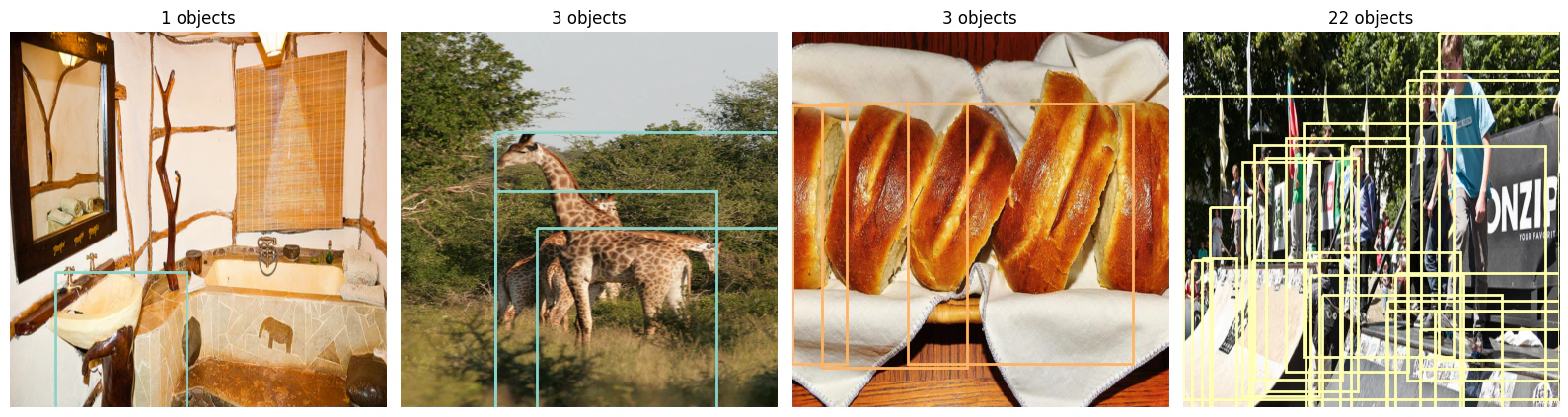
import matplotlib.pyplot as plt
import matplotlib.patches as patches
import numpy as np


def show_batch(images, targets, max_images=4):
    """Display images with bounding box overlays."""
    fig, axes = plt.subplots(1, min(len(images), max_images), figsize=(16, 5))
    if not isinstance(axes, np.ndarray):
        axes = [axes]

    colors = plt.cm.Set3(np.linspace(0, 1, 12))

    for ax, img, tgt in zip(axes, images, targets):
        ax.imshow(img.permute(1, 2, 0).numpy())
        for i, (box, label) in enumerate(zip(tgt["boxes"], tgt["labels"])):
            x1, y1, x2, y2 = box.tolist()
            color = colors[label.item() % len(colors)]
            rect = patches.Rectangle(
                (x1, y1), x2 - x1, y2 - y1,
                linewidth=2, edgecolor=color, facecolor="none"
            )
            ax.add_patch(rect)
        ax.set_title(f"{len(tgt['boxes'])} objects")
        ax.axis("off")

    plt.tight_layout()
    plt.show()


show_batch(images, targets)
Output from cell 6

Train with Faster R-CNN

We use fasterrcnn_resnet50_fpn_v2 pretrained on COCO and fine-tune for 100 steps as a demonstration. In a real scenario you would train for many more steps and evaluate on the validation split.
from torchvision.models.detection import fasterrcnn_resnet50_fpn_v2, FasterRCNN_ResNet50_FPN_V2_Weights

device = torch.device("cuda" if torch.cuda.is_available() else "cpu")
print(f"Using device: {device}")

model = fasterrcnn_resnet50_fpn_v2(weights=FasterRCNN_ResNet50_FPN_V2_Weights.DEFAULT)
model.to(device)
model.train()

optimizer = torch.optim.SGD(
    model.parameters(), lr=0.001, momentum=0.9, weight_decay=0.0005
)

NUM_STEPS = 100
LOG_EVERY = 10

# Rebuild the dataloader for training (fresh iterator)
train_ds = COCOStreamDataset(
    load_dataset("detection-datasets/coco", split="train", streaming=True)
    .shuffle(seed=42, buffer_size=1000)
)
train_loader = DataLoader(train_ds, batch_size=4, collate_fn=collate_fn)

running_loss = 0.0
for step, (imgs, tgts) in enumerate(train_loader):
    if step >= NUM_STEPS:
        break

    imgs = [img.to(device) for img in imgs]
    tgts = [{k: v.to(device) for k, v in t.items()} for t in tgts]

    loss_dict = model(imgs, tgts)
    losses = sum(loss for loss in loss_dict.values())

    optimizer.zero_grad()
    losses.backward()
    optimizer.step()

    running_loss += losses.item()
    if (step + 1) % LOG_EVERY == 0:
        avg_loss = running_loss / LOG_EVERY
        print(f"Step [{step + 1}/{NUM_STEPS}]  Loss: {avg_loss:.4f}")
        running_loss = 0.0

print("Training complete.")
Using device: cuda
Downloading: "https://download.pytorch.org/models/fasterrcnn_resnet50_fpn_v2_coco-dd69338a.pth" to /home/vscode/.cache/torch/hub/checkpoints/fasterrcnn_resnet50_fpn_v2_coco-dd69338a.pth

  0%|          | 0.00/167M [00:00<?, ?B/s]

  1%|          | 2.00M/167M [00:00<00:09, 17.8MB/s]

  3%|▎         | 5.50M/167M [00:00<00:06, 28.2MB/s]

  6%|▌         | 9.75M/167M [00:00<00:04, 33.3MB/s]

 10%|▉         | 15.9M/167M [00:00<00:03, 39.9MB/s]

 14%|█▎        | 22.8M/167M [00:00<00:03, 49.4MB/s]

 17%|█▋        | 28.6M/167M [00:00<00:02, 50.9MB/s]

 21%|██        | 34.9M/167M [00:00<00:02, 53.5MB/s]

 24%|██▍       | 40.5M/167M [00:00<00:02, 55.0MB/s]

 27%|██▋       | 45.9M/167M [00:00<00:02, 55.0MB/s]

 31%|███       | 51.6M/167M [00:01<00:02, 55.8MB/s]

 34%|███▍      | 57.4M/167M [00:01<00:02, 55.6MB/s]

 38%|███▊      | 63.2M/167M [00:01<00:01, 55.7MB/s]

 41%|████      | 68.6M/167M [00:01<00:01, 53.0MB/s]

 44%|████▍     | 73.8M/167M [00:01<00:01, 50.9MB/s]

 48%|████▊     | 80.9M/167M [00:01<00:01, 50.9MB/s]

 53%|█████▎    | 88.6M/167M [00:01<00:01, 58.7MB/s]

 56%|█████▋    | 94.4M/167M [00:01<00:01, 55.8MB/s]

 60%|█████▉    | 99.9M/167M [00:02<00:01, 55.6MB/s]

 63%|██████▎   | 105M/167M [00:02<00:01, 52.5MB/s]

 66%|██████▌   | 110M/167M [00:02<00:01, 51.3MB/s]

 69%|██████▉   | 115M/167M [00:02<00:01, 50.2MB/s]

 72%|███████▏  | 121M/167M [00:02<00:00, 52.4MB/s]

 76%|███████▌  | 127M/167M [00:02<00:00, 54.0MB/s]

 79%|███████▉  | 132M/167M [00:02<00:00, 52.7MB/s]

 82%|████████▏ | 138M/167M [00:02<00:00, 50.2MB/s]

 86%|████████▌ | 144M/167M [00:02<00:00, 54.3MB/s]

 90%|████████▉ | 150M/167M [00:03<00:00, 53.4MB/s]

 93%|█████████▎| 155M/167M [00:03<00:00, 53.5MB/s]

 96%|█████████▌| 161M/167M [00:03<00:00, 55.6MB/s]

100%|█████████▉| 166M/167M [00:03<00:00, 54.7MB/s]

100%|██████████| 167M/167M [00:03<00:00, 52.2MB/s]
Step [10/100]  Loss: 1.2061
Step [20/100]  Loss: 0.9817
Step [30/100]  Loss: 0.9397
Step [40/100]  Loss: 0.8483
Step [50/100]  Loss: 0.8136
Step [60/100]  Loss: 0.7013
Step [70/100]  Loss: 0.7319
Step [80/100]  Loss: 0.8650
Step [90/100]  Loss: 0.5921
Step [100/100]  Loss: 0.6465
Training complete.

Run inference

Switch to eval mode and visualize predictions on a few streamed images. We keep predictions with confidence > 0.5.
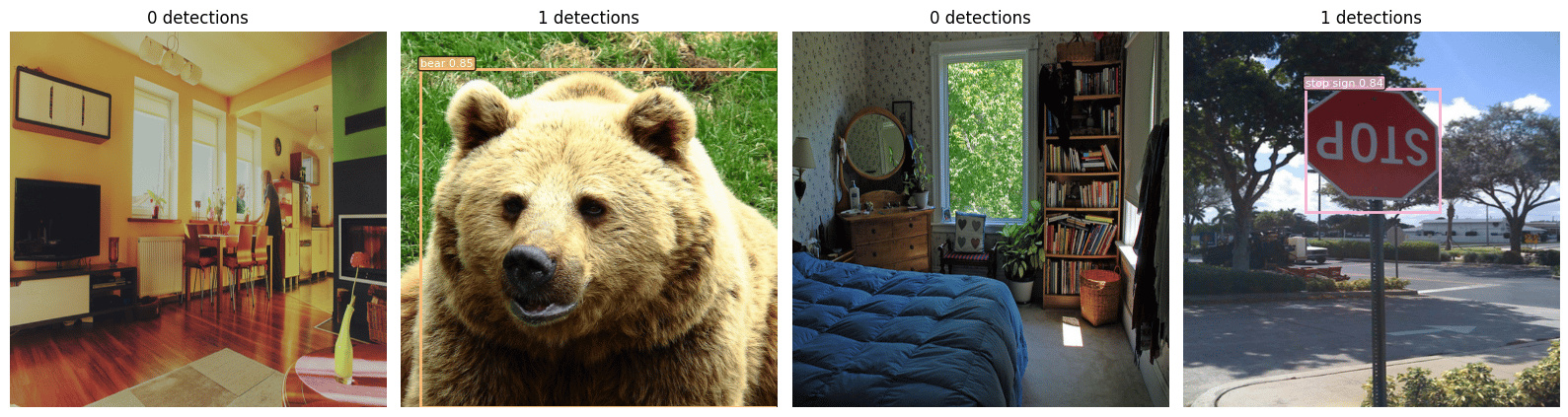
# COCO category names (91 categories, index 0 = background)
COCO_NAMES = [
    "__background__", "person", "bicycle", "car", "motorcycle", "airplane", "bus",
    "train", "truck", "boat", "traffic light", "fire hydrant", "N/A", "stop sign",
    "parking meter", "bench", "bird", "cat", "dog", "horse", "sheep", "cow",
    "elephant", "bear", "zebra", "giraffe", "N/A", "backpack", "umbrella", "N/A",
    "N/A", "handbag", "tie", "suitcase", "frisbee", "skis", "snowboard",
    "sports ball", "kite", "baseball bat", "baseball glove", "skateboard",
    "surfboard", "tennis racket", "bottle", "N/A", "wine glass", "cup", "fork",
    "knife", "spoon", "bowl", "banana", "apple", "sandwich", "orange", "broccoli",
    "carrot", "hot dog", "pizza", "donut", "cake", "chair", "couch",
    "potted plant", "bed", "N/A", "dining table", "N/A", "N/A", "toilet", "N/A",
    "tv", "laptop", "mouse", "remote", "keyboard", "cell phone", "microwave",
    "oven", "toaster", "sink", "refrigerator", "N/A", "book", "clock", "vase",
    "scissors", "teddy bear", "hair drier", "toothbrush",
]


def show_predictions(images, predictions, score_threshold=0.5, max_images=4):
    """Display images with predicted bounding boxes and labels."""
    fig, axes = plt.subplots(1, min(len(images), max_images), figsize=(16, 5))
    if not isinstance(axes, np.ndarray):
        axes = [axes]

    colors = plt.cm.tab20(np.linspace(0, 1, 20))

    for ax, img, pred in zip(axes, images, predictions):
        ax.imshow(img.cpu().permute(1, 2, 0).numpy())
        keep = pred["scores"] > score_threshold
        boxes = pred["boxes"][keep]
        labels = pred["labels"][keep]
        scores = pred["scores"][keep]

        for box, label, score in zip(boxes, labels, scores):
            x1, y1, x2, y2 = box.cpu().tolist()
            color = colors[label.item() % len(colors)]
            rect = patches.Rectangle(
                (x1, y1), x2 - x1, y2 - y1,
                linewidth=2, edgecolor=color, facecolor="none"
            )
            ax.add_patch(rect)
            name = COCO_NAMES[label.item()] if label.item() < len(COCO_NAMES) else str(label.item())
            ax.text(
                x1, y1 - 5, f"{name} {score:.2f}",
                color="white", fontsize=8,
                bbox=dict(boxstyle="round,pad=0.2", facecolor=color, alpha=0.8),
            )
        ax.set_title(f"{len(boxes)} detections")
        ax.axis("off")

    plt.tight_layout()
    plt.show()
# Stream a few validation images for inference
val_ds = COCOStreamDataset(
    load_dataset("detection-datasets/coco", split="val", streaming=True)
)
val_loader = DataLoader(val_ds, batch_size=4, collate_fn=collate_fn)

model.eval()
with torch.no_grad():
    val_images, val_targets = next(iter(val_loader))
    val_images_device = [img.to(device) for img in val_images]
    predictions = model(val_images_device)

show_predictions(val_images_device, predictions, score_threshold=0.5)
Output from cell 9

Next steps

  • Scale up training: increase NUM_STEPS, add a learning rate scheduler, and evaluate on the full validation split with mAP metrics.
  • Try YOLOv11: explore our YOLOv11 from-scratch notebooks for a different detection architecture built entirely in PyTorch for a different detection architecture built entirely in PyTorch.
  • Explore HF streaming: the Hugging Face datasets streaming guide covers advanced features like multi-worker loading, shuffling strategies, and checkpoint resumption with StatefulDataLoader.