




Environment setup
Configure your API keys
To run this notebook, you need to provide your HuggingFace Token and Roboflow API key.- The
ROBOFLOW_API_KEYis required to pull the fine-tuned RF-DETR player detector and the SmolVLM2 number recognizer from Roboflow Universe. - The
HF_TOKENis required to pull the pretrained SigLIP model from HuggingFace.
- Open your
HuggingFace Settingspage. ClickAccess TokensthenNew Tokento generate a new token. - Go to your
Roboflow Settingspage. ClickCopy. This will place your private key in the clipboard. - In Colab, go to the left pane and click on
Secrets(🔑).- Store the HuggingFace Access Token under the name
HF_TOKEN. - Store the Roboflow API Key under the name
ROBOFLOW_API_KEY.
- Store the HuggingFace Access Token under the name
import os
from google.colab import userdata

os.environ["HF_TOKEN"] = userdata.get("HF_TOKEN")
os.environ["ROBOFLOW_API_KEY"] = userdata.get("ROBOFLOW_API_KEY")
Check GPU availability
Let’s make sure we have access to a GPU. Run thenvidia-smi command to verify. If you run into issues, go to Runtime -> Change runtime type, select T4 GPU or L4 GPU, and then click Save.
!nvidia-smi
Wed Nov 26 11:52:28 2025
+-----------------------------------------------------------------------------------------+
| NVIDIA-SMI 550.54.15              Driver Version: 550.54.15      CUDA Version: 12.4     |
|-----------------------------------------+------------------------+----------------------+
| GPU  Name                 Persistence-M | Bus-Id          Disp.A | Volatile Uncorr. ECC |
| Fan  Temp   Perf          Pwr:Usage/Cap |           Memory-Usage | GPU-Util  Compute M. |
|                                         |                        |               MIG M. |
|=========================================+========================+======================|
|   0  NVIDIA A100-SXM4-80GB          Off |   00000000:00:05.0 Off |                    0 |
| N/A   31C    P0             52W /  400W |       0MiB /  81920MiB |      0%      Default |
|                                         |                        |             Disabled |
+-----------------------------------------+------------------------+----------------------+

+-----------------------------------------------------------------------------------------+
| Processes:                                                                              |
|  GPU   GI   CI        PID   Type   Process name                              GPU Memory |
|        ID   ID                                                               Usage      |
|=========================================================================================|
|  No running processes found                                                             |
+-----------------------------------------------------------------------------------------+
HOME constant.
from pathlib import Path

HOME = Path.cwd()
print("HOME:", HOME)
HOME: /content
Install SAM2 real-time
We will usesegment-anything-2-real-time, an open-source fork of Meta’s Segment Anything Model 2 optimized for real-time inference. After installing the repository, we will also download the required checkpoint files.
!git clone https://github.com/Gy920/segment-anything-2-real-time.git
%cd {HOME}/segment-anything-2-real-time
!pip install -e . -q
!python setup.py build_ext --inplace
!(cd checkpoints && bash download_ckpts.sh)
Install dependencies
!pip install -q gdown
!pip install -q inference-gpu

!pip install supervision==0.27.0
!pip install -q git+https://github.com/roboflow/sports.git@feat/basketball

!pip install -q transformers num2words
# !pip install -q flash-attn --no-build-isolation
import os

os.environ["ONNXRUNTIME_EXECUTION_PROVIDERS"] = "[CUDAExecutionProvider]"
Source videos
As an example, we will use sample videos from Game 1 of the 2025 NBA Playoffs between the Boston Celtics and the New York Knicks. We prepared 10 sample videos from this game.SOURCE_VIDEO_DIRECTORY = HOME / "source"
!gdown -q https://drive.google.com/drive/folders/1eDJYqQ77Fytz15tKGdJCMeYSgmoQ-2-H -O {SOURCE_VIDEO_DIRECTORY} --folder
!ls -la {SOURCE_VIDEO_DIRECTORY}
total 73108
drwxr-xr-x 2 root root     4096 Nov 26 12:02 .
drwxr-xr-x 1 root root     4096 Nov 26 12:01 ..
-rw-r--r-- 1 root root  8297338 May 20  2025 boston-celtics-new-york-knicks-game-1-q1-01.54-01.48.mp4
-rw-r--r-- 1 root root  6596558 May 20  2025 boston-celtics-new-york-knicks-game-1-q1-03.16-03.11.mp4
-rw-r--r-- 1 root root 10443619 May 20  2025 boston-celtics-new-york-knicks-game-1-q1-04.28-04.20.mp4
-rw-r--r-- 1 root root  6156208 May 20  2025 boston-celtics-new-york-knicks-game-1-q1-04.44-04.39.mp4
-rw-r--r-- 1 root root  5251332 May 20  2025 boston-celtics-new-york-knicks-game-1-q1-05.13-05.09.mp4
-rw-r--r-- 1 root root  7956046 May 20  2025 boston-celtics-new-york-knicks-game-1-q1-06.00-05.54.mp4
-rw-r--r-- 1 root root  9276239 May 20  2025 boston-celtics-new-york-knicks-game-1-q1-07.41-07.34.mp4
-rw-r--r-- 1 root root  7319631 May 20  2025 boston-celtics-new-york-knicks-game-1-q2-08.09-08.03.mp4
-rw-r--r-- 1 root root  8770496 May 20  2025 boston-celtics-new-york-knicks-game-1-q2-08.43-08.38.mp4
-rw-r--r-- 1 root root  4763755 May 20  2025 boston-celtics-new-york-knicks-game-1-q2-10.36-10.32.mp4
SOURCE_VIDEO_PATH = SOURCE_VIDEO_DIRECTORY / "boston-celtics-new-york-knicks-game-1-q1-04.28-04.20.mp4"
Team rosters
We are preparing player rosters for both teams. We load the official lists that link jersey numbers to player names. These mappings will let us replace detected numbers with real names, making the final analytics clear and readable.TEAM_ROSTERS = {
"New York Knicks": {
"55": "Hukporti",
"1": "Payne",
"0": "Wright",
"11": "Brunson",
"3": "Hart",
"32": "Towns",
"44": "Shamet",
"25": "Bridges",
"2": "McBride",
"23": "Robinson",
"8": "Anunoby",
"4": "Dadiet",
"5": "Achiuwa",
"13": "Kolek"
},
"Boston Celtics": {
"42": "Horford",
"55": "Scheierman",
"9": "White",
"20": "Davison",
"7": "Brown",
"0": "Tatum",
"27": "Walsh",
"4": "Holiday",
"8": "Porzingis",
"40": "Kornet",
"88": "Queta",
"11": "Pritchard",
"30": "Hauser",
"12": "Craig",
"26": "Tillman"
}
}
TEAM_COLORS = {
"New York Knicks": "#006BB6",
"Boston Celtics": "#007A33"
}
Import dependencies
from IPython.display import Video
from typing import Dict, List, Optional, Union, Iterable, Tuple
from operator import itemgetter

import cv2
import numpy as np
import torch
from tqdm import tqdm

import supervision as sv
from inference import get_model
from sports import (
    clean_paths,
    ConsecutiveValueTracker,
    TeamClassifier,
    MeasurementUnit,
    ViewTransformer
)
from sports.basketball import (
    CourtConfiguration,
    League,
    draw_court,
    draw_points_on_court,
    draw_paths_on_court,
    draw_made_and_miss_on_court,
    ShotEventTracker
)
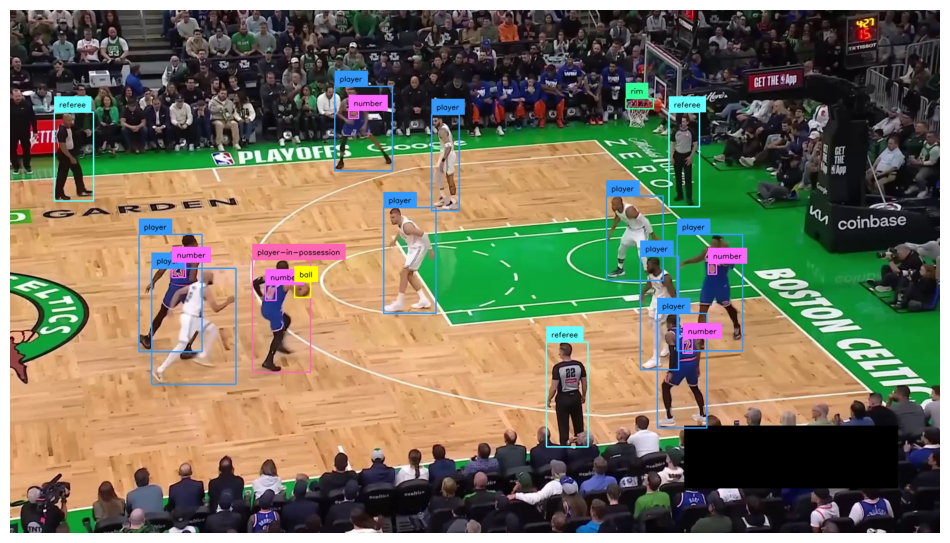
Object detection
The model used in this notebook detects the following classes:ball, ball-in-basket, number, player, player-in-possession, player-jump-shot, player-layup-dunk, player-shot-block, referee, and rim. These classes enable tracking of game events, player actions, and ball location for basketball analytics.
Load RF-DETR object detection model
PLAYER_DETECTION_MODEL_ID = "basketball-player-detection-3-ycjdo/4"
PLAYER_DETECTION_MODEL_CONFIDENCE = 0.4
PLAYER_DETECTION_MODEL_IOU_THRESHOLD = 0.9
PLAYER_DETECTION_MODEL = get_model(model_id=PLAYER_DETECTION_MODEL_ID)

COLOR = sv.ColorPalette.from_hex([
    "#ffff00", "#ff9b00", "#ff66ff", "#3399ff", "#ff66b2", "#ff8080",
    "#b266ff", "#9999ff", "#66ffff", "#33ff99", "#66ff66", "#99ff00"
])
Single frame object detection
box_annotator = sv.BoxAnnotator(color=COLOR, thickness=2)
label_annotator = sv.LabelAnnotator(color=COLOR, text_color=sv.Color.BLACK)

frame_generator = sv.get_video_frames_generator(SOURCE_VIDEO_PATH)
frame = next(frame_generator)

result = PLAYER_DETECTION_MODEL.infer(frame, confidence=PLAYER_DETECTION_MODEL_CONFIDENCE, iou_threshold=PLAYER_DETECTION_MODEL_IOU_THRESHOLD)[0]
detections = sv.Detections.from_inference(result)

annotated_frame = frame.copy()
annotated_frame = box_annotator.annotate(
    scene=annotated_frame,
    detections=detections)
annotated_frame = label_annotator.annotate(
    scene=annotated_frame,
    detections=detections)

sv.plot_image(annotated_frame)
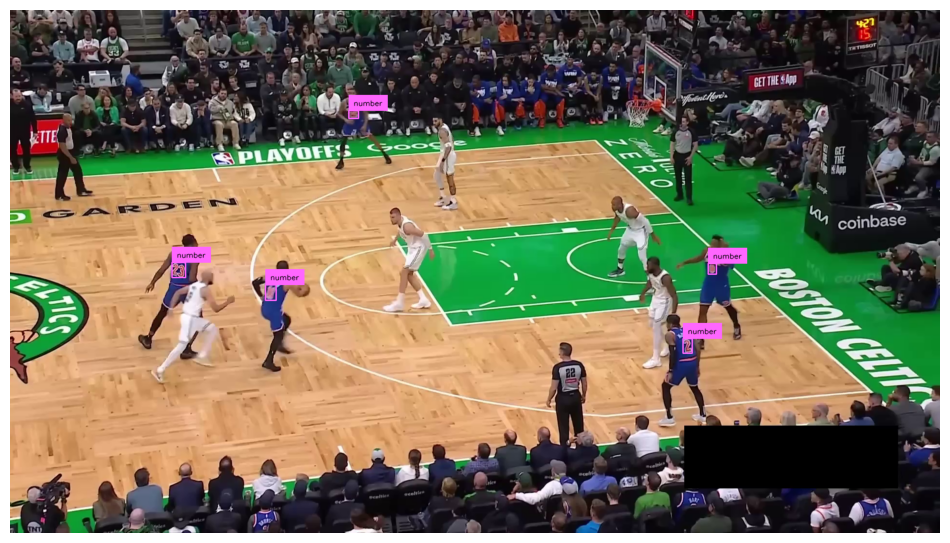
Keep only “number” class
NUMBER_CLASS_ID = 2

box_annotator = sv.BoxAnnotator(color=COLOR, thickness=2)
label_annotator = sv.LabelAnnotator(color=COLOR, text_color=sv.Color.BLACK)

frame_generator = sv.get_video_frames_generator(SOURCE_VIDEO_PATH)
frame = next(frame_generator)

result = PLAYER_DETECTION_MODEL.infer(frame, confidence=PLAYER_DETECTION_MODEL_CONFIDENCE, iou_threshold=PLAYER_DETECTION_MODEL_IOU_THRESHOLD)[0]
detections = sv.Detections.from_inference(result)
detections = detections[detections.class_id == NUMBER_CLASS_ID]

annotated_frame = frame.copy()
annotated_frame = box_annotator.annotate(
    scene=annotated_frame,
    detections=detections)
annotated_frame = label_annotator.annotate(
    scene=annotated_frame,
    detections=detections)

sv.plot_image(annotated_frame)
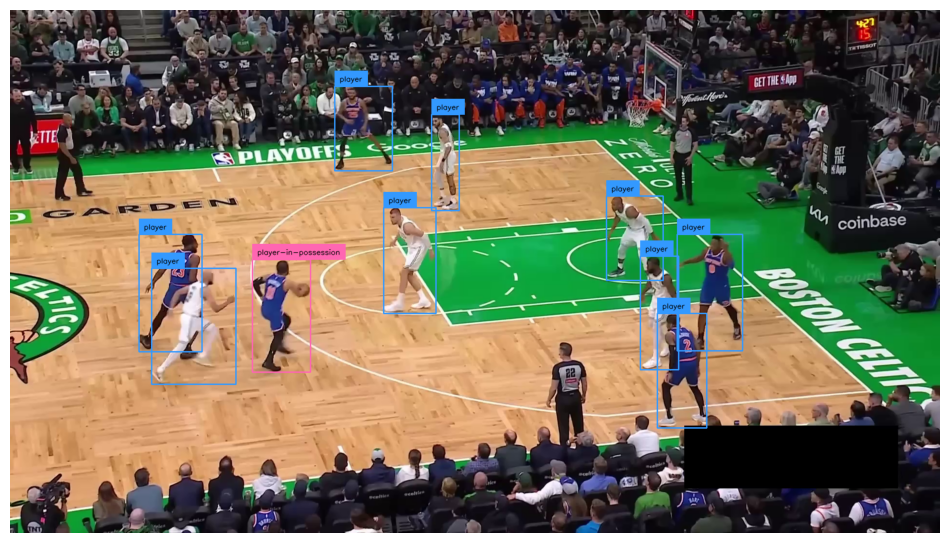
Keep only player-related classes
PLAYER_CLASS_IDS = [3, 4, 5, 6, 7] # player, player-in-possession, player-jump-shot, player-layup-dunk, player-shot-block

box_annotator = sv.BoxAnnotator(color=COLOR, thickness=2)
label_annotator = sv.LabelAnnotator(color=COLOR, text_color=sv.Color.BLACK)

frame_generator = sv.get_video_frames_generator(SOURCE_VIDEO_PATH)
frame = next(frame_generator)

result = PLAYER_DETECTION_MODEL.infer(frame, confidence=PLAYER_DETECTION_MODEL_CONFIDENCE, iou_threshold=PLAYER_DETECTION_MODEL_IOU_THRESHOLD)[0]
detections = sv.Detections.from_inference(result)
detections = detections[np.isin(detections.class_id, PLAYER_CLASS_IDS)]

annotated_frame = frame.copy()
annotated_frame = box_annotator.annotate(
    scene=annotated_frame,
    detections=detections)
annotated_frame = label_annotator.annotate(
    scene=annotated_frame,
    detections=detections)

sv.plot_image(annotated_frame)
Full video object detection
We are running RF-DETR across all frames to produce a per-frame sequence of detections. These sequences seed tracking and provide number crops over time.TARGET_VIDEO_PATH = HOME / f"{SOURCE_VIDEO_PATH.stem}-detection{SOURCE_VIDEO_PATH.suffix}"
TARGET_VIDEO_COMPRESSED_PATH = HOME / f"{TARGET_VIDEO_PATH.stem}-detection{TARGET_VIDEO_PATH.suffix}"
box_annotator = sv.BoxAnnotator(color=COLOR, thickness=2)
label_annotator = sv.LabelAnnotator(color=COLOR, text_color=sv.Color.BLACK)
def callback(frame: np.ndarray, index: int) -> np.ndarray:
result = PLAYER_DETECTION_MODEL.infer(frame, confidence=PLAYER_DETECTION_MODEL_CONFIDENCE, iou_threshold=PLAYER_DETECTION_MODEL_IOU_THRESHOLD)[0]
detections = sv.Detections.from_inference(result)
annotated_frame = frame.copy()
annotated_frame = box_annotator.annotate(
scene=annotated_frame,
detections=detections)
annotated_frame = label_annotator.annotate(
scene=annotated_frame,
detections=detections)
return annotated_frame
sv.process_video(
source_path=SOURCE_VIDEO_PATH,
target_path=TARGET_VIDEO_PATH,
callback=callback,
show_progress=True
)
!ffmpeg -y -loglevel error -i {TARGET_VIDEO_PATH} -vcodec libx264 -crf 28 {TARGET_VIDEO_COMPRESSED_PATH}
Processing video: 0%| | 0/238 [00:00<?, ?it/s]
Video(TARGET_VIDEO_COMPRESSED_PATH, embed=True, width=720)
Player tracking
We are switching from frame-wise boxes to temporal tracks. SAM2 yields per-player masks and stable track IDs that persist through occlusions and re-entries.Load SAM2 tracking model
We are loading a SAM2 checkpoint and config into the camera predictor. The large variant yields the highest quality masks; swap to smaller for speed if needed.%cd $HOME/segment-anything-2-real-time
from sam2.build_sam import build_sam2_camera_predictor
SAM2_CHECKPOINT = "checkpoints/sam2.1_hiera_large.pt"
SAM2_CONFIG = "configs/sam2.1/sam2.1_hiera_l.yaml"
predictor = build_sam2_camera_predictor(SAM2_CONFIG, SAM2_CHECKPOINT)
/content/segment-anything-2-real-time
Full video player tacking
We are prompting SAM2 with RF-DETR boxes and tracking across the clip. The callback saves masks, IDs, and visualizations for downstream use.from __future__ import annotations
class SAM2Tracker:
def __init__(self, predictor) -> None:
self.predictor = predictor
self._prompted = False
def prompt_first_frame(self, frame: np.ndarray, detections: sv.Detections) -> None:
if len(detections) == 0:
raise ValueError("detections must contain at least one box")
if detections.tracker_id is None:
detections.tracker_id = list(range(1, len(detections) + 1))
with torch.inference_mode(), torch.autocast("cuda", dtype=torch.bfloat16):
self.predictor.load_first_frame(frame)
for xyxy, obj_id in zip(detections.xyxy, detections.tracker_id):
bbox = np.asarray([xyxy], dtype=np.float32)
self.predictor.add_new_prompt(
frame_idx=0,
obj_id=int(obj_id),
bbox=bbox,
)
self._prompted = True
def propagate(self, frame: np.ndarray) -> sv.Detections:
if not self._prompted:
raise RuntimeError("Call prompt_first_frame before propagate")
with torch.inference_mode(), torch.autocast("cuda", dtype=torch.bfloat16):
tracker_ids, mask_logits = self.predictor.track(frame)
tracker_ids = np.asarray(tracker_ids, dtype=np.int32)
masks = (mask_logits > 0.0).cpu().numpy()
masks = np.squeeze(masks).astype(bool)
if masks.ndim == 2:
masks = masks[None, ...]
masks = np.array([
sv.filter_segments_by_distance(mask, relative_distance=0.03, mode="edge")
for mask in masks
])
xyxy = sv.mask_to_xyxy(masks=masks)
detections = sv.Detections(xyxy=xyxy, mask=masks, tracker_id=tracker_ids)
return detections
def reset(self) -> None:
self._prompted = False
TARGET_VIDEO_PATH = HOME / f"{SOURCE_VIDEO_PATH.stem}-mask{SOURCE_VIDEO_PATH.suffix}"
TARGET_VIDEO_COMPRESSED_PATH = HOME / f"{TARGET_VIDEO_PATH.stem}-compressed{TARGET_VIDEO_PATH.suffix}"

# define team annotators

mask_annotator = sv.MaskAnnotator(
    color=COLOR,
    color_lookup=sv.ColorLookup.TRACK,
    opacity=0.5)
box_annotator = sv.BoxAnnotator(
    color=COLOR,
    color_lookup=sv.ColorLookup.TRACK,
    thickness=2
)

# we use RF-DETR model to aquire future SAM2 prompt

frame_generator = sv.get_video_frames_generator(SOURCE_VIDEO_PATH)
frame = next(frame_generator)

result = PLAYER_DETECTION_MODEL.infer(frame, confidence=PLAYER_DETECTION_MODEL_CONFIDENCE, iou_threshold=PLAYER_DETECTION_MODEL_IOU_THRESHOLD)[0]
detections = sv.Detections.from_inference(result)
detections = detections[np.isin(detections.class_id, PLAYER_CLASS_IDS)]
detections.tracker_id = np.arange(1, len(detections.class_id) + 1)

annotated_frame = frame.copy()
annotated_frame = box_annotator.annotate(scene=annotated_frame, detections=detections)
sv.plot_image(annotated_frame)

# we prompt SAM2 using RF-DETR model detections

tracker = SAM2Tracker(predictor)
tracker.prompt_first_frame(frame, detections)

# we propagate tacks across all video frames

def callback(frame: np.ndarray, index: int) -> np.ndarray:
    detections = tracker.propagate(frame)
    annotated_frame = frame.copy()
    annotated_frame = mask_annotator.annotate(scene=annotated_frame, detections=detections)
    annotated_frame = box_annotator.annotate(scene=annotated_frame, detections=detections)
    return annotated_frame

sv.process_video(
    source_path=SOURCE_VIDEO_PATH,
    target_path=TARGET_VIDEO_PATH,
    callback=callback,
    show_progress=True
)

!ffmpeg -y -loglevel error -i {TARGET_VIDEO_PATH} -vcodec libx264 -crf 28 {TARGET_VIDEO_COMPRESSED_PATH}
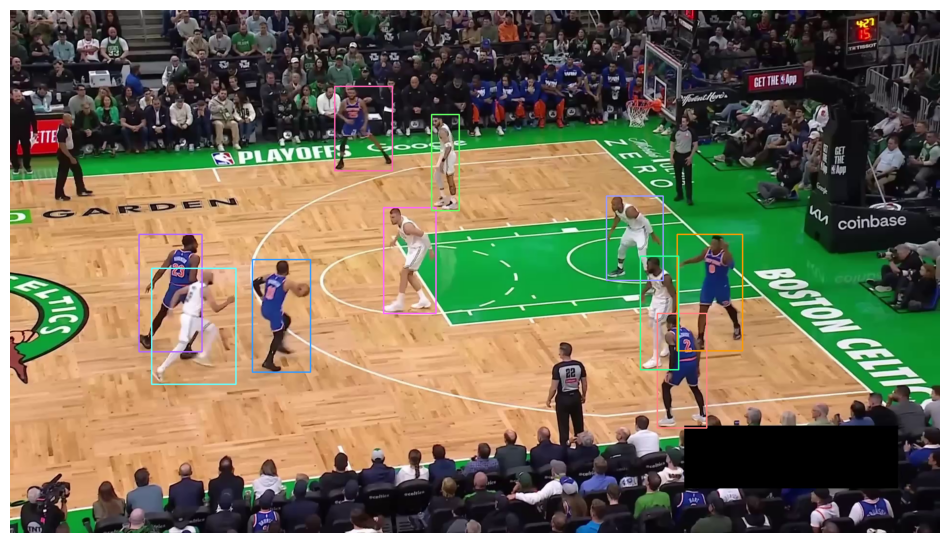
Processing video: 0%| | 0/238 [00:00<?, ?it/s]
Video(TARGET_VIDEO_COMPRESSED_PATH, embed=True, width=720)
Cluster players into teams
EWe are assigning each track to a team without labels. The pipeline uses SigLIP embeddings, UMAP to 3D, then K-means with k=2 for final team IDs.Collecting training set
We are sampling frames at 1 FPS, detecting players, and extracting central crops. Central regions emphasize jersey color and texture while reducing background artifacts.STRIDE = 30
crops = []
for video_path in sv.list_files_with_extensions(SOURCE_VIDEO_DIRECTORY, extensions=["mp4", "avi", "mov"]):
frame_generator = sv.get_video_frames_generator(source_path=video_path, stride=STRIDE)
for frame in tqdm(frame_generator):
result = PLAYER_DETECTION_MODEL.infer(frame, confidence=PLAYER_DETECTION_MODEL_CONFIDENCE, iou_threshold=PLAYER_DETECTION_MODEL_IOU_THRESHOLD, class_agnostic_nms=True)[0]
detections = sv.Detections.from_inference(result)
detections = detections[np.isin(detections.class_id, PLAYER_CLASS_IDS)]
boxes = sv.scale_boxes(xyxy=detections.xyxy, factor=0.4)
for box in boxes:
crops.append(sv.crop_image(frame, box))
sv.plot_images_grid(
    images=crops[:100],
    grid_size=(10, 10),
    size=(10, 10)
)
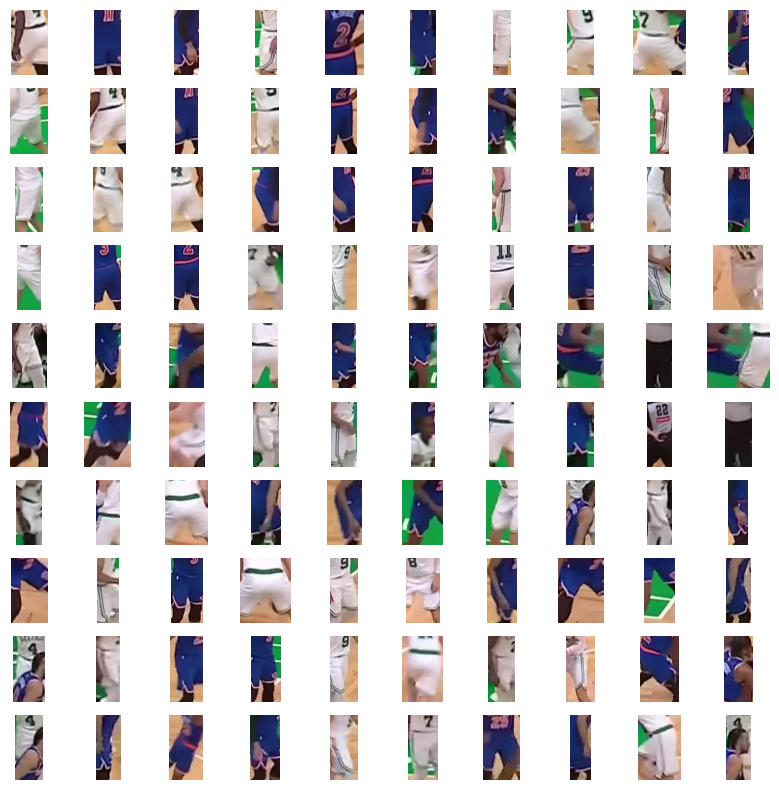
Train and test clustering model
We are computing SigLIP embeddings for crops, reducing with UMAP, and fitting K-means. A quick validation confirms separation by uniform appearance.team_classifier = TeamClassifier(device="cuda")
team_classifier.fit(crops)
teams = team_classifier.predict(crops)

team_0 = [crop for crop, team in zip(crops, teams) if team == 0]
team_1 = [crop for crop, team in zip(crops, teams) if team == 1]

sv.plot_images_grid(
    images=team_0[:50],
    grid_size=(5, 10),
    size=(10, 5)
)

sv.plot_images_grid(
    images=team_1[:50],
    grid_size=(5, 10),
    size=(10, 5)
)
Embedding extraction: 19it [00:02, 6.94it/s]
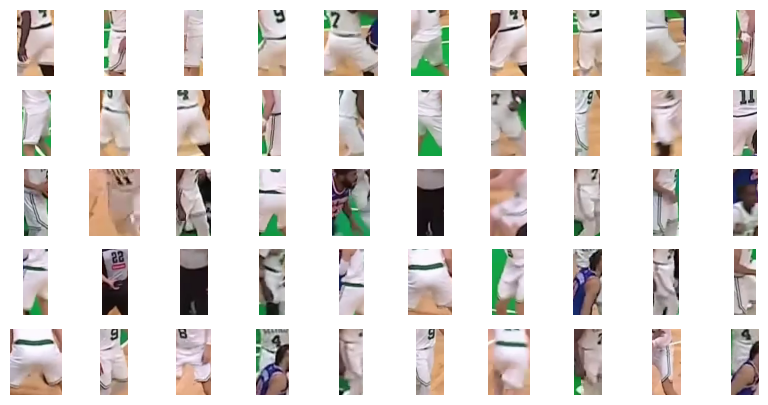
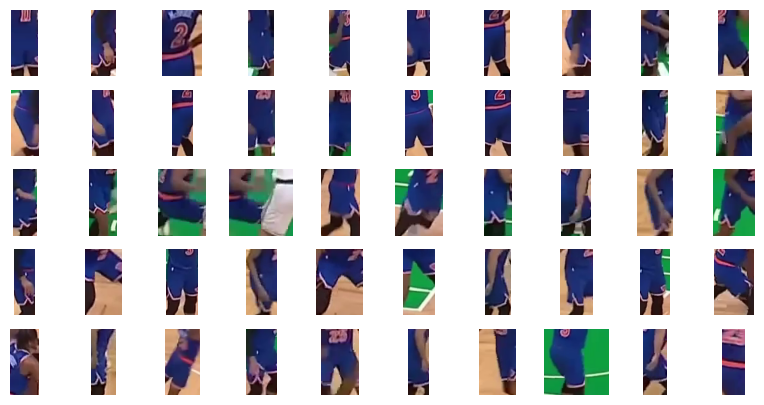
Test clustering model on single video frame
We are applying the trained clustering to one frame’s player crops. The output assigns provisional team IDs to confirm the mapping before full-video use.frame_generator = sv.get_video_frames_generator(SOURCE_VIDEO_PATH)
frame = next(frame_generator)
result = PLAYER_DETECTION_MODEL.infer(frame, confidence=PLAYER_DETECTION_MODEL_CONFIDENCE, iou_threshold=PLAYER_DETECTION_MODEL_IOU_THRESHOLD, class_agnostic_nms=True)[0]
detections = sv.Detections.from_inference(result)
detections = detections[np.isin(detections.class_id, PLAYER_CLASS_IDS)]
boxes = sv.scale_boxes(xyxy=detections.xyxy, factor=0.4)
crops = [sv.crop_image(frame, box) for box in boxes]
teams = np.array(team_classifier.predict(crops))
team_0 = [crop for crop, team in zip(crops, teams) if team == 0]
team_1 = [crop for crop, team in zip(crops, teams) if team == 1]
sv.plot_images_grid(
images=team_0[:10],
grid_size=(1, 10),
size=(10, 1)
)
sv.plot_images_grid(
images=team_1[:10],
grid_size=(1, 10),
size=(10, 1)
)
Embedding extraction: 1it [00:00, 19.79it/s]


# TEAM_NAMES = {
#     0: "New York Knicks",
#     1: "Boston Celtics",
# }

TEAM_NAMES = {
    0: "Boston Celtics",
    1: "New York Knicks",
}
Full video team clustering
We are assigning team IDs to tracks once, then reusing them across frames via track IDs. This keeps colors and labels consistent throughout the video.TARGET_VIDEO_PATH = HOME / f"{SOURCE_VIDEO_PATH.stem}-teams{SOURCE_VIDEO_PATH.suffix}"
TARGET_VIDEO_COMPRESSED_PATH = HOME / f"{TARGET_VIDEO_PATH.stem}-compressed{TARGET_VIDEO_PATH.suffix}"
frame_generator = sv.get_video_frames_generator(SOURCE_VIDEO_PATH)
frame = next(frame_generator)
# define team annotators
team_colors = sv.ColorPalette.from_hex([
TEAM_COLORS[TEAM_NAMES[0]],
TEAM_COLORS[TEAM_NAMES[1]]
])
team_mask_annotator = sv.MaskAnnotator(
color=team_colors,
opacity=0.5,
color_lookup=sv.ColorLookup.INDEX
)
team_box_annotator = sv.BoxAnnotator(
color=team_colors,
thickness=2,
color_lookup=sv.ColorLookup.INDEX
)
# we use RF-DETR model to aquire future SAM2 prompt
result = PLAYER_DETECTION_MODEL.infer(frame, confidence=PLAYER_DETECTION_MODEL_CONFIDENCE, iou_threshold=PLAYER_DETECTION_MODEL_IOU_THRESHOLD)[0]
detections = sv.Detections.from_inference(result)
detections = detections[np.isin(detections.class_id, PLAYER_CLASS_IDS)]
detections.tracker_id = np.arange(1, len(detections.class_id) + 1)
# we determine the team for each player and assign a team ID to every detection
boxes = sv.scale_boxes(xyxy=detections.xyxy, factor=0.4)
crops = [sv.crop_image(frame, box) for box in boxes]
TEAMS = np.array(team_classifier.predict(crops))
# we prompt SAM2 using RF-DETR model detections
tracker = SAM2Tracker(predictor)
tracker.prompt_first_frame(frame, detections)
# we propagate tacks across all video frames
def callback(frame: np.ndarray, index: int) -> np.ndarray:
detections = tracker.propagate(frame)
annotated_frame = frame.copy()
annotated_frame = team_mask_annotator.annotate(
scene=annotated_frame,
detections=detections,
custom_color_lookup=TEAMS[detections.tracker_id - 1]
)
annotated_frame = team_box_annotator.annotate(
scene=annotated_frame,
detections=detections,
custom_color_lookup=TEAMS[detections.tracker_id - 1]
)
return annotated_frame
sv.process_video(
source_path=SOURCE_VIDEO_PATH,
target_path=TARGET_VIDEO_PATH,
callback=callback,
show_progress=True
)
!ffmpeg -y -loglevel error -i {TARGET_VIDEO_PATH} -vcodec libx264 -crf 28 {TARGET_VIDEO_COMPRESSED_PATH}
Video(TARGET_VIDEO_COMPRESSED_PATH, embed=True, width=720)
Player numbers OCR
We are moving to jersey OCR to identify individuals within each team. Number reads pair with tracks and teams to resolve names later.Load number recognition model
We are loading the fine-tuned SmolVLM2 OCR model by ID. It was trained on jersey crops and outputs digit strings suitable for downstream validation.NUMBER_RECOGNITION_MODEL_ID = "basketball-jersey-numbers-ocr/3"
NUMBER_RECOGNITION_MODEL = get_model(model_id=NUMBER_RECOGNITION_MODEL_ID)
NUMBER_RECOGNITION_MODEL_PROMPT = "Read the number."
Single frame player number detection and recognition
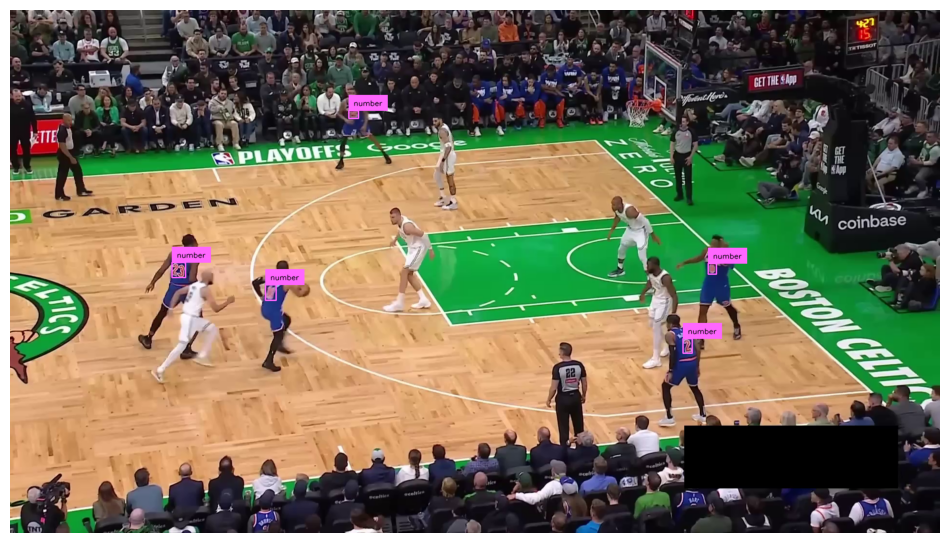
We are detecting number boxes, padding, and cropping. We then run SmolVLM2 on each crop and preview predictions next to the regions.box_annotator = sv.BoxAnnotator(color=COLOR, thickness=2)
label_annotator = sv.LabelAnnotator(color=COLOR, text_color=sv.Color.BLACK)
frame_generator = sv.get_video_frames_generator(SOURCE_VIDEO_PATH)
frame = next(frame_generator)
frame_h, frame_w, *_ = frame.shape
result = PLAYER_DETECTION_MODEL.infer(frame, confidence=PLAYER_DETECTION_MODEL_CONFIDENCE, iou_threshold=PLAYER_DETECTION_MODEL_IOU_THRESHOLD)[0]
detections = sv.Detections.from_inference(result)
detections = detections[detections.class_id == NUMBER_CLASS_ID]
annotated_frame = frame.copy()
annotated_frame = box_annotator.annotate(
scene=annotated_frame,
detections=detections)
annotated_frame = label_annotator.annotate(
scene=annotated_frame,
detections=detections)
sv.plot_image(annotated_frame)
crops = [
    sv.resize_image(sv.crop_image(frame, xyxy), resolution_wh=(224, 224))
    for xyxy
    in sv.clip_boxes(sv.pad_boxes(xyxy=detections.xyxy, px=10, py=10), (frame_w, frame_h))
]
numbers = [
    NUMBER_RECOGNITION_MODEL.predict(crop, NUMBER_RECOGNITION_MODEL_PROMPT)[0]
    for crop
    in crops
]

sv.plot_images_grid(
    images=crops[:10],
    titles=numbers[:10],
    grid_size=(1, 10),
    size=(10, 1)
)

Single frame player detection with number detection matching
We are matching numbers to players using Intersection over Smaller Area. IoS equals 1.0 implies the number lies fully inside the player mask, so we link them.def coords_above_threshold(
matrix: np.ndarray, threshold: float, sort_desc: bool = True
) -> List[Tuple[int, int]]:
"""
Return all (row_index, col_index) where value > threshold.
Rows and columns may repeat.
Optionally sort by value descending.
"""
A = np.asarray(matrix)
rows, cols = np.where(A > threshold)
pairs = list(zip(rows.tolist(), cols.tolist()))
if sort_desc:
pairs.sort(key=lambda rc: A[rc[0], rc[1]], reverse=True)
return pairs
frame_generator = sv.get_video_frames_generator(SOURCE_VIDEO_PATH)
frame = next(frame_generator)

# define team annotators

box_annotator = sv.BoxAnnotator(color=COLOR, thickness=4, color_lookup=sv.ColorLookup.TRACK)

player_mask_annotator = sv.MaskAnnotator(color=COLOR.by_idx(3), opacity=0.8, color_lookup=sv.ColorLookup.INDEX)
number_mask_annotator = sv.MaskAnnotator(color=COLOR.by_idx(0), opacity=0.8, color_lookup=sv.ColorLookup.INDEX)

# we use RF-DETR model to aquire future SAM2 prompt

result = PLAYER_DETECTION_MODEL.infer(frame, confidence=PLAYER_DETECTION_MODEL_CONFIDENCE, iou_threshold=PLAYER_DETECTION_MODEL_IOU_THRESHOLD)[0]
detections = sv.Detections.from_inference(result)
detections = detections[np.isin(detections.class_id, PLAYER_CLASS_IDS)]
detections.tracker_id = np.arange(1, len(detections.class_id) + 1)

# we prompt SAM2 using RF-DETR model detections

tracker = SAM2Tracker(predictor)
tracker.prompt_first_frame(frame, detections)

# we propagate tacks across all video frames

for index, frame in tqdm(enumerate(frame_generator)):

    # we only process the first video frame

    if index > 0:
        break

    frame_h, frame_w, *_ = frame.shape

    player_detections = tracker.propagate(frame)

    # we use RF-DETR model to detect numbers

    result = PLAYER_DETECTION_MODEL.infer(frame, confidence=PLAYER_DETECTION_MODEL_CONFIDENCE, iou_threshold=PLAYER_DETECTION_MODEL_IOU_THRESHOLD)[0]
    number_detections = sv.Detections.from_inference(result)
    number_detections = number_detections[number_detections.class_id == NUMBER_CLASS_ID]
    number_detections.mask = sv.xyxy_to_mask(boxes=number_detections.xyxy, resolution_wh=(frame_w, frame_h))

    # we use mask IoS to match numbers with players

    iou = sv.mask_iou_batch(
        masks_true=player_detections.mask,
        masks_detection=number_detections.mask,
        overlap_metric=sv.OverlapMetric.IOS
    )

    pairs = coords_above_threshold(iou, 0.9)
    player_idx, number_idx = zip(*pairs)

    # we visualize all the masks

    annotated_frame = frame.copy()
    annotated_frame = player_mask_annotator.annotate(
        scene=annotated_frame,
        detections=player_detections)
    annotated_frame = number_mask_annotator.annotate(
        scene=annotated_frame,
        detections=number_detections)
    sv.plot_image(annotated_frame)

    # we visualize only matched pairs

    player_detections = player_detections[np.array(player_idx)]
    number_detections = number_detections[np.array(number_idx)]
    number_detections.tracker_id = player_detections.tracker_id

    annotated_frame = frame.copy()
    annotated_frame = box_annotator.annotate(
        scene=annotated_frame,
        detections=player_detections)
    annotated_frame = box_annotator.annotate(
        scene=annotated_frame,
        detections=number_detections)
    sv.plot_image(annotated_frame)
0it [00:00, ?it/s]
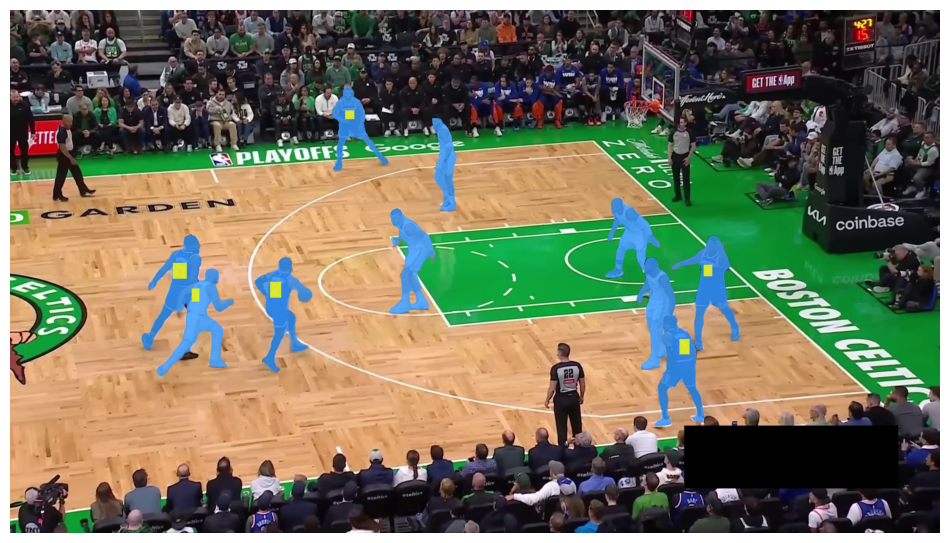
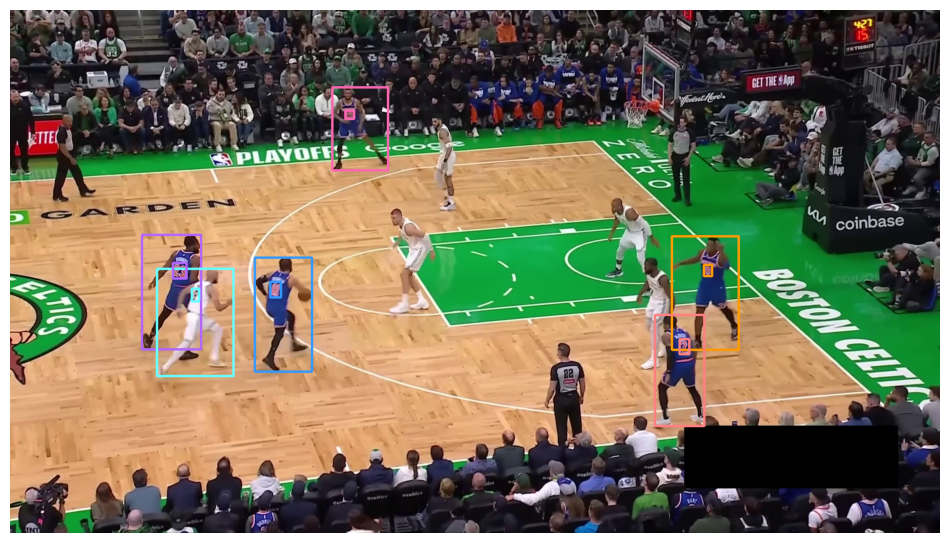
1it [00:01, 1.43s/it]
Validating recognized numbers
We are confirming numbers across time using a consecutive-agreement threshold. The validator locks a number to a track only after repeated consistent reads.TARGET_VIDEO_PATH = HOME / f"{SOURCE_VIDEO_PATH.stem}-validated-numbers{SOURCE_VIDEO_PATH.suffix}"
TARGET_VIDEO_COMPRESSED_PATH = HOME / f"{TARGET_VIDEO_PATH.stem}-compressed{TARGET_VIDEO_PATH.suffix}"
number_validator = ConsecutiveValueTracker(n_consecutive=3)
frame_generator = sv.get_video_frames_generator(SOURCE_VIDEO_PATH)
frame = next(frame_generator)
# define team annotators
mask_annotator = sv.MaskAnnotator(
color=COLOR,
color_lookup=sv.ColorLookup.TRACK,
opacity=0.7)
box_annotator = sv.BoxAnnotator(
color=COLOR,
color_lookup=sv.ColorLookup.TRACK,
thickness=2)
label_annotator = sv.LabelAnnotator(
color=COLOR,
color_lookup=sv.ColorLookup.TRACK,
text_color=sv.Color.BLACK,
text_scale=0.8)
# we use RF-DETR model to aquire future SAM2 prompt
result = PLAYER_DETECTION_MODEL.infer(frame, confidence=PLAYER_DETECTION_MODEL_CONFIDENCE, iou_threshold=PLAYER_DETECTION_MODEL_IOU_THRESHOLD)[0]
detections = sv.Detections.from_inference(result)
detections = detections[np.isin(detections.class_id, PLAYER_CLASS_IDS)]
detections.tracker_id = np.arange(1, len(detections.class_id) + 1)
# we prompt SAM2 using RF-DETR model detections
tracker = SAM2Tracker(predictor)
tracker.prompt_first_frame(frame, detections)
# we propagate tacks across all video frames
def callback(frame: np.ndarray, index: int) -> np.ndarray:
player_detections = tracker.propagate(frame)
# we perform number recognition at specific frame intervals
if index % 5 == 0:
frame_h, frame_w, *_ = frame.shape
# we use RF-DETR model to detect numbers
result = PLAYER_DETECTION_MODEL.infer(frame, confidence=PLAYER_DETECTION_MODEL_CONFIDENCE, iou_threshold=PLAYER_DETECTION_MODEL_IOU_THRESHOLD)[0]
number_detections = sv.Detections.from_inference(result)
number_detections = number_detections[number_detections.class_id == NUMBER_CLASS_ID]
number_detections.mask = sv.xyxy_to_mask(boxes=number_detections.xyxy, resolution_wh=(frame_w, frame_h))
# we crop out numbers detection and run recognition model
number_crops = [
sv.crop_image(frame, xyxy)
for xyxy
in sv.clip_boxes(sv.pad_boxes(xyxy=number_detections.xyxy, px=10, py=10), (frame_w, frame_h))
]
numbers = [
NUMBER_RECOGNITION_MODEL.predict(number_crop, NUMBER_RECOGNITION_MODEL_PROMPT)[0]
for number_crop
in number_crops
]
# we use mask IoS to match numbers with players
iou = sv.mask_iou_batch(
masks_true=player_detections.mask,
masks_detection=number_detections.mask,
overlap_metric=sv.OverlapMetric.IOS
)
pairs = coords_above_threshold(iou, 0.9)
if pairs:
player_idx, number_idx = zip(*pairs)
player_idx = [i + 1 for i in player_idx]
number_idx = list(number_idx)
# we update number_validator state
numbers = [numbers[int(i)] for i in number_idx]
number_validator.update(tracker_ids=player_idx, values=numbers)
# we visualize boxes and masks
annotated_frame = frame.copy()
annotated_frame = mask_annotator.annotate(
scene=annotated_frame,
detections=player_detections)
annotated_frame = box_annotator.annotate(
scene=annotated_frame,
detections=player_detections)
# we extract validated numbers
numbers = number_validator.get_validated(tracker_ids=player_detections.tracker_id)
# we visualize numbers
annotated_frame = label_annotator.annotate(
scene=annotated_frame,
detections=player_detections,
labels=numbers)
return annotated_frame
sv.process_video(
source_path=SOURCE_VIDEO_PATH,
target_path=TARGET_VIDEO_PATH,
callback=callback,
show_progress=True
)
!ffmpeg -y -loglevel error -i {TARGET_VIDEO_PATH} -vcodec libx264 -crf 28 {TARGET_VIDEO_COMPRESSED_PATH}
Video(TARGET_VIDEO_COMPRESSED_PATH, embed=True, width=720)
Player recognition
We are overlaying names, numbers, team colors, and masks for each tracked player. The final render shows stable identities aligned with roster data across the full clip.!gdown https://drive.google.com/drive/folders/1RBjpI5Xleb58lujeusxH0W5zYMMA4ytO -O {HOME / "fonts"} --folder
frames_history = []
detections_history = []

number_validator = ConsecutiveValueTracker(n_consecutive=3)
team_validator = ConsecutiveValueTracker(n_consecutive=1)

frame_generator = sv.get_video_frames_generator(SOURCE_VIDEO_PATH)
frame = next(frame_generator)

# we use RF-DETR model to aquire future SAM2 prompt

result = PLAYER_DETECTION_MODEL.infer(frame, confidence=PLAYER_DETECTION_MODEL_CONFIDENCE, iou_threshold=PLAYER_DETECTION_MODEL_IOU_THRESHOLD)[0]
detections = sv.Detections.from_inference(result)
detections = detections[np.isin(detections.class_id, PLAYER_CLASS_IDS)]
detections.tracker_id = np.arange(1, len(detections.class_id) + 1)

# we determine the team for each player and assign a team ID to every detection

boxes = sv.scale_boxes(xyxy=detections.xyxy, factor=0.4)
crops = [sv.crop_image(frame, box) for box in boxes]
TEAMS = np.array(team_classifier.predict(crops))

team_validator.update(tracker_ids=detections.tracker_id, values=TEAMS)

# we prompt SAM2 using RF-DETR model detections

tracker = SAM2Tracker(predictor)
tracker.prompt_first_frame(frame, detections)

# we propagate tacks across all video frames

frame_generator = sv.get_video_frames_generator(SOURCE_VIDEO_PATH)

for index, frame in tqdm(enumerate(frame_generator)):
    player_detections = tracker.propagate(frame)
    frames_history.append(frame)
    detections_history.append(player_detections)

    # we perform number recognition at specific frame intervals

    if index % 5 == 0:
        frame_h, frame_w, *_ = frame.shape

        # we use RF-DETR model to detect numbers

        result = PLAYER_DETECTION_MODEL.infer(frame, confidence=PLAYER_DETECTION_MODEL_CONFIDENCE, iou_threshold=PLAYER_DETECTION_MODEL_IOU_THRESHOLD)[0]
        number_detections = sv.Detections.from_inference(result)
        number_detections = number_detections[number_detections.class_id == NUMBER_CLASS_ID]
        number_detections.mask = sv.xyxy_to_mask(boxes=number_detections.xyxy, resolution_wh=(frame_w, frame_h))

        # we crop out numbers detection and run recognition model

        number_crops = [
            sv.crop_image(frame, xyxy)
            for xyxy
            in sv.clip_boxes(sv.pad_boxes(xyxy=number_detections.xyxy, px=10, py=10), (frame_w, frame_h))
        ]
        numbers = [
            NUMBER_RECOGNITION_MODEL.predict(number_crop, NUMBER_RECOGNITION_MODEL_PROMPT)[0]
            for number_crop
            in number_crops
        ]

        # we use mask IoS to match numbers with players

        iou = sv.mask_iou_batch(
            masks_true=player_detections.mask,
            masks_detection=number_detections.mask,
            overlap_metric=sv.OverlapMetric.IOS
        )

        pairs = coords_above_threshold(iou, 0.9)

        if pairs:

            player_idx, number_idx = zip(*pairs)
            player_idx = [i + 1 for i in player_idx]
            number_idx = list(number_idx)

            # we update number_validator state

            numbers = [numbers[int(i)] for i in number_idx]
            number_validator.update(tracker_ids=player_idx, values=numbers)
TARGET_VIDEO_PATH = HOME / f"{SOURCE_VIDEO_PATH.stem}-result{SOURCE_VIDEO_PATH.suffix}"
TARGET_VIDEO_COMPRESSED_PATH = HOME / f"{TARGET_VIDEO_PATH.stem}-compressed{TARGET_VIDEO_PATH.suffix}"

video_info = sv.VideoInfo.from_video_path(SOURCE_VIDEO_PATH)

team_colors = sv.ColorPalette.from_hex([
    TEAM_COLORS[TEAM_NAMES[0]],
    TEAM_COLORS[TEAM_NAMES[1]]
])

team_mask_annotator = sv.MaskAnnotator(
    color=team_colors,
    opacity=0.5,
    color_lookup=sv.ColorLookup.INDEX)
team_label_annotator = sv.RichLabelAnnotator(
    font_path=f"{HOME}/fonts/Staatliches-Regular.ttf",
    font_size=40,
    color=team_colors,
    text_color=sv.Color.WHITE,
    text_position=sv.Position.BOTTOM_CENTER,
    text_offset=(0, 10),
    color_lookup=sv.ColorLookup.INDEX)

with sv.VideoSink(TARGET_VIDEO_PATH, video_info) as sink:
    for frame, detections in tqdm(zip(frames_history, detections_history)):
        detections = detections[detections.area > 100]

        teams = team_validator.get_validated(tracker_ids=detections.tracker_id)
        teams = np.array(teams).astype(int)
        numbers = number_validator.get_validated(tracker_ids=detections.tracker_id)
        numbers = np.array(numbers)

        labels = [
            f"#{number} {TEAM_ROSTERS[TEAM_NAMES[team]].get(number)}"
            for number, team
            in zip(numbers, teams)
        ]

        annotated_frame = frame.copy()
        annotated_frame = team_mask_annotator.annotate(
            scene=annotated_frame,
            detections=detections,
            custom_color_lookup=teams)
        annotated_frame = team_label_annotator.annotate(
            scene=annotated_frame,
            detections=detections,
            labels=labels,
            custom_color_lookup=teams)

        sink.write_frame(annotated_frame)

!ffmpeg -y -loglevel error -i {TARGET_VIDEO_PATH} -vcodec libx264 -crf 28 {TARGET_VIDEO_COMPRESSED_PATH}
238it [00:34, 7.00it/s]
Video(TARGET_VIDEO_COMPRESSED_PATH, embed=True, width=720)
Court keypoints detection
Load keypoint detection model
KEYPOINT_DETECTION_MODEL_ID = "basketball-court-detection-2/14"
KEYPOINT_DETECTION_MODEL_CONFIDENCE = 0.3
KEYPOINT_DETECTION_MODEL_ANCHOR_CONFIDENCE = 0.5
KEYPOINT_DETECTION_MODEL = get_model(model_id=KEYPOINT_DETECTION_MODEL_ID)
KEYPOINT_COLOR = sv.Color.from_hex('#FF1493')
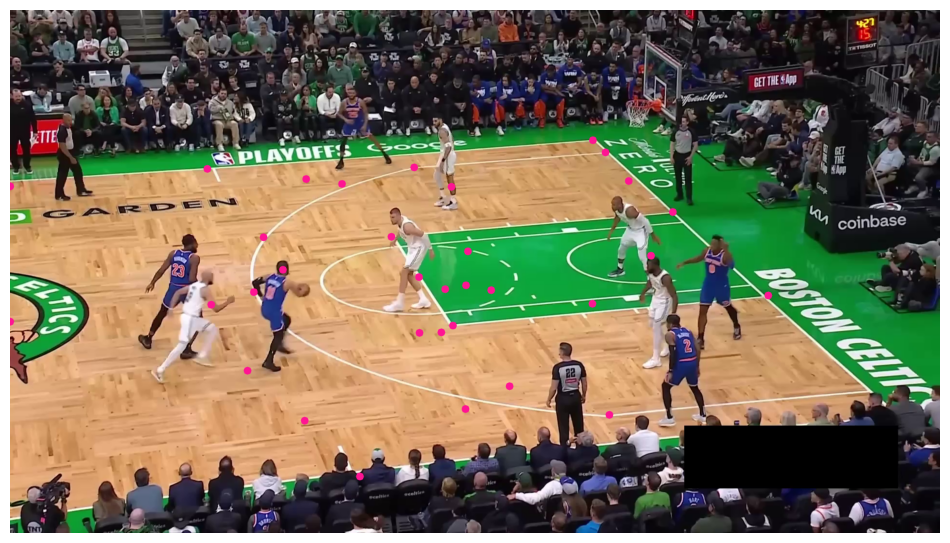
Single frame keypoint detection
vertex_annotator = sv.VertexAnnotator(color=KEYPOINT_COLOR, radius=8)

frame_generator = sv.get_video_frames_generator(SOURCE_VIDEO_PATH)
frame = next(frame_generator)

result = KEYPOINT_DETECTION_MODEL.infer(frame, confidence=KEYPOINT_DETECTION_MODEL_CONFIDENCE)[0]
key_points = sv.KeyPoints.from_inference(result)

annotated_frame = frame.copy()
annotated_frame = vertex_annotator.annotate(
    scene=annotated_frame,
    key_points=key_points)

sv.plot_image(annotated_frame)
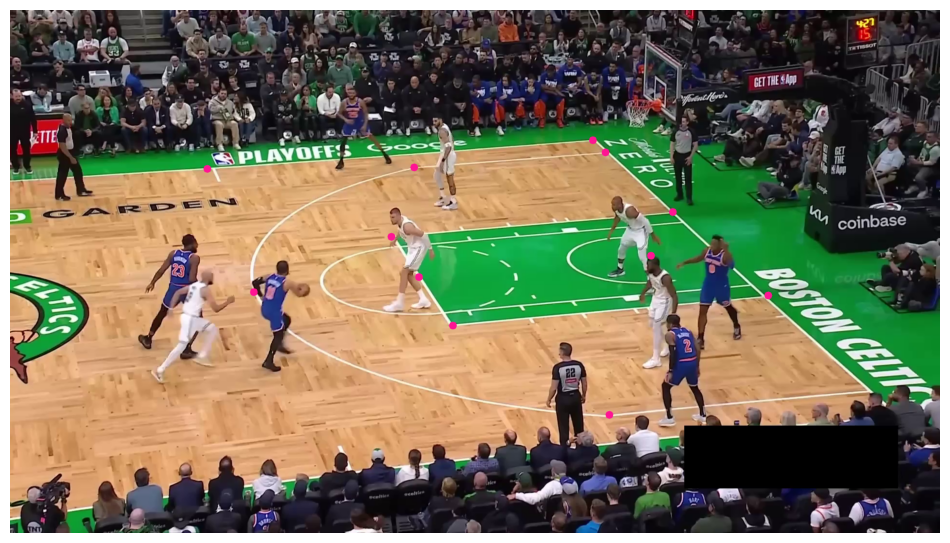
Detecting keypoints with high confidence
vertex_annotator = sv.VertexAnnotator(color=KEYPOINT_COLOR, radius=8)

frame_generator = sv.get_video_frames_generator(SOURCE_VIDEO_PATH)
frame = next(frame_generator)

result = KEYPOINT_DETECTION_MODEL.infer(frame, confidence=KEYPOINT_DETECTION_MODEL_CONFIDENCE)[0]
key_points = sv.KeyPoints.from_inference(result)
key_points = key_points[:, key_points.confidence[0] > KEYPOINT_DETECTION_MODEL_ANCHOR_CONFIDENCE]

annotated_frame = frame.copy()
annotated_frame = vertex_annotator.annotate(
    scene=annotated_frame,
    key_points=key_points)

sv.plot_image(annotated_frame)
Map player positions to court coordinates
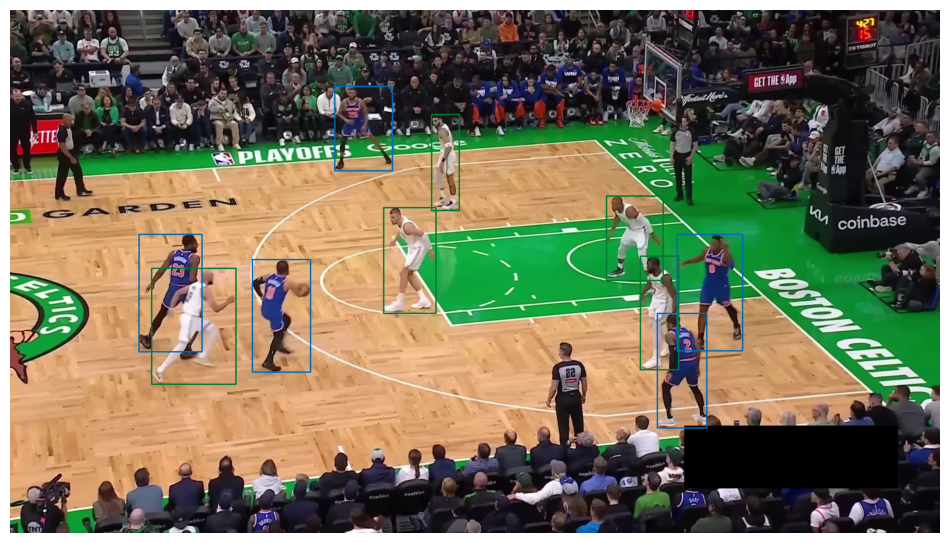
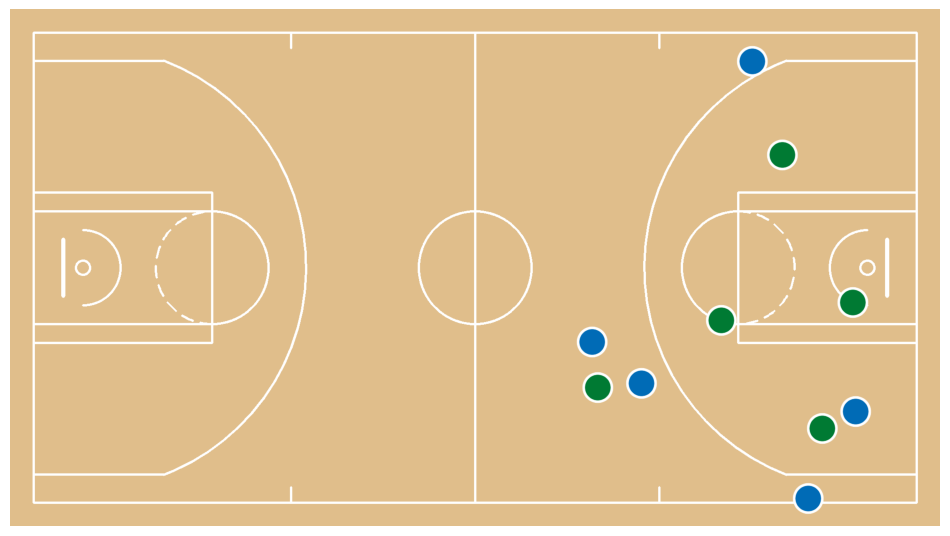
Single frame player position mapping
config = CourtConfiguration(league=League.NBA, measurement_unit=MeasurementUnit.FEET)

frame_generator = sv.get_video_frames_generator(SOURCE_VIDEO_PATH)
frame = next(frame_generator)

# define team annotators

team_colors = sv.ColorPalette.from_hex([
    TEAM_COLORS[TEAM_NAMES[0]],
    TEAM_COLORS[TEAM_NAMES[1]]
])

team_box_annotator = sv.BoxAnnotator(
    color=team_colors,
    thickness=2,
    color_lookup=sv.ColorLookup.INDEX
)

# we use RF-DETR model to aquire future SAM2 prompt

result = PLAYER_DETECTION_MODEL.infer(frame, confidence=PLAYER_DETECTION_MODEL_CONFIDENCE, iou_threshold=PLAYER_DETECTION_MODEL_IOU_THRESHOLD)[0]
detections = sv.Detections.from_inference(result)
detections = detections[np.isin(detections.class_id, PLAYER_CLASS_IDS)]
detections.tracker_id = np.arange(1, len(detections.class_id) + 1)

# we determine the team for each player and assign a team ID to every detection

boxes = sv.scale_boxes(xyxy=detections.xyxy, factor=0.4)
crops = [sv.crop_image(frame, box) for box in boxes]
TEAMS = np.array(team_classifier.predict(crops))

annotated_frame = frame.copy()
annotated_frame = team_box_annotator.annotate(
    scene=annotated_frame,
    detections=detections,
    custom_color_lookup=TEAMS[detections.tracker_id - 1]
)
sv.plot_image(annotated_frame)

# we use a keypoint model to detect court landmarks

result = KEYPOINT_DETECTION_MODEL.infer(frame, confidence=KEYPOINT_DETECTION_MODEL_CONFIDENCE)[0]
key_points = sv.KeyPoints.from_inference(result)
landmarks_mask = key_points.confidence[0] > KEYPOINT_DETECTION_MODEL_ANCHOR_CONFIDENCE

if np.count_nonzero(landmarks_mask) >= 4:

    # we calculate homography matrix

    court_landmarks = np.array(config.vertices)[landmarks_mask]
    frame_landmarks = key_points[:, landmarks_mask].xy[0]

    frame_to_court_transformer = ViewTransformer(
        source=frame_landmarks,
        target=court_landmarks,
    )

    frame_xy = detections.get_anchors_coordinates(anchor=sv.Position.BOTTOM_CENTER)

    if len(frame_xy) > 0:

        # we transform points

        court_xy = frame_to_court_transformer.transform_points(points=frame_xy)

        # we visualize the results

        court = draw_court(config=config)
        court = draw_points_on_court(
            config=config,
            xy=court_xy[TEAMS == 0],
            fill_color=sv.Color.from_hex(TEAM_COLORS[TEAM_NAMES[0]]),
            court=court
        )
        court = draw_points_on_court(
            config=config,
            xy=court_xy[TEAMS == 1],
            fill_color=sv.Color.from_hex(TEAM_COLORS[TEAM_NAMES[1]]),
            court=court
        )

        sv.plot_image(court)
Embedding extraction: 1it [00:00, 17.67it/s]
Full video player position mapping
video_xy = []

frame_generator = sv.get_video_frames_generator(SOURCE_VIDEO_PATH)
frame = next(frame_generator)

# we use RF-DETR model to aquire future SAM2 prompt

result = PLAYER_DETECTION_MODEL.infer(frame, confidence=PLAYER_DETECTION_MODEL_CONFIDENCE, iou_threshold=PLAYER_DETECTION_MODEL_IOU_THRESHOLD)[0]
detections = sv.Detections.from_inference(result)
detections = detections[np.isin(detections.class_id, PLAYER_CLASS_IDS)]
detections.tracker_id = np.arange(1, len(detections.class_id) + 1)

# we determine the team for each player and assign a team ID to every detection

boxes = sv.scale_boxes(xyxy=detections.xyxy, factor=0.4)
crops = [sv.crop_image(frame, box) for box in boxes]
TEAMS = np.array(team_classifier.predict(crops))

# we prompt SAM2 using RF-DETR model detections

tracker = SAM2Tracker(predictor)
tracker.prompt_first_frame(frame, detections)

# we propagate tacks across all video frames

for frame_idx, frame in tqdm(enumerate(frame_generator)):
    detections = tracker.propagate(frame)

    # we use a keypoint model to detect court landmarks

    result = KEYPOINT_DETECTION_MODEL.infer(frame, confidence=KEYPOINT_DETECTION_MODEL_CONFIDENCE)[0]
    key_points = sv.KeyPoints.from_inference(result)
    landmarks_mask = key_points.confidence[0] > KEYPOINT_DETECTION_MODEL_ANCHOR_CONFIDENCE

    if np.count_nonzero(landmarks_mask) >= 4:

        # we calculate homography matrix

        court_landmarks = np.array(config.vertices)[landmarks_mask]
        frame_landmarks = key_points[:, landmarks_mask].xy[0]

        frame_to_court_transformer = ViewTransformer(
            source=frame_landmarks,
            target=court_landmarks,
        )

        frame_xy = detections.get_anchors_coordinates(anchor=sv.Position.BOTTOM_CENTER)

        # transform video frame coordinates into court coordinates

        court_xy = frame_to_court_transformer.transform_points(points=frame_xy)
        video_xy.append(court_xy)

video_xy = np.array(video_xy)
Embedding extraction: 1it [00:00, 18.17it/s]
237it [01:39,  2.39it/s]
TARGET_VIDEO_PATH = HOME / f"{SOURCE_VIDEO_PATH.stem}-map{SOURCE_VIDEO_PATH.suffix}"
TARGET_VIDEO_COMPRESSED_PATH = HOME / f"{TARGET_VIDEO_PATH.stem}-compressed{TARGET_VIDEO_PATH.suffix}"

config = CourtConfiguration(league=League.NBA, measurement_unit=MeasurementUnit.FEET)
court = draw_court(config=config)
court_h, court_w, _ = court.shape

video_info = sv.VideoInfo.from_video_path(SOURCE_VIDEO_PATH)
video_info.width = court_w
video_info.height = court_h

with sv.VideoSink(TARGET_VIDEO_PATH, video_info) as sink:
    for frame_xy in tqdm(video_xy):
        court = draw_court(config=config)
        court = draw_points_on_court(
            config=config,
            xy=frame_xy[TEAMS == 0],
            fill_color=sv.Color.from_hex(TEAM_COLORS[TEAM_NAMES[0]]),
            court=court
        )
        court = draw_points_on_court(
            config=config,
            xy=frame_xy[TEAMS == 1],
            fill_color=sv.Color.from_hex(TEAM_COLORS[TEAM_NAMES[1]]),
            court=court
        )

        sink.write_frame(court)

!ffmpeg -y -loglevel error -i {TARGET_VIDEO_PATH} -vcodec libx264 -crf 28 {TARGET_VIDEO_COMPRESSED_PATH}
100%|██████████| 237/237 [00:09<00:00, 25.08it/s]
Video(TARGET_VIDEO_COMPRESSED_PATH, embed=True, width=720)
Clean player movement paths
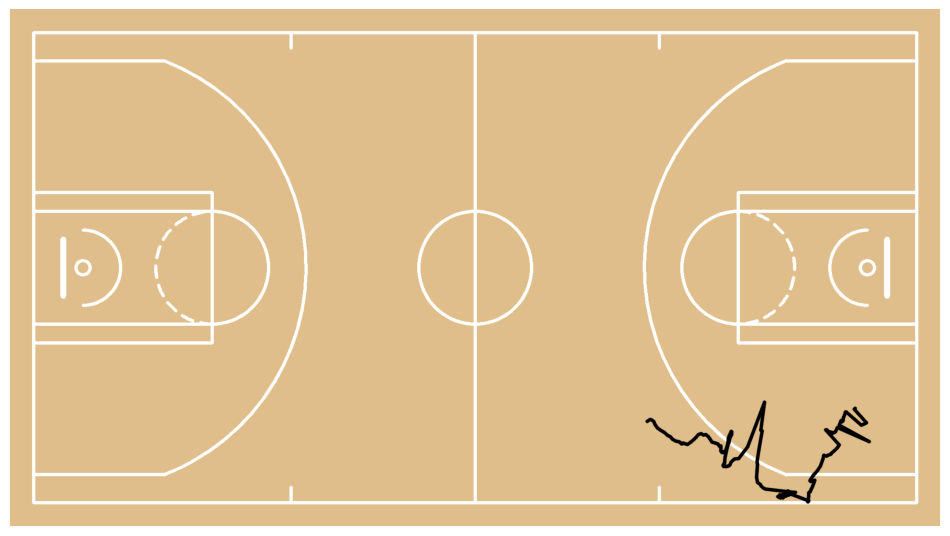
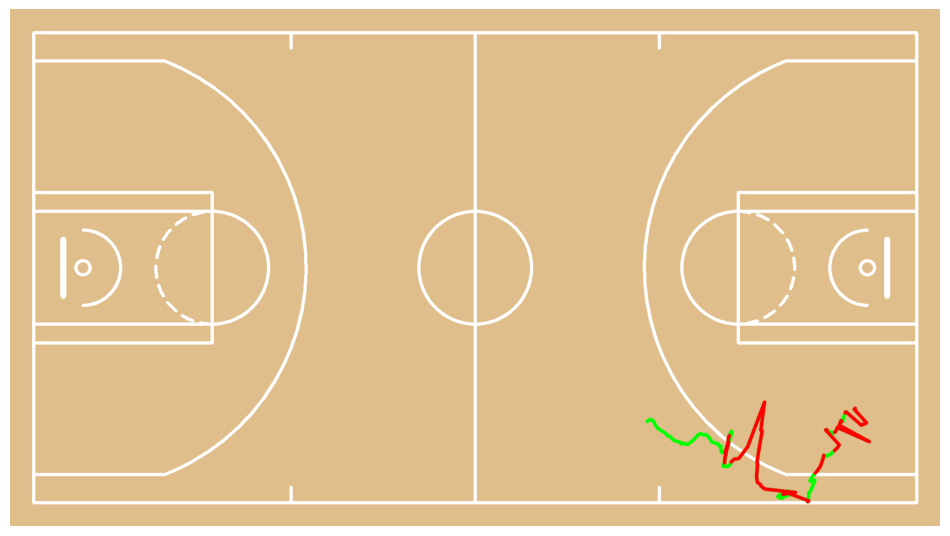
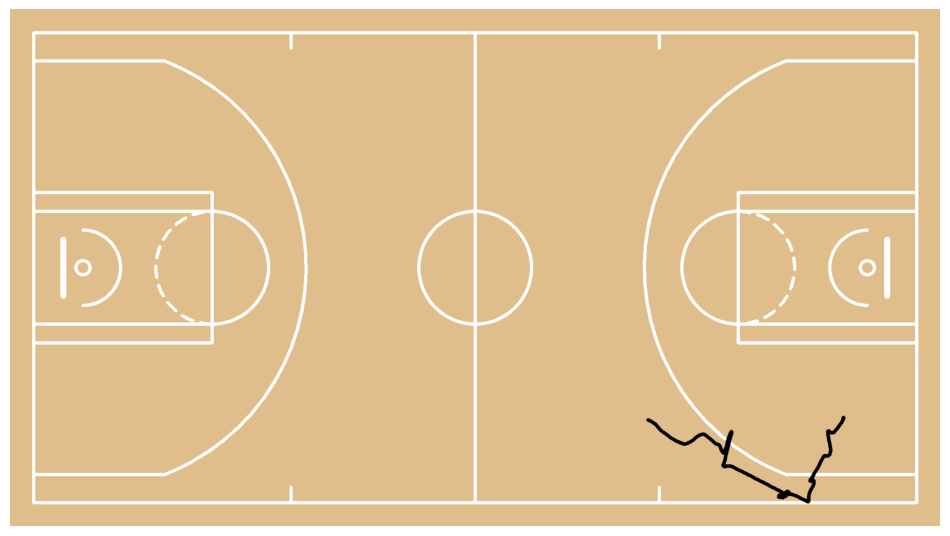
We are detecting sudden jumps in position using robust speed analysis. We are removing short abnormal runs and nearby frames to eliminate teleport-like artifacts. We are filling missing segments with linear interpolation to ensure continuous motion. We are smoothing all paths with a Savitzky–Golay filter to achieve stable and natural movement.court = draw_paths_on_court(
config=config,
paths=[video_xy[:, 0, :]],
)
sv.plot_image(court)
cleaned_xy, edited_mask = clean_paths(
    video_xy,
    jump_sigma=3.5,
    min_jump_dist=0.6,
    max_jump_run=18,
    pad_around_runs=2,
    smooth_window=9,
    smooth_poly=2,
)
def split_true_runs(mask: np.ndarray, coords: np.ndarray) -> list[np.ndarray]:
    mask = mask.squeeze()
    idx = np.flatnonzero(mask)
    if idx.size == 0:
        return []
    splits = np.where(np.diff(idx) > 1)[0] + 1
    groups = np.split(idx, splits)
    return [coords[g, 0, :] for g in groups]


court = draw_paths_on_court(
    config=config,
    paths=[video_xy[:, 0, :]],
    color=sv.Color.GREEN,
)

court = draw_paths_on_court(
    config=config,
    paths=split_true_runs(edited_mask[:, 0], video_xy),
    color=sv.Color.RED,
    court=court
)

sv.plot_image(court)
test = draw_paths_on_court(
    config=config,
    paths=[cleaned_xy[:, 0, :]],
)

sv.plot_image(test)
TARGET_VIDEO_PATH = HOME / f"{SOURCE_VIDEO_PATH.stem}-map{SOURCE_VIDEO_PATH.suffix}"
TARGET_VIDEO_COMPRESSED_PATH = HOME / f"{TARGET_VIDEO_PATH.stem}-compressed{TARGET_VIDEO_PATH.suffix}"

config = CourtConfiguration(league=League.NBA, measurement_unit=MeasurementUnit.FEET)
court = draw_court(config=config)
court_h, court_w, _ = court.shape

video_info = sv.VideoInfo.from_video_path(SOURCE_VIDEO_PATH)
video_info.width = court_w
video_info.height = court_h

with sv.VideoSink(TARGET_VIDEO_PATH, video_info) as sink:
    for frame_xy in tqdm(cleaned_xy):
        court = draw_court(config=config)
        court = draw_points_on_court(
            config=config,
            xy=frame_xy[TEAMS == 0],
            fill_color=sv.Color.from_hex(TEAM_COLORS[TEAM_NAMES[0]]),
            court=court
        )
        court = draw_points_on_court(
            config=config,
            xy=frame_xy[TEAMS == 1],
            fill_color=sv.Color.from_hex(TEAM_COLORS[TEAM_NAMES[1]]),
            court=court
        )

        sink.write_frame(court)

!ffmpeg -y -loglevel error -i {TARGET_VIDEO_PATH} -vcodec libx264 -crf 28 {TARGET_VIDEO_COMPRESSED_PATH}
100%|██████████| 237/237 [00:09<00:00, 25.14it/s]
Video(TARGET_VIDEO_COMPRESSED_PATH, embed=True, width=720)
Classify shorts as made or miss
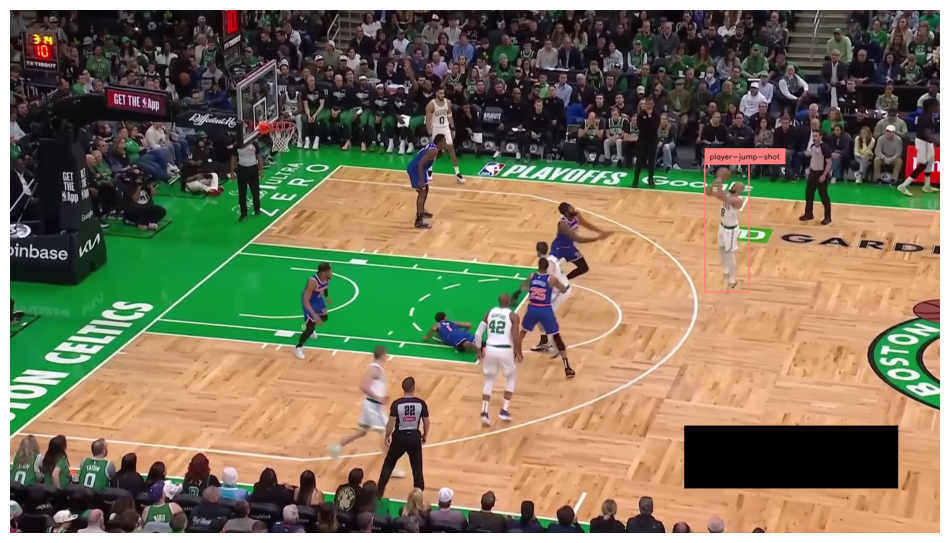
Keep only “player-jump-shot” class
SOURCE_VIDEO_PATH = SOURCE_VIDEO_DIRECTORY / "boston-celtics-new-york-knicks-game-1-q1-03.16-03.11.mp4"
PLAYER_JUMP_SHOT_CLASS_ID = 5
FRAME_IDX = 65

box_annotator = sv.BoxAnnotator(color=COLOR, thickness=2)
label_annotator = sv.LabelAnnotator(color=COLOR, text_color=sv.Color.BLACK)

frame_generator = sv.get_video_frames_generator(SOURCE_VIDEO_PATH, start=FRAME_IDX, iterative_seek=True)
frame = next(frame_generator)

result = PLAYER_DETECTION_MODEL.infer(frame, confidence=PLAYER_DETECTION_MODEL_CONFIDENCE, iou_threshold=PLAYER_DETECTION_MODEL_IOU_THRESHOLD)[0]
detections = sv.Detections.from_inference(result)
detections = detections[detections.class_id == PLAYER_JUMP_SHOT_CLASS_ID]

annotated_frame = frame.copy()
annotated_frame = box_annotator.annotate(
    scene=annotated_frame,
    detections=detections)
annotated_frame = label_annotator.annotate(
    scene=annotated_frame,
    detections=detections)

sv.plot_image(annotated_frame)
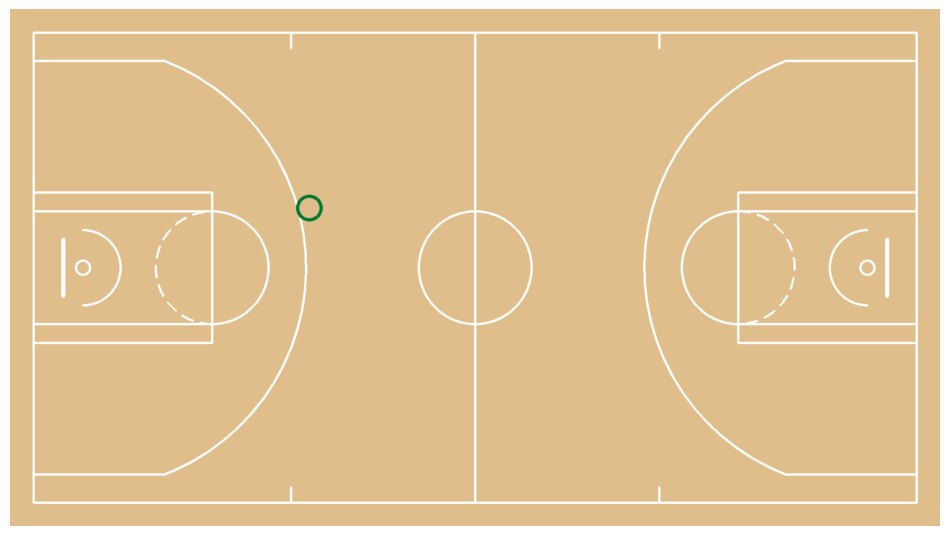
Mark jump-shot location on the court
config = CourtConfiguration(league=League.NBA, measurement_unit=MeasurementUnit.FEET)

frame_generator = sv.get_video_frames_generator(SOURCE_VIDEO_PATH, start=FRAME_IDX, iterative_seek=True)
frame = next(frame_generator)

# we use a RF-DETR model to detect players

result = PLAYER_DETECTION_MODEL.infer(frame, confidence=PLAYER_DETECTION_MODEL_CONFIDENCE, iou_threshold=PLAYER_DETECTION_MODEL_IOU_THRESHOLD)[0]
detections = sv.Detections.from_inference(result)
detections = detections[detections.class_id == PLAYER_JUMP_SHOT_CLASS_ID]

# we use a keypoint model to detect court landmarks

result = KEYPOINT_DETECTION_MODEL.infer(frame, confidence=KEYPOINT_DETECTION_MODEL_CONFIDENCE)[0]
key_points = sv.KeyPoints.from_inference(result)
landmarks_mask = key_points.confidence[0] > KEYPOINT_DETECTION_MODEL_ANCHOR_CONFIDENCE

if np.count_nonzero(landmarks_mask) >= 4:

    # we calculate homography matrix

    court_landmarks = np.array(config.vertices)[landmarks_mask]
    frame_landmarks = key_points[:, landmarks_mask].xy[0]

    frame_to_court_transformer = ViewTransformer(
        source=frame_landmarks,
        target=court_landmarks,
    )

    frame_xy = detections.get_anchors_coordinates(anchor=sv.Position.BOTTOM_CENTER)

    # transform video frame coordinates into court coordinates

    court_xy = frame_to_court_transformer.transform_points(points=frame_xy)

    court = draw_made_and_miss_on_court(
        config=config,
        made_xy=court_xy,
        made_size=25,
        made_color=sv.Color.from_hex("#007A33"),
        made_thickness=6,
        line_thickness=4
    )

    sv.plot_image(court)
Detect shot events
BALL_IN_BASKET_CLASS_ID = 1
JUMP_SHOT_CLASS_ID = 5
LAYUP_DUNK_CLASS_ID = 6

box_annotator = sv.BoxAnnotator(color=COLOR, thickness=2)
label_annotator = sv.LabelAnnotator(color=COLOR, text_color=sv.Color.BLACK)

frame_generator = sv.get_video_frames_generator(SOURCE_VIDEO_PATH)
video_info = sv.VideoInfo.from_video_path(SOURCE_VIDEO_PATH)

shot_event_tracker = ShotEventTracker(
    reset_time_frames=int(video_info.fps * 1.7),
    minimum_frames_between_starts=int(video_info.fps * 0.5),
    cooldown_frames_after_made=int(video_info.fps * 0.5),
)

for frame_index, frame in enumerate(frame_generator):

    # we use a RF-DETR model to detect jump shot, layup, dunk and ball in basket

    result = PLAYER_DETECTION_MODEL.infer(frame, confidence=PLAYER_DETECTION_MODEL_CONFIDENCE, iou_threshold=PLAYER_DETECTION_MODEL_IOU_THRESHOLD)[0]
    detections = sv.Detections.from_inference(result)

    has_jump_shot = len(detections[detections.class_id == JUMP_SHOT_CLASS_ID]) > 0
    has_layup_dunk = len(detections[detections.class_id == LAYUP_DUNK_CLASS_ID]) > 0
    has_ball_in_basket = len(detections[detections.class_id == BALL_IN_BASKET_CLASS_ID]) > 0

    events = shot_event_tracker.update(
        frame_index=frame_index,
        has_jump_shot=has_jump_shot,
        has_layup_dunk=has_layup_dunk,
        has_ball_in_basket=has_ball_in_basket,
    )

    if events:
        print(events)

        annotated_frame = frame.copy()
        annotated_frame = box_annotator.annotate(
            scene=annotated_frame,
            detections=detections)
        annotated_frame = label_annotator.annotate(
            scene=annotated_frame,
            detections=detections)

        sv.plot_image(annotated_frame)
[{'event': 'START', 'frame': 64, 'type': 'JUMP'}]
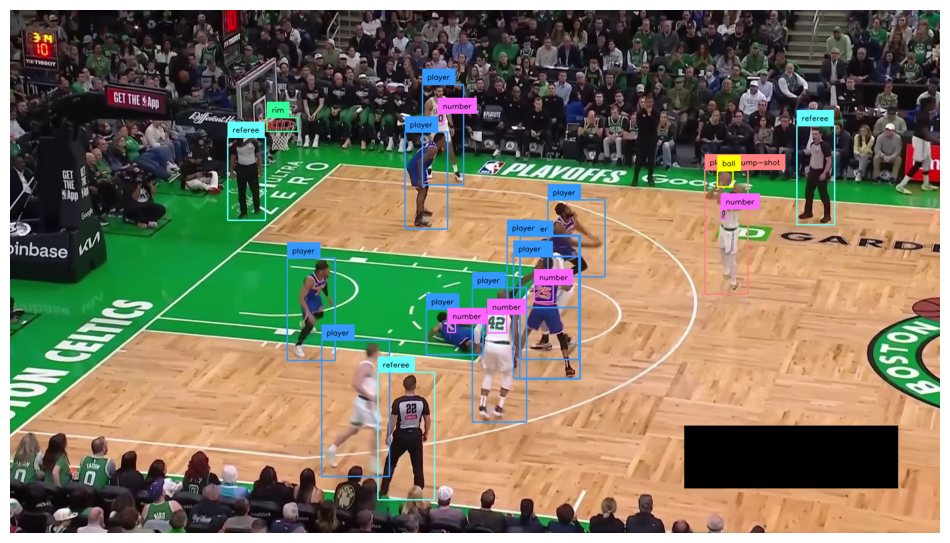
[{'event': 'MISSED', 'frame': 115, 'type': 'JUMP'}]
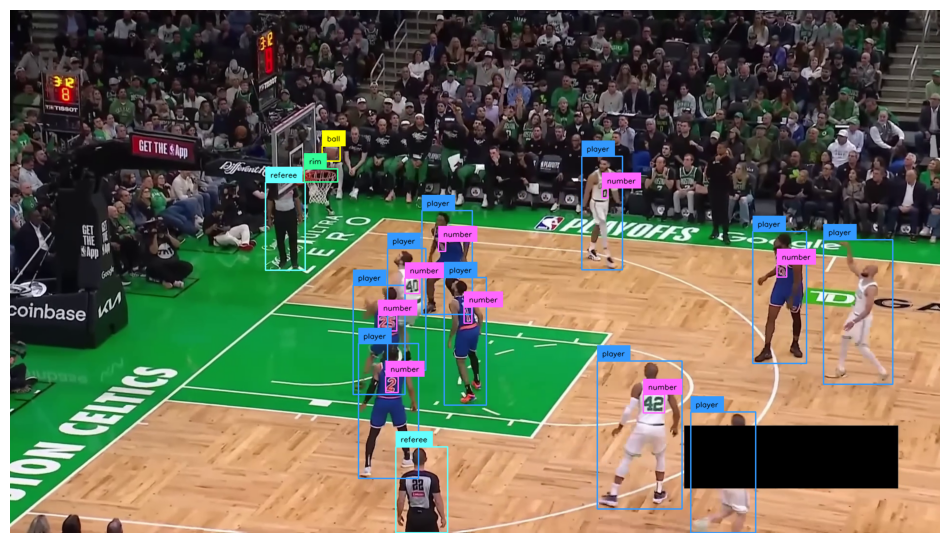
[{'event': 'START', 'frame': 121, 'type': 'LAYUP'}]
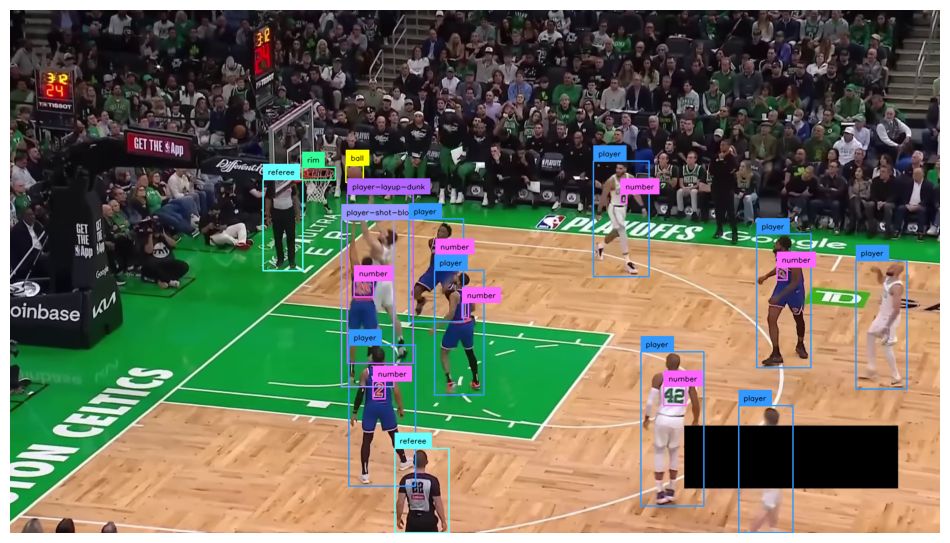
[{'event': 'MADE', 'frame': 135, 'type': 'LAYUP'}]
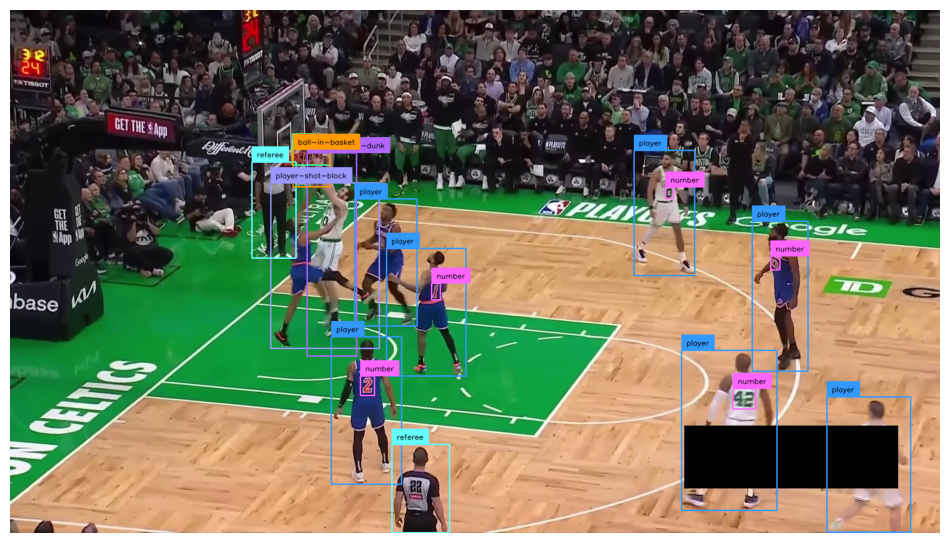
Looking for more tutorials or have questions? Check out our GitHub repo for more notebooks, or visit our discord.
Found an error on this page? Report an issue.