


Camera Models
Camera models describe how a camera projects points in the 3D world onto a 2D image plane. Each model makes different assumptions. Common camera models include:- The Pinhole Camera Model: The pinhole model is the simplest camera model. It assumes that light rays pass through a single point, called the pinhole, before reaching the image plane. Its parameters include the focal length and the position of the pinhole.
- The Perspective Camera Model: The perspective model extends the pinhole model to include lens distortion and other optical effects. It is used in computer vision and graphics to model camera behavior.
- The Orthographic Camera Model: In the orthographic model, parallel lines in the 3D world remain parallel in the 2D image. This property is useful for technical drawings and architectural visualizations that require accurate measurements.
- The Spherical Camera Model: The spherical model uses a spherical image sensor to capture a 360-degree view of a scene. It is used in virtual reality and panoramic photography.
- The Omnidirectional Camera Model: The omnidirectional model uses multiple lenses or a fisheye lens to capture a wide field of view (FOV). It is used in robotics and surveillance.
Camera Model Fundamentals
Pinhole Camera Model
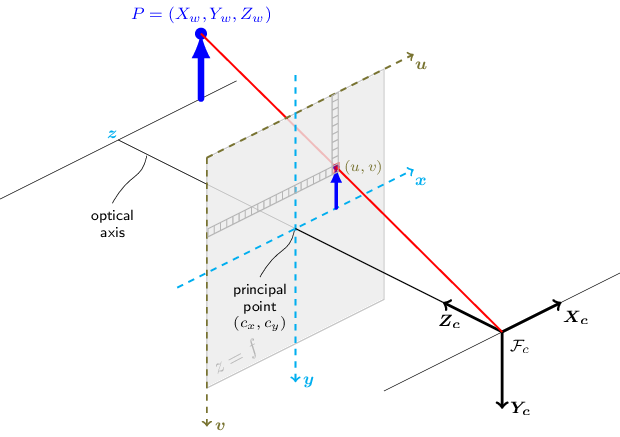
The functions in this section use the pinhole camera model. A perspective transformation projects a 3D scene point onto the image plane at pixel . The variables and are represented in homogeneous coordinates as 3D and 2D vectors, respectively. The pinhole camera model gives the following distortion-free projective transformation: where:- is a 3D point expressed with respect to the world coordinate system
- is a 2D pixel in the image plane
- is the camera intrinsic matrix
- and are the rotation and translation that describe the change of coordinates from world to camera coordinate systems
- is the projective transformation’s arbitrary scaling
Camera Intrinsic Matrix
The camera intrinsic matrix maps 3D points in the camera coordinate system to 2D pixel coordinates, up to a scale factor: Dividing by is the perspective division that turns into pixel coordinates. The matrix contains the focal lengths and , expressed in pixels, and the principal point , which is usually near the image center: Therefore:Coordinate Transformations
The joint rotation-translation matrix factors into a 3-by-4 projection and a 4-by-4 homogeneous transformation (Hartley & Zisserman, 2004; Szeliski, n.d.): The homogeneous transformation, built from the extrinsic parameters, maps a world point to camera coordinates . The projection keeps these three coordinates and drops the homogeneous one. Read as a homogeneous 2D point, the result gives the normalized camera coordinates and on the image plane. The extrinsic parameters and define the homogeneous transformation from the world coordinate system to the camera coordinate system : The complete transformation is: If , this is equivalent to:Lens Distortion Model
Real lenses introduce radial and tangential distortion.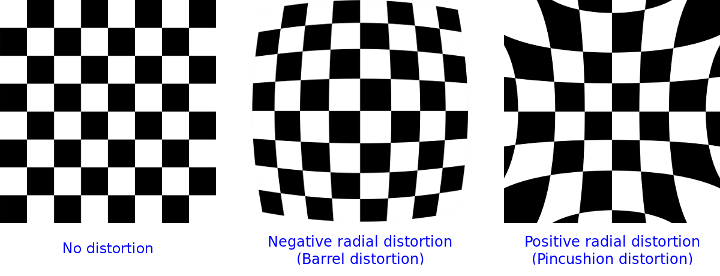
- Radial coefficients: , , , , ,
- Tangential coefficients: ,
- Thin prism coefficients: , , ,
- Barrel distortion: decreases as grows, so points far from the center move inward.
- Pincushion distortion: increases as grows, so points far from the center move outward.
Right-handed and Left-handed Coordinate Systems
Right-handed and left-handed coordinate systems use different conventions for orienting axes in 3D space. Applications may use either convention, so you must know which one applies.ROS2
ROS2 RViz2 uses a right-handed coordinate system. The right-hand rule determines the axis directions. Point your thumb along the X-axis and your index finger along the Y-axis. Your middle finger then points along the Z-axis.Sensor Coordinate Systems
Each sensor uses a coordinate system documented by the vendor. It may be right-handed or left-handed. RealSense cameras use a right-handed coordinate system.- Point of view:
- Imagine that you are standing behind the camera and looking forward.
- Use this point of view when describing coordinates, left and right infrared sensors, and sensor positions.
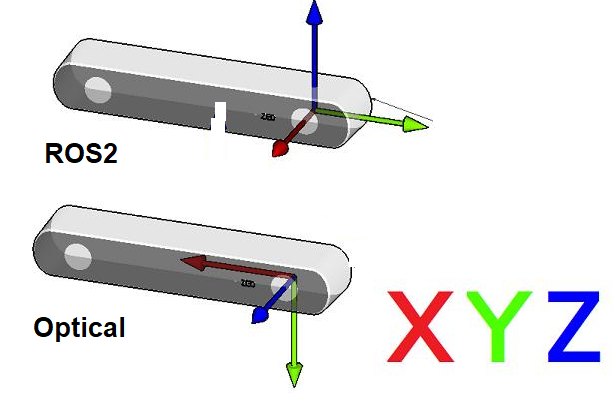
- ROS2 Coordinate System: (X: Forward, Y: Left, Z: Up)
- Camera Optical Coordinate System: (X: Right, Y: Down, Z: Forward)
- References: REP-0103, REP-0105
- All data published by the RealSense wrapper is optical data taken directly from the camera sensors.
- Static and dynamic TF topics publish the optical and ROS coordinate systems. You can use these transforms to move from one coordinate system to the other.
TF from Coordinate A to Coordinate B
- A TF message gives the pose of the coordinate frame child_frame_id in the coordinate frame “header.frame_id”. Applied to a point, it maps coordinates in child_frame_id into coordinates in header.frame_id; mapping the other way needs its inverse. The ROS documentation describes this as a transform from header.frame_id to child_frame_id, which refers to the frames, not to the direction in which coordinates are mapped. See the reference.
- In RealSense cameras, the origin (0,0,0) is the position of the left infrared sensor (infra1). This origin defines the “camera_link” frame.
- The depth, left infrared, and “camera_link” coordinate frames coincide.
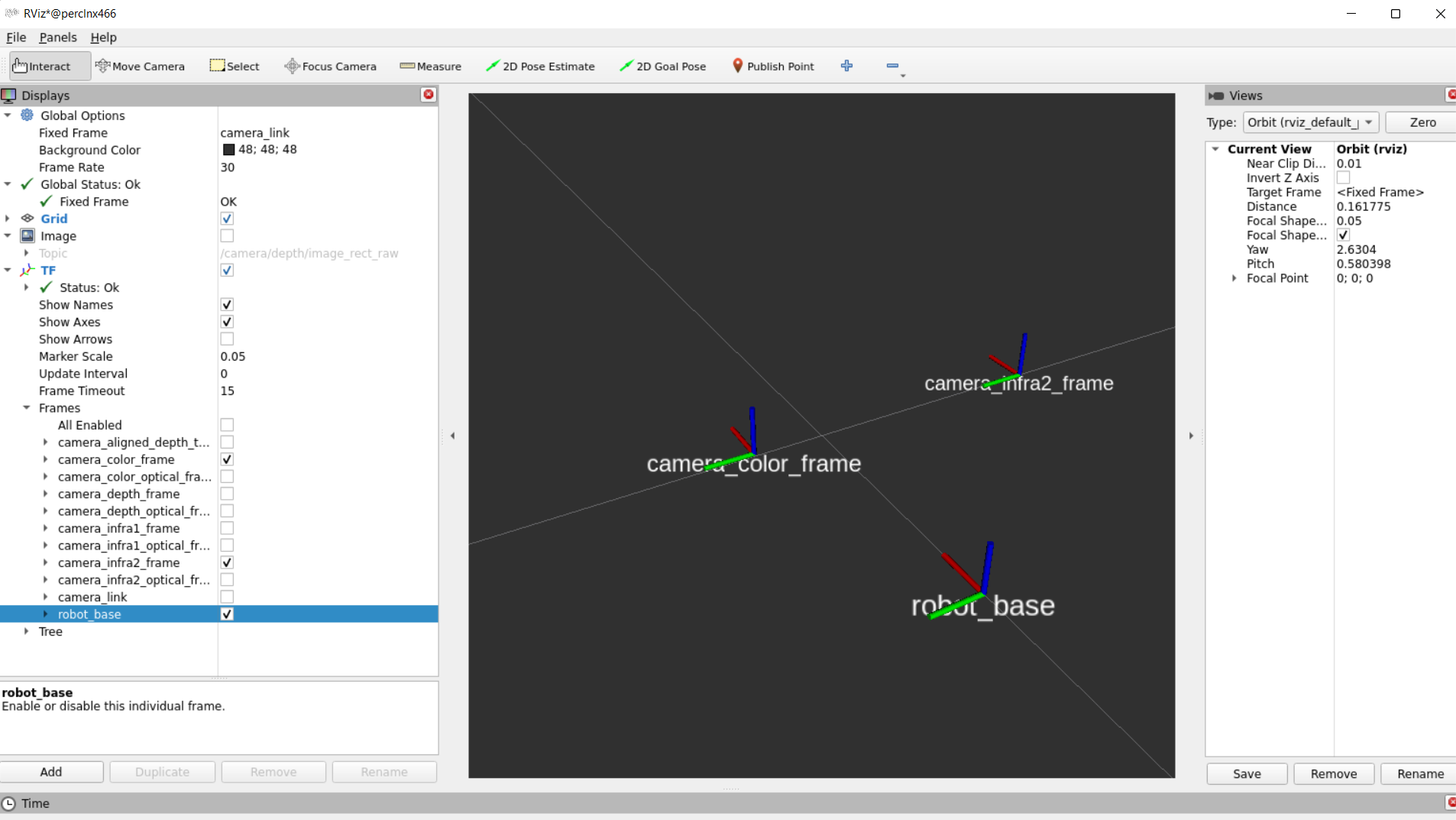
- The wrapper provides static TFs from each sensor coordinate frame to the camera base (camera_link).
- It also provides TFs from each sensor ROS coordinate frame to the corresponding optical coordinate frame.
- The following image shows the static TFs for the RGB sensor and the Infra2 (right infrared) sensor of a D435i module in RViz2:
Extrinsics from Sensor A to Sensor B
- The extrinsic transform from sensor A to sensor B gives the position and orientation of sensor A relative to sensor B.
- If B is the origin (0,0,0), then Extrinsics(A->B) describes the position of sensor A relative to sensor B.
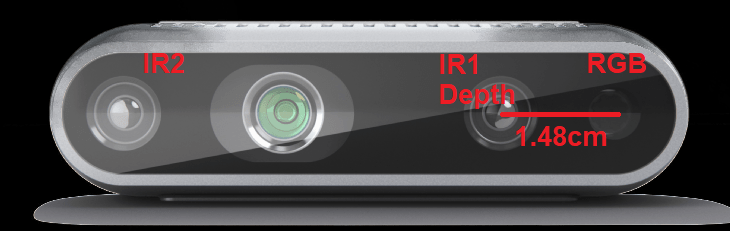
- For example, consider depth_to_color for the D435i:
- Viewed from behind the D435i, the extrinsic transform from depth to color specifies the position of the depth sensor relative to the color sensor.
- Consider only the X coordinates in the optical coordinate system, viewed from behind. If the COLOR (RGB) sensor is at (0,0,0), the DEPTH sensor is 0.0148 m (1.48 cm) to its right.
- An extrinsic message has two parts:
- float64[9] rotation (column-major 3x3 rotation matrix)
- float64[3] translation (three-element translation vector in meters)
References
- Hartley, R., Zisserman, A. (2004). Multiple View Geometry in Computer Vision.
- Szeliski, R. (n.d.). Computer Vision: Algorithms and Applications.
Found an error on this page? Report an issue.